ReportedIP Blacklist Passes 20,000 High-Confidence Threat IPs
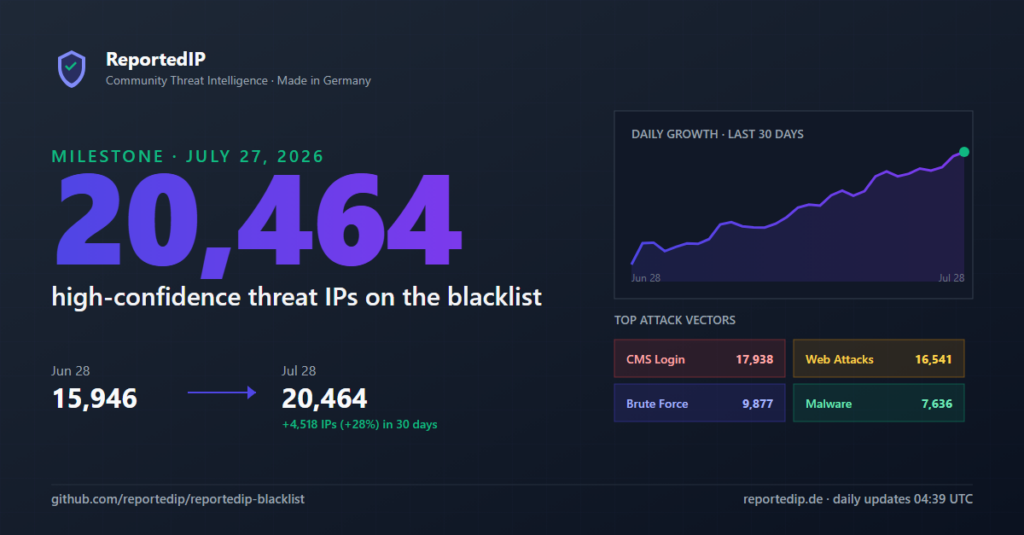
The community-driven ReportedIP blacklist crossed 20,000 high-confidence threat IPs on July 27, 2026 and stands at 20,464 entries as of July 28. The list grew by 4,518 IPs in the last 30 days, a 28% jump that tracks the constant attack pressure on WordPress sites and web servers.
The full list is free to download from the reportedip-blacklist GitHub repository, updated every day at 04:39 UTC.
What 20,000 blocked threat IPs say about the current attack level
Every IP on the blacklist earned its place through real attacks reported by the community network. The category breakdown shows where the pressure lands: login pages first, everything else second.
| Thematic list | IPs listed (Jul 28, 2026) |
|---|---|
| CMS login attacks | 17,938 |
| Web attacks (SQLi, XSS, path traversal) | 16,541 |
| Brute force | 9,877 |
| Malware distribution | 7,636 |
| Malicious infrastructure | 3,744 |
| DDoS | 1,991 |
| APT-linked activity | 1,981 |
| Spam | 800 |
| Fraud | 610 |
The category counts add up to 61,118 across 20,464 unique addresses. The average listed IP appears in three of the nine thematic lists at once: an attacker that brute-forces your login today will probe your plugins for injection points tomorrow.
87.7% of all listed IPs target CMS login pages, and WordPress absorbs most of that traffic. Our WordPress Attack Report for May through July 2026 breaks down the same pattern from the reporting side: 7,217 new attack reports arrived on July 28 alone, on top of 5.36 million total reports in the network.
How an IP ends up on the blacklist
The feed is generated automatically from community reports. No manual picks, no guesswork. An address makes the cut only when all of these hold:
- Confidence score of 75% or higher, computed from report volume, reporter diversity, recency and threat severity
- 48-hour cooldown: freshly reported IPs wait before publication, which filters out one-off false positives
- Whitelist filter: known crawlers, monitoring services and legitimate infrastructure never enter the feed
- Daily rebuild: the exporter regenerates all files and pushes to GitHub at 04:39 UTC, so stale entries age out as their scores decay
The scoring model behind the confidence threshold is documented on the blacklist documentation page, including the delisting path for operators who cleaned up a compromised host.
How to use the blacklist on your server
The repository ships ready-to-use formats next to the raw data: formats/nginx-deny.conf for Nginx, formats/apache-htaccess.txt for Apache and formats/iptables.sh for firewall-level blocking. The raw list comes as TXT, JSON and CSV with SHA-256 checksums for every file.
WordPress sites get the same intelligence without any manual syncing: the free ReportedIP Hive plugin checks visitor IPs against the live network, blocks known attackers in real time and reports new attacks back to the community. For a server-level walkthrough covering Nginx, Fail2ban and CrowdSec-style setups, see our guide to protecting a web server with an IP blacklist.
Frequently asked questions
How often is the blacklist updated?
Once per day at 04:39 UTC. Every update regenerates all 18 files in the repository, including the nine thematic lists and the server-ready formats.
Is the blacklist free to use?
Yes. The GitHub feed is free for commercial and private use. Higher request volumes and per-IP detail lookups run through the ReportedIP API.
How does an IP get removed from the list?
Two ways: automatically, when its confidence score decays below 75% because no new attacks are reported, or manually through the IP delisting process after the operator has resolved the compromise.