WordPress Sites Get Attacked Just for Being Online: 356 Attacks in 7 Hours
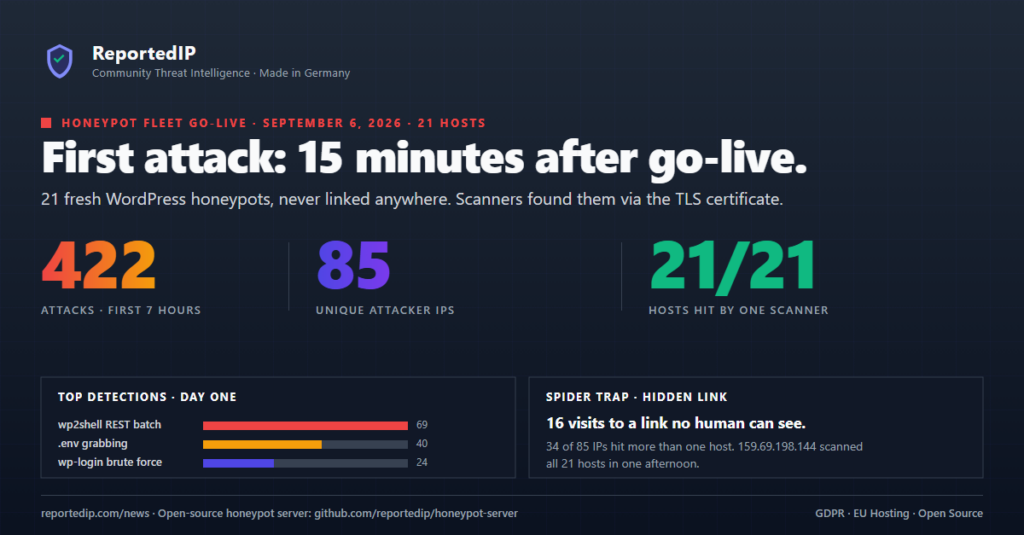
A WordPress site does not need visitors, content or backlinks to get attacked. On 6 September 2026, 21 new WordPress honeypots that nobody knew about took 356 attacks from 84 IP addresses within seven hours, and the first attack arrived 15 minutes after go-live.
Warning for every site owner: nobody knew these 21 sites existed. No link, no search engine, no visitor. All 21 were still attacked, about 17 times each in one afternoon. Your site gets the same traffic from the day it goes online. Protect wp-login.php, xmlrpc.php and the REST API on install day.
None of the 21 domains was linked, submitted to a search engine or mentioned anywhere. The only public trace was a freshly issued TLS certificate. To watch the same traffic on your own server, follow the honeypot server guide.
How fast do attackers find a new WordPress site?
Attackers found the new sites within 15 minutes. The fleet went live between 12:30 and 12:45 UTC, and the first detection on one of the new hosts was logged at 12:49:57 UTC. A first wave followed in the 13:00 UTC hour. The busiest hour of the day was 16:00 UTC with 150 attacks.
How did anyone know the hosts existed? Every certificate issued by Let’s Encrypt is published to public Certificate Transparency logs within seconds. Scanners subscribe to those log feeds and probe each new hostname as it appears. That is the most likely route here: no backlinks, no sitemap ping, no crawler visit before the certificate was issued, and a full scan 15 minutes later.
What do 356 attacks on a new WordPress site look like?
All numbers cover 6 September 2026, 00:00 to 19:30 UTC, across all 21 hosts. Twenty hosts went live at midday; one had been online for months and joined the fleet that day. Our own monitoring and setup IPs are excluded.
| Path | Hits | What the request is after |
|---|---|---|
/?rest_route=/batch/v1 | 64 | wp2shell REST batch exploit (CVE-2026-63030) |
/xmlrpc.php | 28 | XML-RPC abuse and multicall login attempts |
/author/admin/ | 23 | User enumeration |
/wp-login.php?action=lostpassword | 22 | Password reset abuse |
/wp-config.php.bak | 15 | Backup copy of the WordPress configuration |
/.git/config | 11 | Exposed Git repository |
/wp-content/debug.log | 11 | Debug log with paths and stack traces |
The environment file /.env was requested more than 40 times, and three variants (.env.local, .env.example, .env.production) drew another 10 hits. The counts come from the honeypots’ own logs. The central ReportedIP database shows the same day as 116 reports from 76 addresses, because repeated hits by one address within a short window are merged into a single report.
For scale: our first honeypot has been reporting since the end of February 2026 and had sent 36,206 reports by the time it joined the fleet. The quarterly figures for the whole network are in the WordPress attack report.
Why is wp2shell the most common attack on new WordPress sites?
The REST batch exploit behind wp2shell was the single most frequent detection: 69 detections in seven hours, on hosts that had existed for less than a day. WordPress patched the flaw on 17 July 2026, and scanners still try it on every new site they find. It ranked ahead of the classic .env probe, XML-RPC abuse (27 detections) and wp-login brute force (24). The attack chain and the firewall rules that stop it are in the wp2shell write-up.
Mapped to ReportedIP threat categories, the day breaks down as follows:
- WP REST API Abuse + WP Core Exploit (34, 37): 58 reports
- Port Scan + Hacking + WP Config Exposure (14, 15, 58): 53 reports
- Port Scan + Hacking (14, 15): 30 reports
- Brute-Force + WP Login Brute Force (18, 31): 24 reports
- Bad Web Bot (category 19): scanners recognised by their user agent
How many sites does a single scanner hit?
33 of the 84 attacker IPs (39 percent) hit more than one host. One address, 157.143.67.218, reached 20 of the 21 hosts. 130.12.180.117 covered 17 hosts, and three addresses from one OVH range (158.69.55.148, 158.69.117.45, 158.69.55.82) produced 46 hits between them.
- 51 IPs touched exactly one host
- 15 IPs touched two hosts
- 7 IPs touched three hosts
- 11 IPs touched between 4 and 20 hosts
A single site sees one probe and cannot tell a stray request from a campaign. Many sites seeing the same address within minutes can. Across the network, the confidence score rewards exactly this: an address reported by several independent reporters climbs faster than one reported many times by a single source.
How does a spider trap expose scanning bots?
A spider trap is a bait address that a person never sees and a well-behaved crawler never requests. Only a bot that extracts every link from the HTML and follows all of them ends up there. On day one that happened 16 times, and each hit went out with the Spider Trap category. Hive uses the same principle on production sites with decoy paths.
The user agents tell the same story. 192 requests carried a truncated fake Chrome string (Windows NT 10.0 without the Chrome token), the largest single scanner fleet of the day. 28 came from an Android Nexus 5 string (a 2013 phone), 5 from l9scan (leakix.net). 32 requests carried ClaudeBot/1.0, an AI crawler that followed links to xmlrpc.php and the login page and tripped the same analyzers as a scanner.
What does this mean for your own WordPress site?
The 21 honeypots are ordinary WordPress front ends behind ordinary domains. Nothing about them attracted the scanners except being reachable. Scanners that read the certificate logs treat your site the same way. Three consequences:
- Secure the site before it has traffic. The attacks start before the first visitor arrives. Login, XML-RPC and the REST batch endpoint need protection on install day.
- Block known attackers by reputation. 39 percent of the attacker IPs hit several hosts. An address that other sites have already reported can be blocked before it reaches your login form. ReportedIP Hive does this with the community data.
- Whitelist your own monitoring. An uptime check from curl looks exactly like a scanner. Add its IPs before it runs, or you report yourself.
How do you run your own WordPress honeypot?
All 21 hosts run the ReportedIP Honeypot Server, version 1.3.10 on the day of the measurement; the current release is 1.4.1. It is a standalone PHP application that emulates a WordPress, Drupal or Joomla installation. It needs PHP 8.2 with pdo_sqlite and curl, has no Composer dependencies, stores everything in SQLite and ships with a Dockerfile. The code is source-available under the Business Source License 1.1: production use is allowed as long as you do not sell it or run it as a hosted service for others, and it converts to Apache 2.0 on 1 March 2030.
- 40 threat analyzers for SQL injection, path traversal, brute force, credential stuffing, XML-RPC abuse, plugin exploits, config file access, webshell probes and the wp2shell REST batch exploit
- Honeytokens: fake configuration leaks embed canary credentials per IP; replaying one is a confirmed-malicious event
- Traps: a spider trap, a blind-SQLi tarpit and a fake admin area that captures uploaded plugin payloads
- Automatic reporting to the ReportedIP API with rate limiting and exponential backoff, plus webhooks for your SIEM, Slack or AbuseIPDB
- Admin dashboard for attacks, payloads, triggered honeytokens and whitelists
Reporting needs a Community Access Key. Every ReportedIP account includes one: create a free account, then copy the key from your dashboard. One setup detail matters more than the rest: route every request, including dotfiles and robots.txt, to public/index.php. Managed hosting panels often answer /.env with a 403 from the web server, and then the traps never fire.
Honeypot reports go into the same pool as reports from Hive-protected sites: the confidence score per IP and the dynamic blacklist that Hive installations, fail2ban and firewalls pull from.
Frequently asked questions
How did scanners find domains that were never published?
Scanners most likely found them through Certificate Transparency logs. Every publicly trusted TLS certificate is logged there, and the logs can be read in real time. A new hostname with a fresh certificate is visible to anyone watching the feed, which is why the first probe arrived 15 minutes after go-live.
Is a request for /.env on my WordPress site an attack?
A request for /.env is always hostile. No browser, plugin or search engine has a reason to ask for that file. On 6 September 2026 it was requested more than 40 times across the fleet, plus 10 times for variants. Make sure your web server returns nothing useful for it.
Will the honeypot report my own uptime checks?
The honeypot reports your uptime checks unless you whitelist them. Add the IPv4 and IPv6 addresses of your monitoring and admin systems to the whitelist during installation, before the first status check runs. A curl-based uptime probe looks like a scanner to the analyzers and gets reported like one.