WordPress Honeypot Decoy Paths: Catching Scanners on Their First Probe
A WordPress honeypot with decoy paths catches scanners with a single request: ReportedIP Hive watches addresses that no page links to and that no real visitor ever asks for, so the first hit is already the attack signal. The feature is free, switched on by default and needs no maintenance.
This guide explains how decoy paths work, what happens on a hit, how to protect real backup files at server level and how to add your own traps.
What is a decoy path in WordPress?
Automated scanners do not browse a site, they guess. They request forgotten configuration backups, environment files, database dumps and credential files, hoping that a careless deployment left one readable in the web root. The OWASP Web Security Testing Guide lists old backups and unreferenced files as a standard point of attack for exactly that reason.
A decoy path turns that guessing into a signal. Hive keeps a built-in list of such addresses. None of them is linked anywhere on a normal WordPress site, so a request for one comes from a tool that is probing the site, not from a person reading it. We do not publish the list, because a scanner that knows it could simply skip those addresses.
Why a single request is enough
Most attack sensors need a pattern before they react: several failed logins, a burst of 404 errors, a stream of REST requests. That protects real visitors who mistype a password or follow an old link. A decoy path does not need that patience. There is no legitimate reason to request it, so Hive treats the very first request as the attack indicator instead of waiting for a count to build up.
Because the signal is so clean, decoy hits are among the most valuable reports in the community network. An address that probes for credential files on one site is very likely doing the same on thousands of others.
How to switch decoy paths on
Decoy path blocking is on by default on every plan. To check or change it, turn on expert mode in the page header, open Protection, card Firewall & Bots, and look for Decoy path blocking. The normal view shows the setting with an Open in expert mode link.

The Detection Score on the dashboard counts decoy paths as their own sensor, Decoy-path block. If it shows Enable there, the switch is off.
What happens when a scanner takes the bait
- The request is refused, so the scanner never receives a file.
- The Event Log records a Decoy Path Hit together with the address and the time.
- In Community Network mode, Hive reports the address to the network in anonymised form, and every other site learns about it.
Addresses on your whitelist are skipped entirely. With report-only mode switched on under Blocking & Escalation, the hit is recorded and reported but the request is not refused, which is useful while you check that no own tool requests a trap by accident.
Protect real backup files at server level
A decoy path only works if the request reaches WordPress. If a real backup file with a matching name lies on disk, Apache or nginx could deliver it directly before PHP ever runs. Hive therefore adds rewrite rules at web server level that send those requests through WordPress, where the sensor sees them, instead of serving the file.
- Apache and LiteSpeed: Hive writes the rules into
.htaccessitself, in a block marked# BEGIN ReportedIP Hive Decoy. No manual step is needed. - nginx: copy the snippet from Tools, tab Server, card Decoy Path Block (rewrite rules) into your server configuration. There is a regex form for plain nginx and an exact-match form for ISPConfig and other managed stacks.
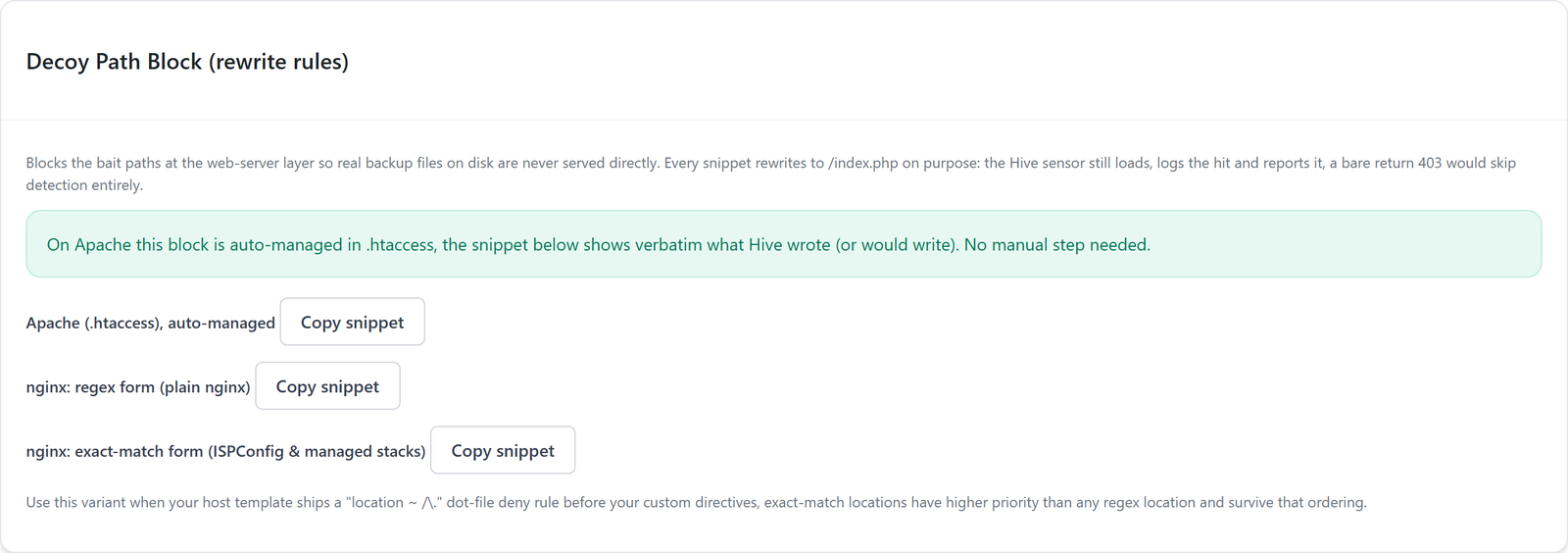
The rules deliberately rewrite to WordPress instead of answering with a plain 403 at server level, because a bare refusal would skip the detection and the report. The best protection is still not to leave backups in the web root at all: move them out of the document root and delete old copies after a deployment.
Check your web root for forgotten backups
Decoy paths catch the scanner, but a readable backup would still be a leak if it slipped through elsewhere. Once after every deployment, look at the web root and the directories next to wp-config.php by SSH, SFTP or the file manager of your host. Remove anything that is not part of the site: copies with endings such as .bak, .old or .orig, any .env file, database exports ending in .sql and archives of the whole site. Keep such files in a directory outside the document root, where no web server can deliver them.
Many backup plugins store their archives inside wp-content by default. Check their settings and move the target to a location outside the web root or to external storage.
Add your own decoy paths
Developers can extend the built-in list with the filter reportedip_hive_decoy_paths. Good candidates are addresses of a previous system that scanners still try, such as the admin area of an old shop. Never add an address that a real page links to or that a service you use calls, because every request to it would count as an attack.
Where to see decoy hits
Open Activity, tab Event Log, and filter by the event type Decoy Path Hit. Each row shows the address, the time and the requested path, and offers to look the address up or block it by hand. A steady trickle of hits is normal for any public site; a sudden wave from many addresses usually means a new scanner campaign is running.
Decoy paths, form honeypot and honeypot server
| Trap | What it catches | Where it runs |
|---|---|---|
| Decoy paths | Scanners that probe for files | Every Hive site |
| Form honeypot | Bots that fill in comment and contact forms | Every Hive site |
| Honeypot server | Attacks on a dedicated trap server | A server you run for the network |
All three feed the same community network. The form honeypot guide covers the spam side, and the honeypot server documentation shows how to run a dedicated trap.
Questions about WordPress honeypot decoy paths
Can decoy paths lock out real visitors?
No page on a normal WordPress site links to a decoy path, so ordinary visitors never request one. The risk lies in your own tools: a backup plugin, a monitoring service or a deployment script that checks for such a file. Put their addresses on the whitelist, and they are skipped entirely.
Why is the list of decoy paths not published?
A trap only works while the attacker does not know where it is. A scanner that had the list could leave those addresses out and probe everything else undisturbed. The list is part of the plugin on your server, and the filter lets you add your own paths without anyone else knowing them.
Do decoy paths also work with Cloudflare or a CDN?
They work as long as the request reaches WordPress, which is the normal case for addresses that do not exist as static files. Set the client IP header and the trusted proxy ranges in the Detection & Thresholds card, so Hive records the real address of the scanner instead of the address of the CDN.
Do I need decoy paths if I have no backups in the web root?
Yes. The value of a decoy path lies in recognising the scanner, not in protecting a file. Every hit identifies an address that is actively probing sites, and in Community Network mode that knowledge protects other sites before the same scanner reaches them.
Read on
The Hive documentation lists the attack sensors and the firewall settings in detail.