WordPress Security Hardening Checklist: 12 Steps Ordered by Real Attack Data
This WordPress security hardening checklist has twelve steps, and the order comes from what actually hit WordPress sites in the ReportedIP network between 4 July and 1 October 2026: 36,548 attack events from 18,378 addresses. Scanners looking for config files, plugins and version numbers made up more than half of it, password guessing came second, and the exploits everyone writes about were a few hundred events at the end of the list.
Every step names what it closes, what it can break and where the switch sits in ReportedIP Hive. The detection and lockdown core of the plugin is free; the steps that need the Professional plan say so. You do not need to be a developer for most of it: eight of the twelve steps are switches in one free plugin, and the plugin shows you which ones are still off.
If you only have ten minutes: the short version
The short version takes about ten minutes and covers the steps that stop most of the traffic in the table below.
- Download ReportedIP Hive and install it like any other plugin: Plugins, Add New, Upload Plugin, choose the zip file, Activate.
- Run the Quickstart the plugin opens after activation. Choose the mode, paste your key if you have one, switch protection on. Sensors, firewall and progressive blocking come preset for your plan.
- Open the dashboard and work through the Hardening Score. Every item that still says Enable links to its switch. The second factor for your own account is the first one to take.
The plugin is free and open source. Professional adds the managed parts later, from the same screen.
What attacked WordPress sites in the last 90 days
The numbers below are the attack events that WordPress sites and servers reported to the ReportedIP network through its API in those 90 days, counted per category. Honeypot traffic is left out, and an event with several categories is counted once in each of them. The checklist step that closes each vector is in the last column.
| Attack type | Events | Addresses | Closed by step |
|---|---|---|---|
| Probing for config files and backups | 16,548 | 7,549 | 2 and 3 |
| Plugin scanning | 16,308 | 7,515 | 1 and 3 |
| Version scanning | 16,184 | 7,480 | 3 |
| Login brute force | 11,235 | 8,010 | 4, 5 and 8 |
| User enumeration | 6,130 | 3,026 | 6 |
| Fake search-engine bots | 1,978 | 382 | 11 |
| XML-RPC brute force | 681 | 237 | 7 |
| Plugin exploit attempts | 574 | 149 | 1 and 11 |
| REST API abuse | 357 | 128 | 7 |
Two things follow from the table. The bulk of the traffic is reconnaissance, so a site that gives nothing away gets fewer follow-up attacks. And the small number of exploit attempts is the one row that ends in a compromise, which is why updates stay at the top even though the scanner rows are nearly thirty times larger.
The hardening checklist at a glance
| Step | Effort | Can break | In ReportedIP Hive |
|---|---|---|---|
| 1. Update and remove plugins | Recurring | Theme or plugin after a major update | Not a plugin task |
| 2. Lock the files | Once | Plugins that write to their own folder | Block PHP in uploads |
| 3. Hide version fingerprints | Once | Nothing | Hide software fingerprints |
| 4. Harden the login | Once | Shared office addresses | Progressive blocking, password policy |
| 5. Enforce two-factor | Once per role | Users without a phone | Two-Factor Authentication |
| 6. Stop user enumeration | Once | Public author pages | User enumeration defence |
| 7. Close XML-RPC and REST | Once | Jetpack, the mobile app, headless setups | Access Lockdown |
| 8. Hide the login page | Once | Bookmarks of your editors | Hide Login |
| 9. Send security headers | Once | Embeds and a strict CSP | Security Headers |
| 10. HTTPS, PHP and proxies | Once | Old plugins on new PHP | Trusted proxy sources |
| 11. Put a firewall in front | Once | Forms that send code | Web Application Firewall |
| 12. Backups and monitoring | Recurring | Nothing | System Status |
1. Update core, plugins and themes, and delete what you do not use
Plugin scanning was the second-largest row in the table for one reason: a scanner that knows which plugins and versions a site runs can match them against published vulnerabilities and come back with the one exploit that fits. The 574 exploit attempts are the end of that chain. An installation whose plugins are current has nothing for the chain to end in.
- Turn on automatic updates for WordPress core, at least for minor releases, which carry the security fixes.
- Update plugins and themes on a schedule, weekly for most sites, the same day for a plugin with a published vulnerability.
- Delete inactive plugins and themes. An inactive plugin still has files on disk, and a scanner reads files, not the activation state.
- Test large updates on a staging copy before they reach the live site, in particular WooCommerce and page builders.
If nobody in the company owns this schedule, hand it to someone who does it every week. CMS ADMINS WordPress maintenance, the Munich team behind ReportedIP, runs updates on a fixed rhythm, with a staging environment on the larger plans, takes daily backups, monitors the site around the clock and hosts on German servers for customers who want maintenance and hosting from one contact person.
2. Lock down wp-config.php, file permissions and the file editor
The largest row in the table, 16,548 events, is scanners asking for backup copies and configuration files that should never be readable from the outside. Three settings close most of that surface.
Add these two lines to wp-config.php above the line that says the editing stops there. The first removes the theme and plugin editor from wp-admin, so a stolen administrator session cannot paste PHP into your theme. The second stops the plugin and theme installer, which you only want on a site where every change goes through a deployment anyway.
define( 'DISALLOW_FILE_EDIT', true );
define( 'DISALLOW_FILE_MODS', true ); // only if you deploy plugins yourself
Set the file permissions the WordPress hardening guide recommends: directories 755, files 644, and wp-config.php 600 so only the web server user can read it. Never leave a copy named wp-config.php.bak or wp-config.old next to it; a web server serves those as plain text, which is exactly what the 16,548 requests were asking for.
find /path/to/site -type d -exec chmod 755 {} \;
find /path/to/site -type f -exec chmod 644 {} \;
chmod 600 /path/to/site/wp-config.php
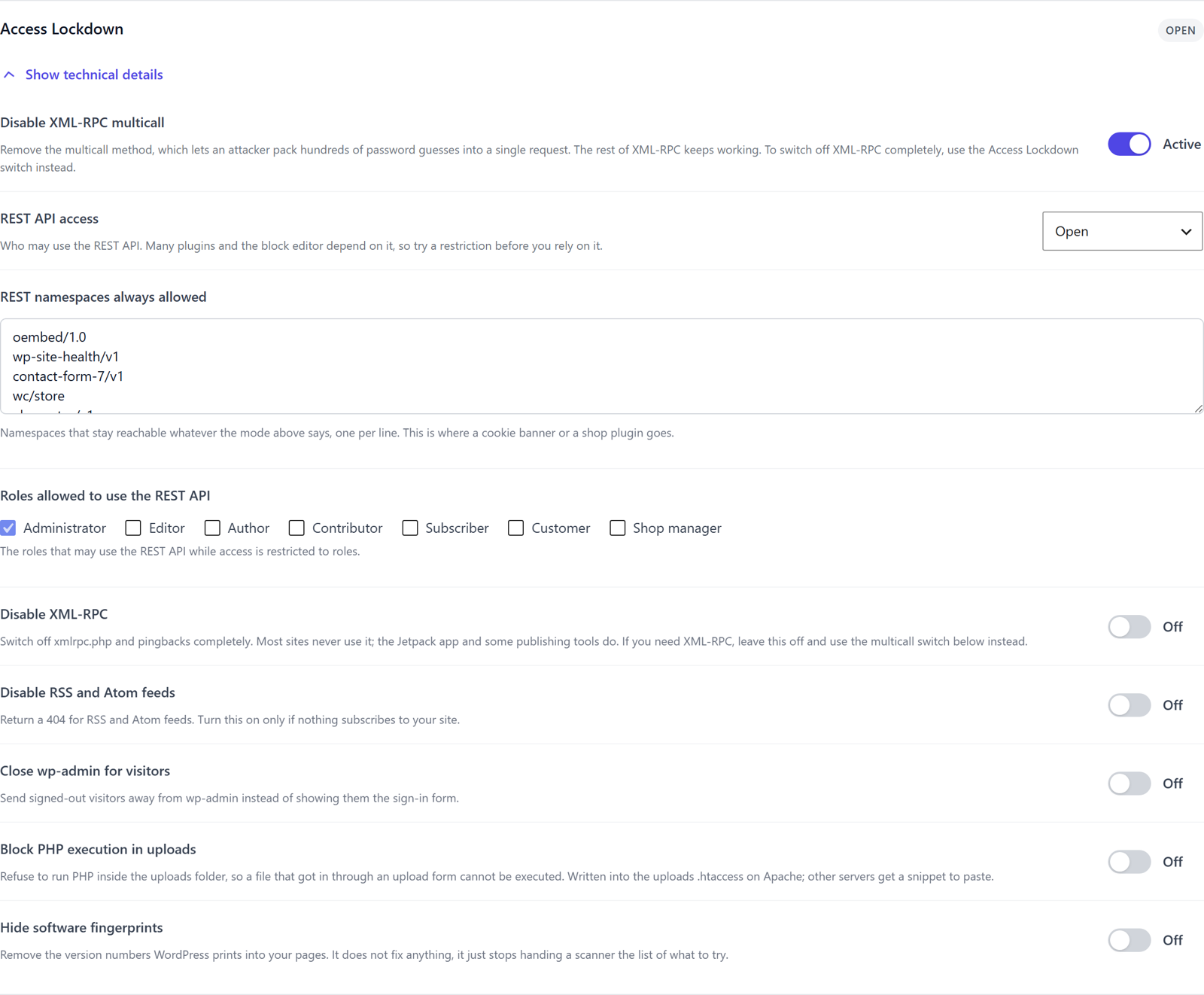
The uploads folder is the one place where a visitor can put a file on your server. Hive adds a rule that refuses to run PHP inside it, so a script that arrives through a broken upload form cannot be executed. On Apache the plugin writes the rule into the uploads .htaccess itself; on nginx it shows a snippet to paste. The switch is Block PHP execution in uploads under Protection, Firewall & Bots, Access Lockdown.
If editing files on the server is not your thing, take only the last switch and ask your host for the two lines and the permissions. For a host that is a five-minute job.
3. Stop handing scanners your version numbers
WordPress prints its version into the page source, the feeds and the script and style URLs, and 16,184 events in 90 days were scanners reading exactly that. Removing the fingerprints fixes nothing by itself. It stops handing the scanner the list of what to try next, which is why it comes this early for the amount of work it takes.
In Hive the switch is Hide software fingerprints in the same Access Lockdown section. Two more things catch scanners on the way in: the scan detector counts missed paths per address and blocks after a burst, and the decoy paths answer a request for a file that exists on no real site with a block and a report to the network. Both are free and on by default; the decoy paths guide explains what they do and do not do.
4. Make the login expensive: unique names, strong passwords, progressive blocks
Login brute force was 11,235 events from 8,010 addresses, the widest spread of any row: most of those addresses tried a handful of times and moved on. That pattern decides the defence. Blocking by address alone does not scale against 8,010 of them, so the password must be unguessable and the attempts must cost the attacker something.
- No account named admin. Create a new administrator with a name nobody can guess, sign in with it, delete the old one and assign its content to the new account.
- Strong, unique passwords with a breach check. Hive’s password policy sets a minimum length and character classes and can check a new password against known breaches without sending the password anywhere.
- Progressive blocking instead of a flat ban. Hive counts failed logins per address and blocks for minutes on the first offence and for days on repeat offences, so a colleague with a typo is not locked out for a day. The brute-force blocking guide walks through the ladder.
- Share what you learn. In Community Network mode an address that other sites already reported is refused before the password is checked, and your own blocks help the next site.
5. Enforce two-factor authentication for every role that can edit
A second factor is the one step that makes a stolen or guessed password worthless, and it is the single largest item in the hardening score for that reason. Hive ships four methods: an authenticator app, passkeys and hardware keys, a code by email, and SMS on the Professional plan through the managed relay. The first three are free in every plan, including the fully offline Local Shield mode.
Enforcing it for a role is the part that matters. Under Protection, Core protection, Two-Factor Authentication, pick the roles that must use a second factor, administrators and editors at a minimum. Users get a grace period to set it up, recovery codes cover a lost phone, and the password-reset flow asks for the second factor as well, so a stolen mailbox cannot bypass it. The two-factor authentication guide compares the four methods.
Professional adds adaptive step-up: a sign-in from a new country, a new network or a new device asks for the second factor again, even on a trusted device. For a shop, the storefront variant renders the challenge inside the WooCommerce theme on My Account and checkout.
6. Stop user enumeration
Before a bot guesses passwords it wants usernames, and WordPress hands them out in four places: the ?author=1 redirect, the users endpoint of the REST API, the oEmbed response and the login error that says whether the username or the password was wrong. The 6,130 enumeration events are bots collecting names for the 11,235 login attempts above.
Hive’s user enumeration defence closes all four at once and counts the probes per address, so a bot that keeps asking gets blocked. Sites that link to their author pages can keep those public; the other three stay closed. The switch is on by default under Protection, Core protection.
7. Close XML-RPC, the REST API and the other doors you do not use
XML-RPC brute force and REST API abuse together were about a thousand events, far less than the login page, and they are the two switches most likely to break something. So test before you rely on them. XML-RPC is needed by the Jetpack app, the WordPress mobile app and a few publishing tools; the REST API is used by the block editor, most form and shop plugins and every headless front end.
Hive’s Access Lockdown offers the switches with the middle ground built in. Disable XML-RPC turns the endpoint and pingbacks off completely; if you need it, a second switch removes only the multicall method that packs hundreds of password guesses into one request. REST API access can stay open, be limited to signed-in users or be restricted to chosen roles, with a list of namespaces that always stay reachable for a cookie banner or a shop plugin. Disable RSS and Atom feeds is for sites nobody subscribes to.
Each switch is free, off by default and reversible from the same screen. The full list is in the Access Lockdown documentation.
8. Hide the login page and close wp-admin for visitors
Moving the sign-in page away from wp-login.php does not stop a targeted attacker, but it takes the site out of every automated sweep that tries the default address, which is where most password guessing starts. Hive’s Hide Login sets a custom slug, decides what the old address answers and logs what still asks for it. Close wp-admin for visitors sends signed-out visitors away from the admin area instead of showing them the form.
Tell your editors the new address before you switch, and keep the plugin’s whitelist for the office network in mind: an address on it is never blocked, whatever it does.
9. Send security headers
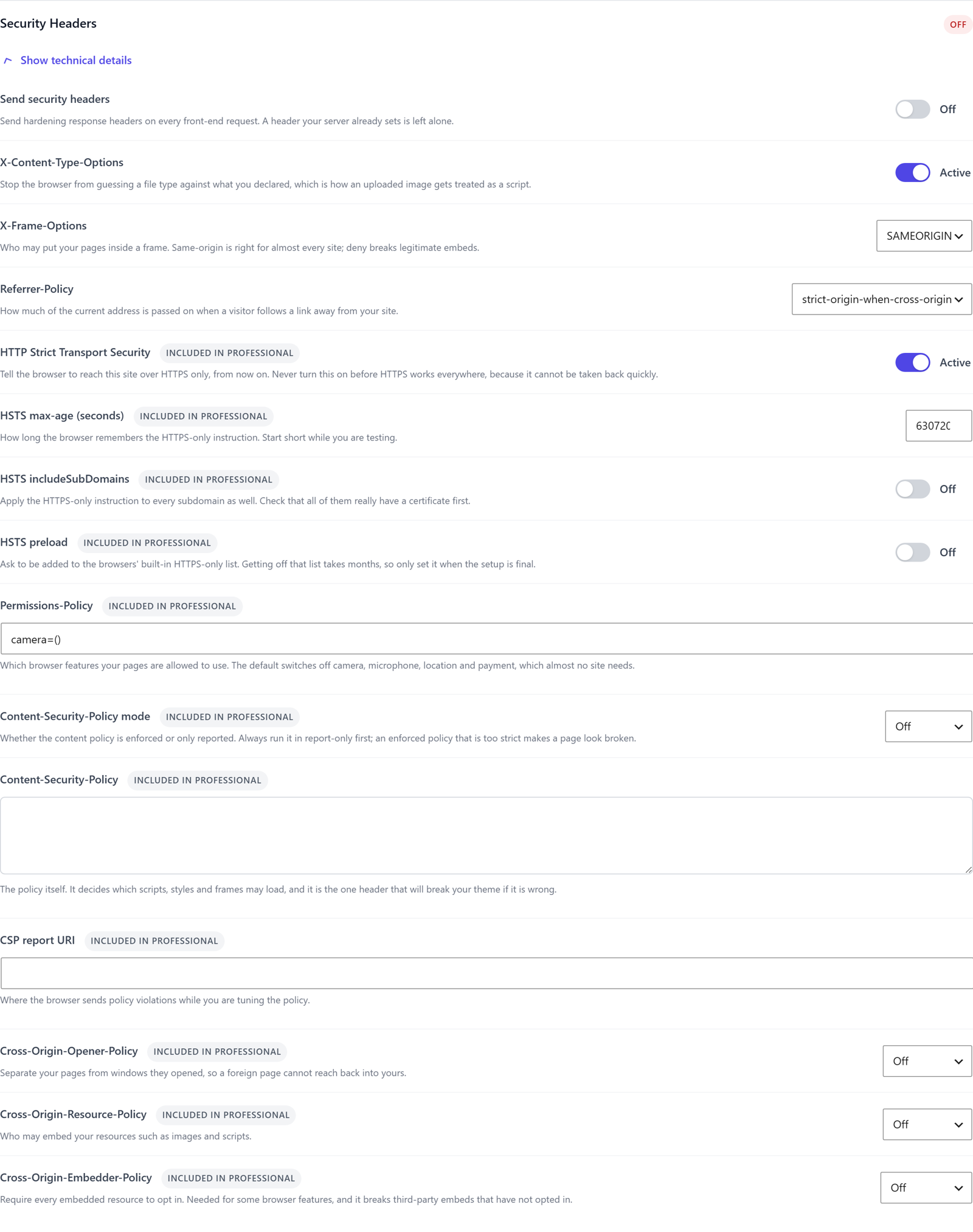
Response headers tell the browser what it must refuse: guessing a file type, framing your pages on a foreign site, leaking the full address when a visitor follows a link, or falling back to HTTP. The basic three, X-Content-Type-Options, X-Frame-Options and Referrer-Policy, are free in Hive and safe on almost every site. HSTS, Permissions-Policy, a Content-Security-Policy that starts in report-only mode and the cross-origin trio come with Professional.
Two cautions from the settings screen itself: never switch HSTS on before HTTPS works everywhere, because browsers remember it for the period you set, and always run a Content-Security-Policy in report-only mode first, because an enforced policy that is too strict makes a page look broken. Headers your server already sends are detected and left alone. Check the result from the outside with the Security Header Check.
If none of this means anything to you: switch the basic three on and leave the rest off. That alone is more than most sites send.
10. HTTPS, a current PHP version and the real client address
Three things belong to the hosting layer and no plugin can do them for you. HTTPS with a valid certificate on every subdomain, because every step above assumes the session cookie travels encrypted. A PHP version that still receives security fixes, because an unsupported PHP is a vulnerability with no patch coming. And, behind Cloudflare or any reverse proxy, the header that carries the real visitor address.
The last point decides whether every other step works. If the plugin sees the proxy’s address instead of the visitor’s, it blocks the proxy and lets the attacker through. Hive’s trusted proxy setting takes the header and the proxy ranges; the System Status page warns when a header is set without ranges. If you would rather not own the hosting layer at all, the maintenance plans from CMS ADMINS include hosting on German servers with the PHP version kept current.
11. Put a firewall in front of PHP, and let it tighten under attack
The 574 exploit attempts and the 1,978 fake search-engine bots are what a web application firewall is for. Hive’s firewall inspects every request for SQL injection, cross-site scripting, path traversal, command injection and scanner tooling, and the engine with its OWASP baseline ruleset is free on every plan. An optional drop-in blocks before WordPress loads, with Apache and nginx configuration generated for you. Verified bot detection confirms Googlebot and Bingbot through their official address ranges and flags or blocks the impostors.
Professional adds two things. The deeper rulesets arrive signed through Priority Sync as they are published, and Hardening Mode reacts to a coordinated attack: when many addresses hit the login in a short window, the plugin tightens its thresholds site-wide for an hour and then releases them. Distributed brute force from a botnet stops mid-flight instead of slipping under the per-address limit. The firewall guide and the Hardening Mode guide cover both in detail.
12. Backups you have restored, monitoring and a readiness check
A backup counts only once you have restored it. Keep daily copies off the web server, keep them long enough to reach back before a compromise you noticed late, and restore one onto a staging site at least once a quarter so the procedure is known before it is needed.
Monitoring is the other half. Hive’s System Status page lists the things that usually fail quietly: a stalled cron, a trusted proxy header without ranges, a failing mail delivery, an administrator without a second factor of their own. Each finding carries a severity, the time it was first seen and a link to the setting behind it. On the Business plan the audit event trail records who changed which setting, plugin, file or account, with the old and the new value, which is what you need the morning after an incident.
Measure the result: the hardening score
Every step in this checklist that the plugin can see is scored on the Hive dashboard. The hardening score weighs thirteen items, from the enforced second factor to the hidden fingerprints, gives a grade from A+ to F and links each item to its setting. A fresh installation with the defaults starts low on purpose: the score measures what you switched on, not what the plugin could do.
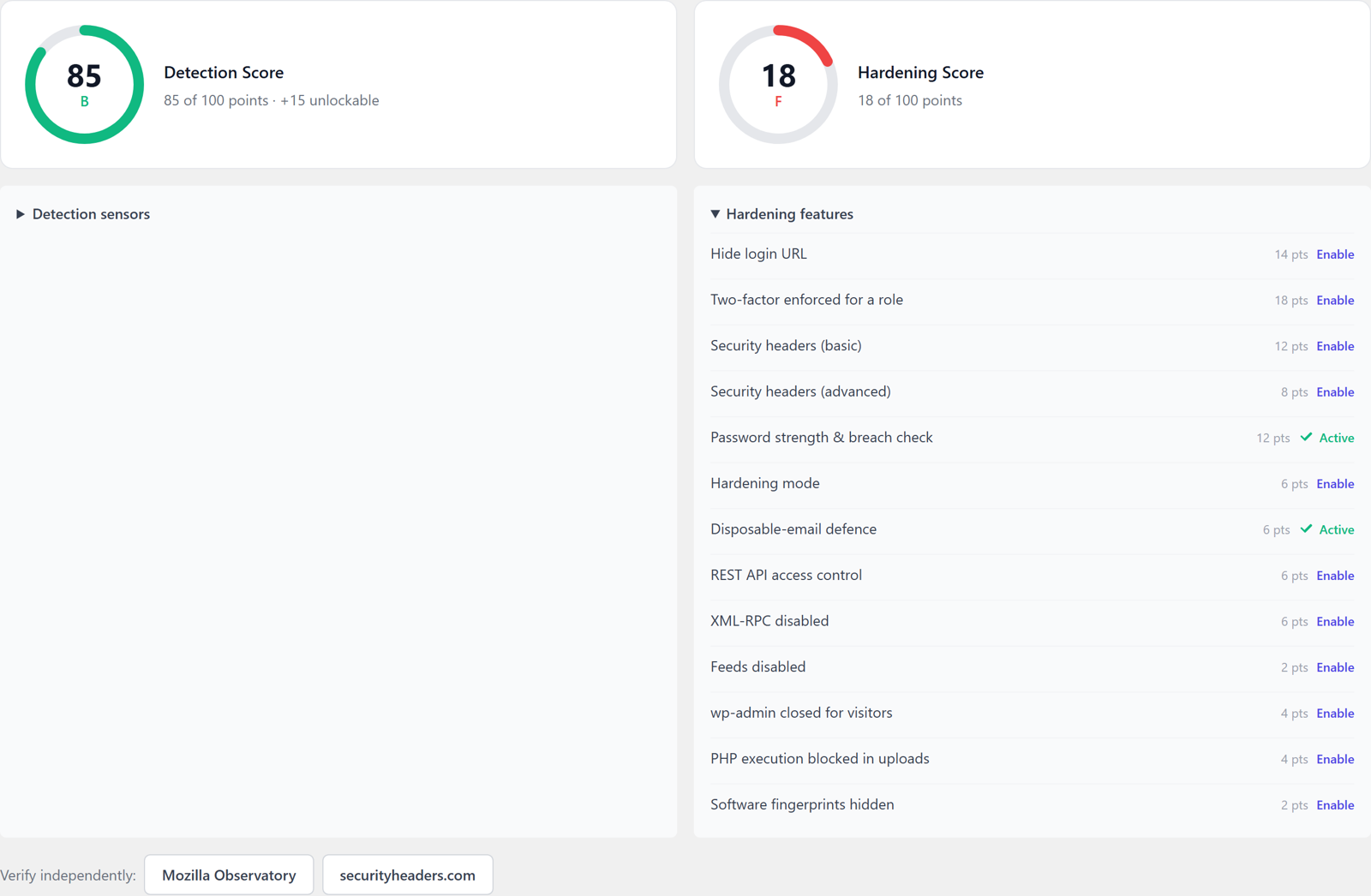
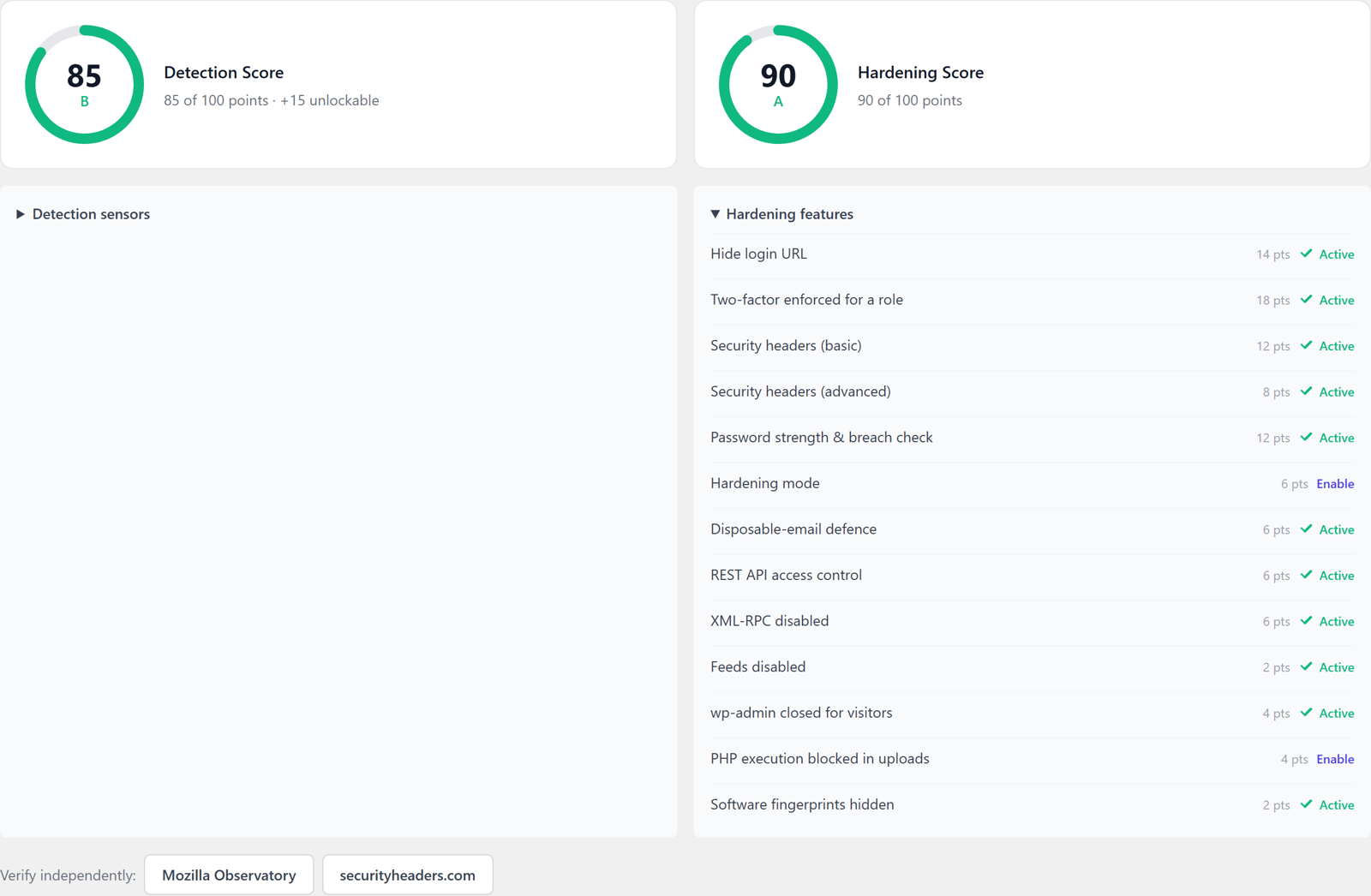
The two buttons under the gauges open Mozilla Observatory and securityheaders.com, so you can confirm the header part of the score with a tool that is not ours. How the score is built is in the score documentation.
Which steps need Hive Professional
Most of this checklist runs on the free plugin. Professional, 14.90 euros a month including VAT for three domains, adds the pieces that need managed infrastructure or a rule feed.
| Checklist item | Free | Professional |
|---|---|---|
| Sixteen sensors and progressive blocking | Yes | Yes |
| Access Lockdown switches and Hide Login | Yes | Yes |
| Two-factor by app, passkey and email | Yes | Yes |
| Two-factor by SMS | No | Yes |
| Adaptive step-up per role | No | Yes |
| Basic security headers | Yes | Yes |
| HSTS, Permissions-Policy, CSP, cross-origin headers | No | Yes |
| Firewall engine and OWASP baseline | Yes | Yes |
| Deeper rulesets through Priority Sync | No | Yes |
| Hardening Mode on coordinated attacks | No | Yes |
| Hardening score and System Status | Yes | Yes |
Ready to start? The free plugin covers steps 3 to 9 and 11 out of the box. If you would rather hand the whole list to someone, CMS ADMINS sets it up and keeps it running.
Questions about hardening WordPress
Is a security plugin enough to harden WordPress?
A security plugin covers eight of the twelve steps on this list: the login, the second factor, enumeration, the lockdown switches, the hidden login page, headers, the firewall and the score. Updates, file permissions, HTTPS and backups live outside the plugin, on the server and in a routine, and no plugin can take them over.
Does disabling XML-RPC break Jetpack or the WordPress app?
Yes, both use XML-RPC and stop working when the endpoint is switched off. Hive’s second switch keeps XML-RPC running and removes only the multicall method that packs hundreds of password guesses into one request, which is the part attackers use.
How often should I go through the checklist again?
Step 1 runs weekly and step 12 quarterly. The other ten are set once and stay set; the hardening score on the dashboard shows at a glance when one of them was switched off again, for example after a plugin conflict.
Do I still need a firewall plugin behind Cloudflare?
Cloudflare filters at the edge and never sees a failed WordPress login, a comment or a form submission, which is where most of the events in the table above happen. The two layers complement each other, provided the plugin is told to trust the Cloudflare header for the visitor address.