WordPress Security Setup: The ReportedIP Hive Quickstart Step by Step
A WordPress security setup with ReportedIP Hive takes two decisions on one page: how the site connects, and which plan it runs on. Everything else, from brute-force blocking to log retention, is preconfigured and stays editable afterwards.
This guide walks through the quickstart screen by screen, lists what it switches on for each plan, and shows how to test the result against live traffic before any visitor is blocked.
What does the ReportedIP Hive quickstart set up?
The quickstart is a single page titled Set up ReportedIP Hive. It replaces the ten-step wizard of older versions and asks for two things: an operating mode and, in Community Network mode, a Community Access Key. From the key it reads the plan of your account and applies the matching recommendation in one go.
Security misconfiguration is one of the most common weaknesses in web applications, which is why OWASP lists it in its Top 10. The quickstart answers that with defaults that are safe on a fresh install, instead of a blank settings page that waits for someone to find every switch.
Before you start: requirements
- WordPress 5.9 or later and PHP 8.1 or later.
- An administrator account. On a multisite network the quickstart runs in the Network Admin only.
- For Community Network mode: a free account on reportedip.com. The quickstart links to the sign-up form, so you can create it while you set up.
After you activate the plugin, WordPress sends you to the quickstart once, as long as setup is not finished and no key is stored. A bulk activation from the plugin list skips that redirect. You can open the page again at any time under System Status, card Quickstart, button Open quickstart.
Step by step through the quickstart
Step 1: Choose Community Network or Local Shield
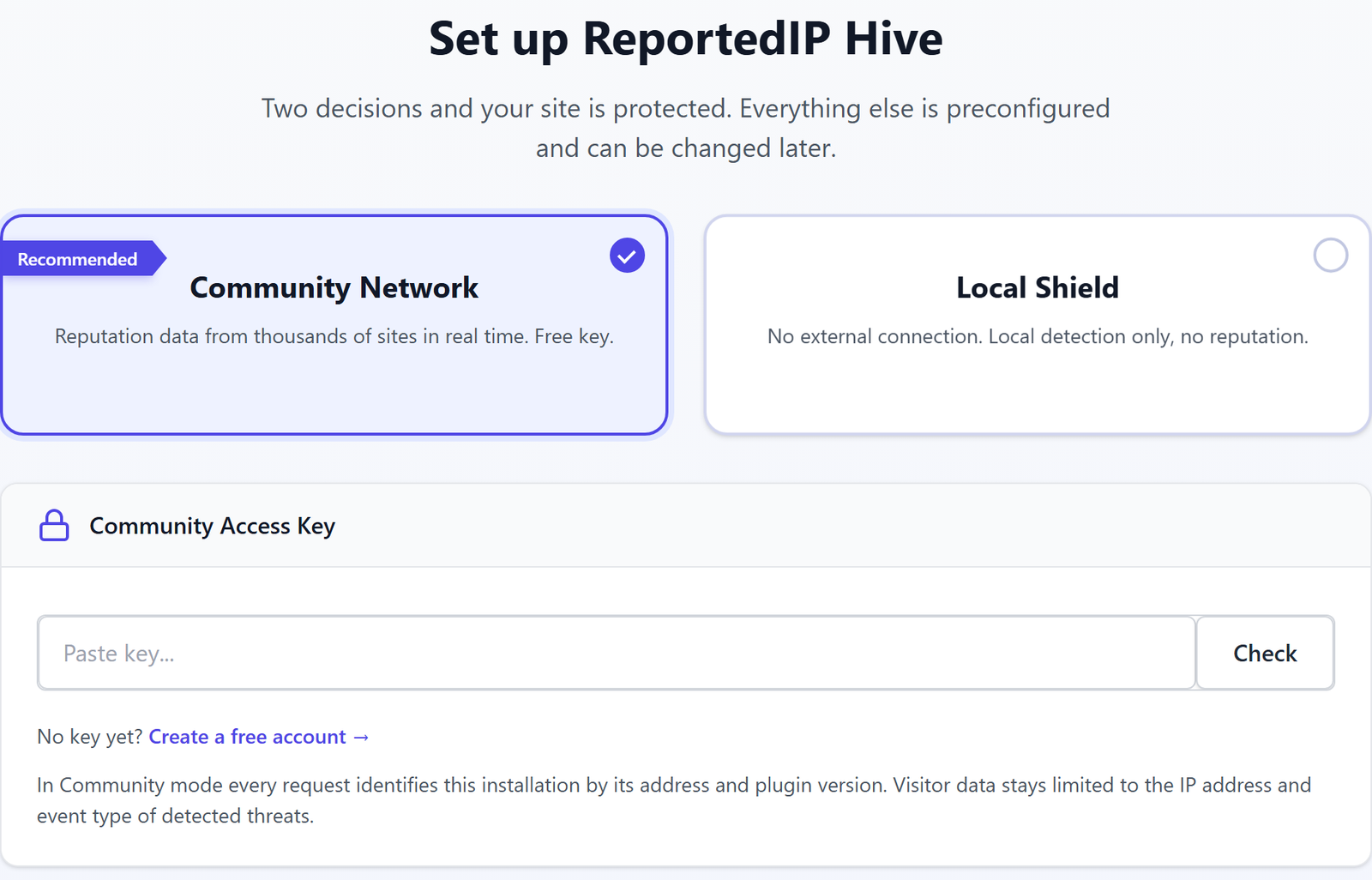
Two cards sit at the top of the page. Community Network is marked as recommended: the site checks visitors against reputation data from thousands of other sites in real time and shares its own detections back. Local Shield makes no external connection at all. It relies on the local sensors only, so there is no reputation check, no mail or SMS relay and no news feed.
Step 2: Paste and check the Community Access Key
In Community Network mode, paste the key into the Community Access Key field and press Check. The plugin verifies it against your account and reads the plan. Without a key, the link No key yet? Create a free account opens the registration page with your site address already filled in. If you try to continue in Community Network mode without a checked key, the page stops and asks you to check the key or switch to Local Shield.
The same card states what the connection sends: every request identifies the installation by its address and plugin version, and visitor data stays limited to the IP address and event type of detected threats.
Step 3: Review what gets switched on
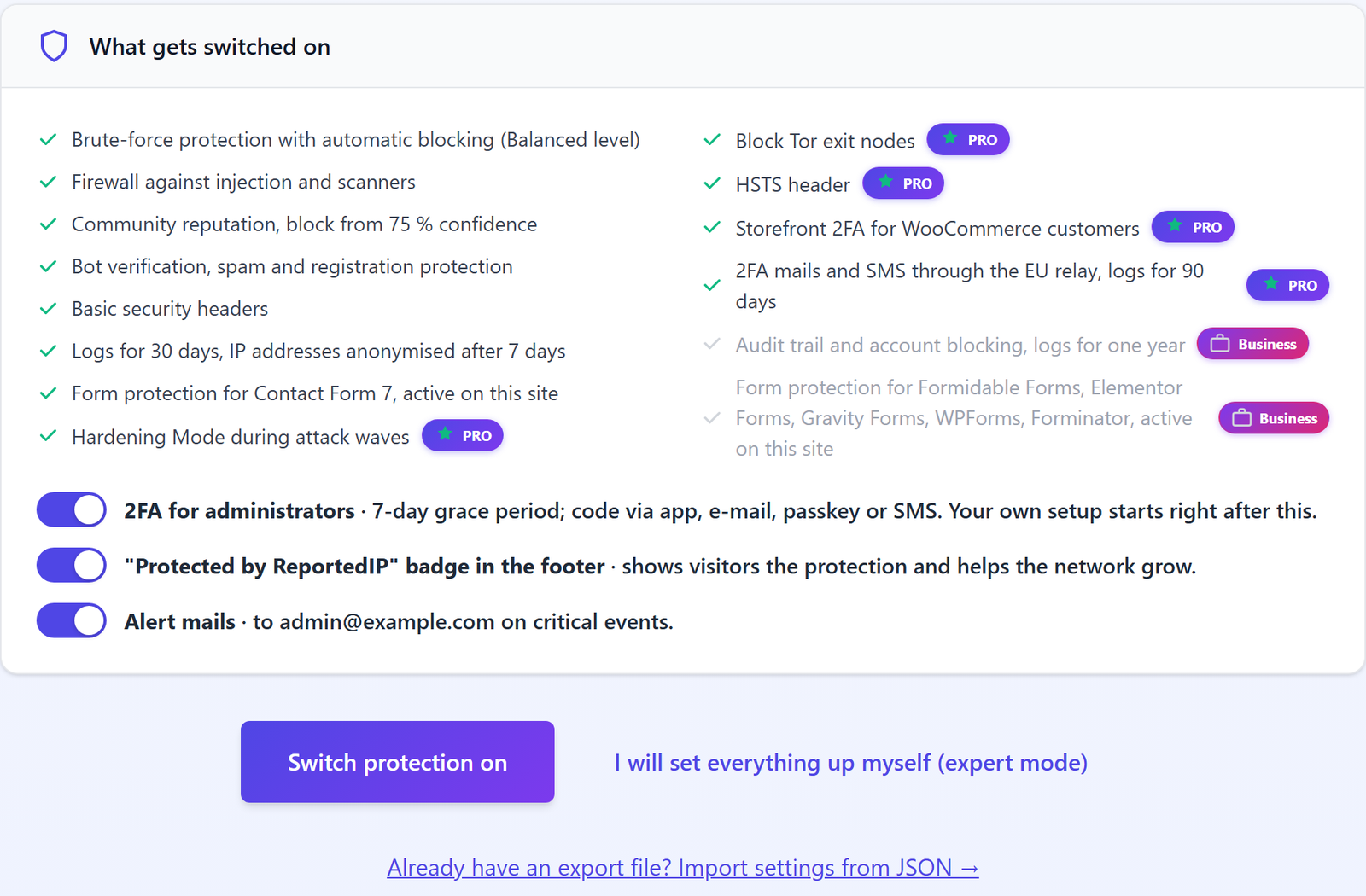
The card What gets switched on lists every setting the recommendation applies. Items above your plan are greyed out and carry a plan badge, so you see what an upgrade would add without anything being enabled. Local Shield always receives the Free recommendation.
| Plan | What the recommendation switches on |
|---|---|
| Free | Brute-force protection with automatic blocking at the Balanced level |
| Free | Firewall against injection and scanners |
| Free | Community reputation blocking from 75 % confidence |
| Free | Bot verification, spam and registration protection |
| Free | Basic security headers |
| Free | Logs for 30 days, IP addresses anonymised after 7 days |
| Professional | Hardening Mode during attack waves |
| Professional | Tor exit node blocking and the HSTS header |
| Professional | Storefront 2FA for WooCommerce customers |
| Professional | 2FA mails and SMS through the EU relay, logs for 90 days |
| Business | Audit trail and account blocking, logs for one year |
| Business | Form protection for the supported form plugins that are active on the site |
Form protection for Contact Form 7 is part of every plan. Enterprise receives the Business recommendation.
Step 4: Decide on the three visible switches
Three settings stay as switches under the list, because they change what administrators or visitors see. All three are on by default.
- 2FA for administrators. A 7-day grace period applies, codes come by app, e-mail, passkey or SMS, and your own enrolment starts right after the quickstart.
- “Protected by ReportedIP” badge in the footer. It shows visitors that the site is protected and helps the network grow.
- Alert mails. They go to the admin address of the site on critical events.
Step 5: Switch protection on, or open expert mode
Switch protection on saves the recommendation and opens the dashboard. I will set everything up myself (expert mode) saves the same recommendation as a starting point, turns on expert mode for your user and opens the Protection page with every field visible. Both paths leave you with the same protection; expert mode only shows more controls.
How do you move settings from another site?
Below the buttons, Already have an export file? Import settings from JSON takes a settings export from another Hive installation. After Import and finish the site runs with the imported values and opens the dashboard. This is the fastest way to give a group of client sites identical settings; the export itself is created under System Status, section Settings import & export.
What the security dashboard shows after setup
The Security Dashboard opens with a banner that names the date protection started and the plan recommendation it runs on. Four tiles follow: attacks blocked in the last 30 days, blocks today, IPs currently blocked and the number of active protection layers.
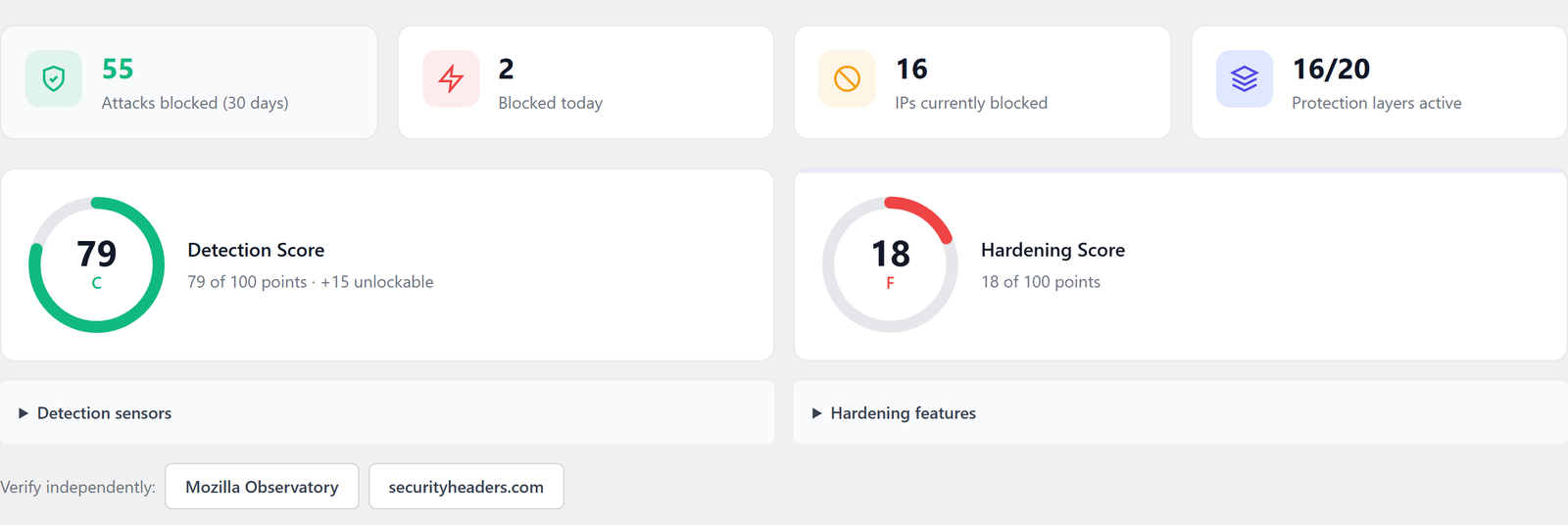
Two scores rate the setup from different angles. The Detection Score counts the active sensors, from the failed-login monitor to community threat blocking, and shows how many points a higher plan would add. The Hardening Score counts measures that shrink the attack surface, such as a hidden login URL, enforced 2FA for a role, security headers or disabled XML-RPC. The demo site above has almost none of them switched on, hence the F; the buttons Mozilla Observatory and securityheaders.com let you verify the result with an outside tool.
Further down the page sit Next steps, the Protection areas, the Security Events chart with a 7, 30 or 90 day range, the threat distribution and Recent Activity with the latest five events of the past 24 hours. Community Network sites also see the three latest posts under News from reportedip.com.
Where to find blocked IPs, logs and settings afterwards
| Menu item | What you find there |
|---|---|
| Activity | Event Log, IP Lookup and Audit Trail |
| Activity, tab IP Lists | Blocked addresses, the whitelist and group entries |
| Protection | All protection settings, grouped in cards |
| Community | Key, plan, quota and API statistics |
| System Status | Environment checks, the quickstart link and settings import and export |
| 2FA Status | Two-factor enrolment of every user |
| Tools | Server, Rules, Data and Diagnostics tabs, shown in expert mode |
On the blocked list you can unblock an address or move it to the whitelist, and you can import a list of addresses to block from a CSV file.
How to test the setup without blocking real visitors
Open Protection, card Blocking & Escalation, and turn on Report-only mode. Hive then logs every event exactly as it would have blocked it, but rejects no one. Watch the Event Log for a few days of normal traffic; when no customer, editor or monitoring service shows up as a would-be block, turn report-only mode off and the same rules start blocking.
Trusted addresses such as your office network or an uptime monitor belong on the whitelist before you switch enforcement on.
Questions about the WordPress security quickstart
Can I run the quickstart again later?
You can open the quickstart at any time from System Status, card Quickstart, button Open quickstart. Running it again lets you change the mode, the Community Access Key and the recommended protection, while existing settings stay in place. That is the quickest way to pick up new modules after an upgrade from Free to Professional or Business.
Does Local Shield send any data to reportedip.com?
Local Shield makes no outbound connection to reportedip.com. Detection, blocking and logging run on your own server, so there is no reputation check, no mail or SMS relay and no news feed. You can switch to Community Network later by running the quickstart again or on the Community page, without reinstalling the plugin.
What happens to the old setup wizard link?
The old wizard address redirects to the quickstart, so bookmarks and documentation that point at the previous ten-step setup still work. The quickstart replaced the wizard in version 2.1.54 and asks two questions instead of ten, because the plan now decides the rest.
Will 2FA lock administrators out after setup?
Administrators get a 7-day grace period to enrol a second factor, and the admin who runs the quickstart is guided through enrolment right away. Codes can come from an authenticator app, by e-mail, by SMS or through a passkey, so every administrator has at least one method that works for them.
Read on
- The 16 attack sensors
- Progressive IP blocking
- Two-factor authentication in Hive
- Privacy defaults and GDPR
The quickstart reference and the plan comparison in the Hive documentation cover every setting in detail, and the dashboard reference explains each chart.