YubiKey 5C NFC for WordPress 2FA: Which Key, Setup, Errors
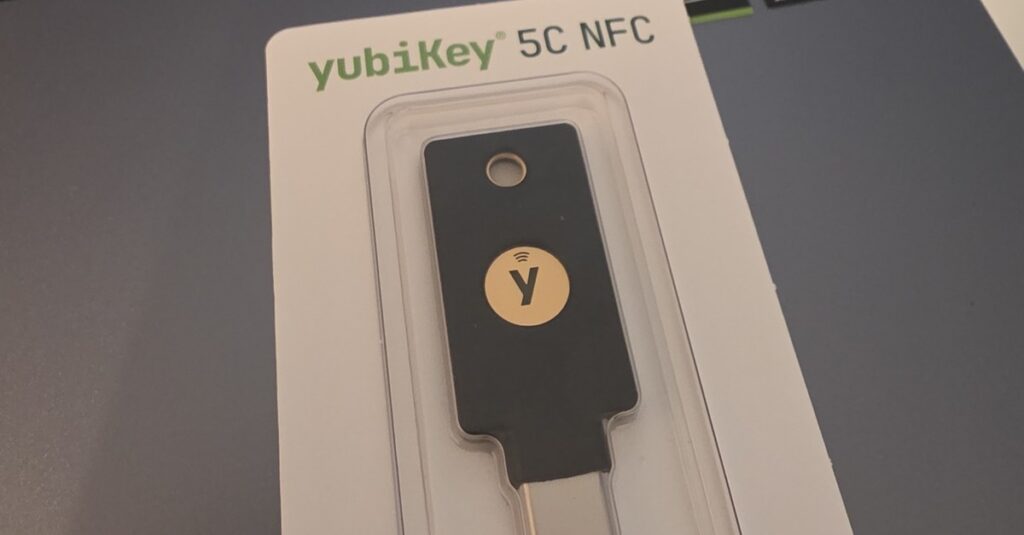
The YubiKey 5C NFC turns the WordPress login into a touch on a small key: plugged into USB-C on the desktop, held against the phone for NFC on the go. This guide shows how to set it up as a second factor with ReportedIP Hive, what site owners need to switch on, what to do when a key is lost and what the error messages mean.
We sign in to our own WordPress sites with exactly this key every day, so the steps and messages below are the ones you will see on a current Hive install.
Can you use a YubiKey with WordPress?
Yes. WordPress has no second factor of its own, but a security plugin with WebAuthn support turns any key of the YubiKey 5 series or the cheaper Security Key series into the second step after the password. The key signs a login only for the domain it was registered on, so a phishing page has nothing it could reuse. With ReportedIP Hive one key per account is free, and one key works on any number of sites.
What is the YubiKey 5C NFC?
The YubiKey 5C NFC is a hardware security key made by Yubico. It keeps its private keys inside a secure chip, signs a login request when you touch it and never hands a secret to the computer. It has no battery, no display and no network connection, so there is nothing to charge, update or phish.
| Property | YubiKey 5C NFC |
|---|---|
| Connectors | USB-C and NFC |
| Login standards | FIDO2 / WebAuthn and FIDO U2F |
| Other functions | Smart card (PIV), OpenPGP, OATH codes, Yubico OTP |
| Passkey storage | Up to 100 from firmware 5.7, fewer on older keys |
| Build | Water and dust resistant (IP68), no battery |
The full specification is on the Yubico product page. For WordPress only one line matters: the key speaks WebAuthn, the W3C standard that browsers use for passkeys and security keys.
Which YubiKey do you need for WordPress?
The WordPress login uses only the FIDO part of the key, so cheaper models than the 5C NFC do the job too. Prices from the Yubico store for Germany on 29 October 2026, including VAT:
| Model | Connectors | Standards | Price |
|---|---|---|---|
| Security Key C NFC | USB-C and NFC | FIDO2, U2F | €34.51 |
| Security Key NFC | USB-A and NFC | FIDO2, U2F | €34.51 |
| YubiKey 5C NFC | USB-C and NFC | FIDO2, U2F, OTP, PIV, OpenPGP | €69.02 |
| YubiKey 5 NFC | USB-A and NFC | FIDO2, U2F, OTP, PIV, OpenPGP | €69.02 |
| YubiKey 5Ci | USB-C and Lightning | FIDO2, U2F, OTP, PIV, OpenPGP | €101.15 |
| YubiKey C Bio (FIDO Edition) | USB-C | FIDO2, U2F, fingerprint | €116.62 |
- For WordPress alone the Security Key C NFC does the same job as the 5C NFC at half the price.
- The YubiKey 5 series pays off if you also want the key for SSH or signed commits with OpenPGP, for smart card logins with PIV or for one-time codes.
- The 5Ci adds a Lightning plug for iPhones without USB-C and has no NFC.
- The Bio models read a fingerprint. As a second factor after the password a touch is enough, so the sensor adds little for WordPress.
Whichever model you choose, buy two: one for daily use and one as a spare. What that costs for a team is shown further down.
Why a hardware key for WordPress administrators
An administrator account on WordPress can install plugins, and a plugin can run any code on the server. Losing that account means losing the site. One-time codes from an app or by e-mail help against stolen passwords, but a well-made phishing page can ask for the code too and pass it on within seconds.
| Second factor | Stops password theft | Stops phishing pages | Needs a phone |
|---|---|---|---|
| E-mail code | Yes | No | No |
| Authenticator app | Yes | No | Yes |
| YubiKey 5C NFC | Yes | Yes | No |
The key signs only for the real domain of your site. On a look-alike domain it simply has no matching login, so there is nothing an attacker could relay. The passkey guide explains that mechanism and when a passkey on the phone or laptop is the better choice than a separate key.
Our own network data shows why a password alone is not enough. Between 29 September and 28 October 2026, sites and honeypots in the ReportedIP network reported 26,179 password attacks on WordPress logins (wp-login.php, wp-admin and XML-RPC) from 8,795 IP addresses.
- 4,700 of those addresses (53 %) tried exactly once in the 30 days.
- 7,103 addresses (81 %) tried three times or less.
- The busiest single address made 211 attempts.
A lockout after five failed logins never fires for an address that tries once and moves on. Spread over thousands of addresses, the attempts look like ordinary typos to the site. A second factor stops the login even when one of those passwords is right.
What security agencies say about hardware keys
Government guidance puts this kind of login at the top:
- NIST SP 800-63B-4 (2025): at assurance level AAL2 a service must offer at least one phishing-resistant option, and at AAL3 the authenticator needs a non-exportable private key and phishing resistance. A FIDO2 hardware key fits that description. NIST guideline
- CISA, the US cyber security agency, calls phishing-resistant MFA the gold standard and names FIDO/WebAuthn as its only widely available form. CISA fact sheet
- BSI, Germany’s federal security office, rates passkeys and device-bound FIDO2 keys as resistant to common phishing. E-mail codes, SMS and authenticator apps do not protect against real-time phishing in its comparison, and for FIDO2 it plans two hardware tokens per account for recovery. BSI comparison
What happens inside the key during a WordPress login
WebAuthn, the W3C standard behind security keys, splits the work between key and site. Three design choices in Hive decide how the YubiKey behaves:
- The site stores the credential. Hive registers a non-discoverable credential: the key wraps everything it needs into an ID that WordPress keeps and hands back at every login. That is why no passkey slot is used and one key covers any number of sites.
- A touch is enough. The password is already the first factor, and the touch proves that a person is at the key. Sites that also want the FIDO2 PIN can have a developer switch Hive to require user verification; the key then asks for its PIN at every login.
- A counter catches copies. The key raises a signature counter with every login. If the value Hive receives goes backwards, a cloned key is in use, and Hive refuses the login and warns the user.
What you need before you start
- A current version of ReportedIP Hive with two-factor authentication switched on for the site.
- HTTPS. Browsers allow security keys only on encrypted pages.
- A current browser: Chrome, Edge, Firefox or Safari on the desktop, Chrome on Android or Safari on iOS for NFC.
- No PIN on the key. Hive asks only for a touch, so you do not have to set a FIDO2 PIN first.
Registering the key with a WordPress site does not use one of the passkey storage slots on the YubiKey. The login data is kept by the site, so one key works on as many WordPress sites as you like.
How to set up the YubiKey step by step
Step 1: open your profile
Sign in and open Users > Profile. In the section Two-Factor Authentication you find the row Passkey or security key with the area Security keys & passkeys.
Step 2: name the key
Click Add security key and give the key a name you will recognise later, for example “YubiKey office”. The name matters as soon as you manage more than one key.
Step 3: register it
Click Security key (USB / NFC). The browser opens its dialog for security keys. Plug the YubiKey into the USB-C port and touch the gold contact when it starts to blink. On a phone, hold the key flat against the back of the device. Hive confirms with “Security key registered.” and the key appears in the list with the type Security key.
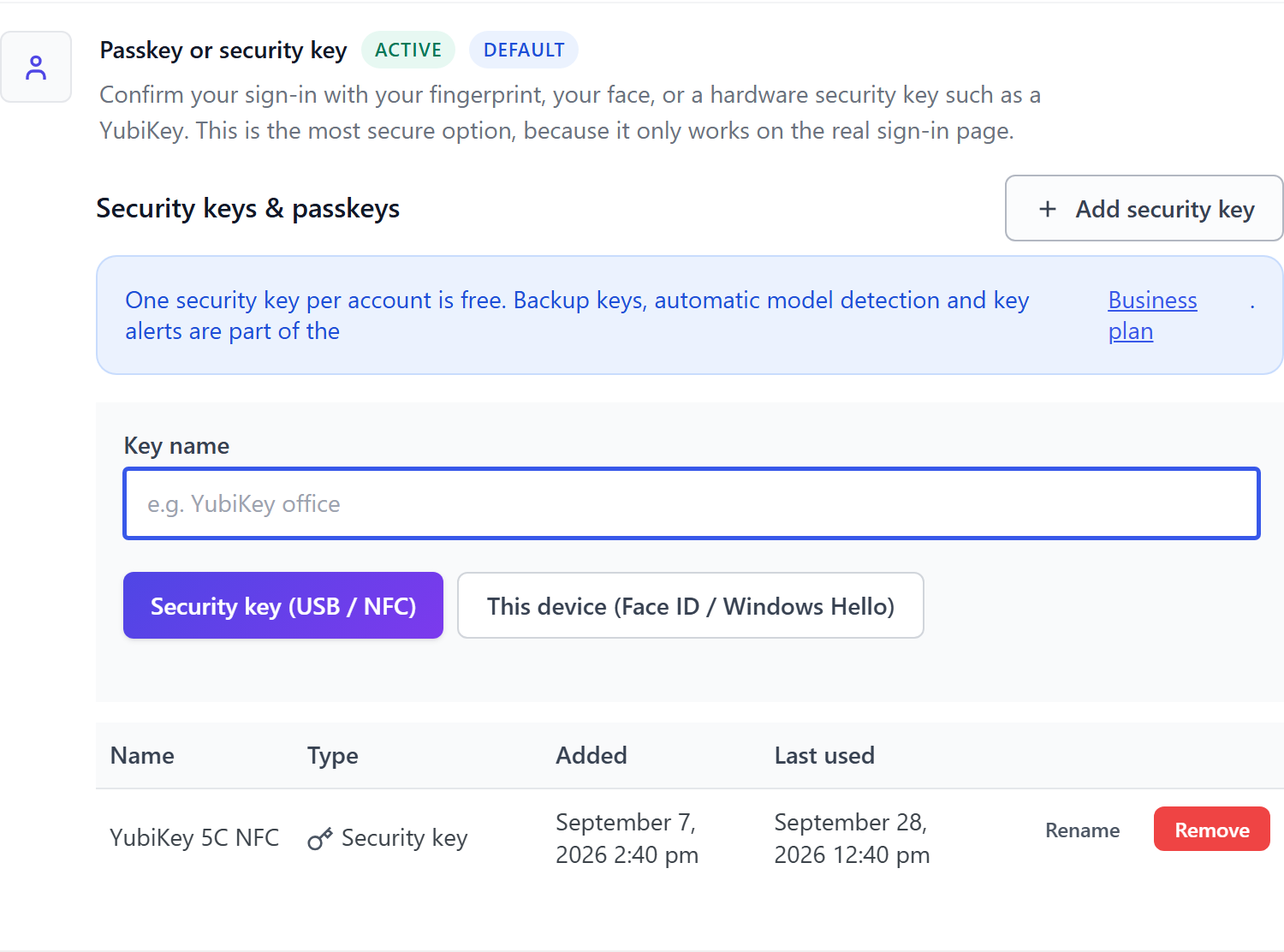
When you enable two-factor authentication for the first time, Hive also creates ten recovery codes. Print them or store them in a password manager now, not after the key is lost.
How signing in with the key works
After the password, Hive shows the page Verification required with the tab Passkey. Click Use passkey or security key, then touch the key. On the desktop that is one touch on the plugged-in key. On a phone, hold the key flat against the back; on most Android phones the NFC antenna sits in the upper third, on an iPhone at the top edge. If NFC is switched off in the phone’s quick settings, the browser offers a QR code instead of NFC, and switching NFC on solves it.
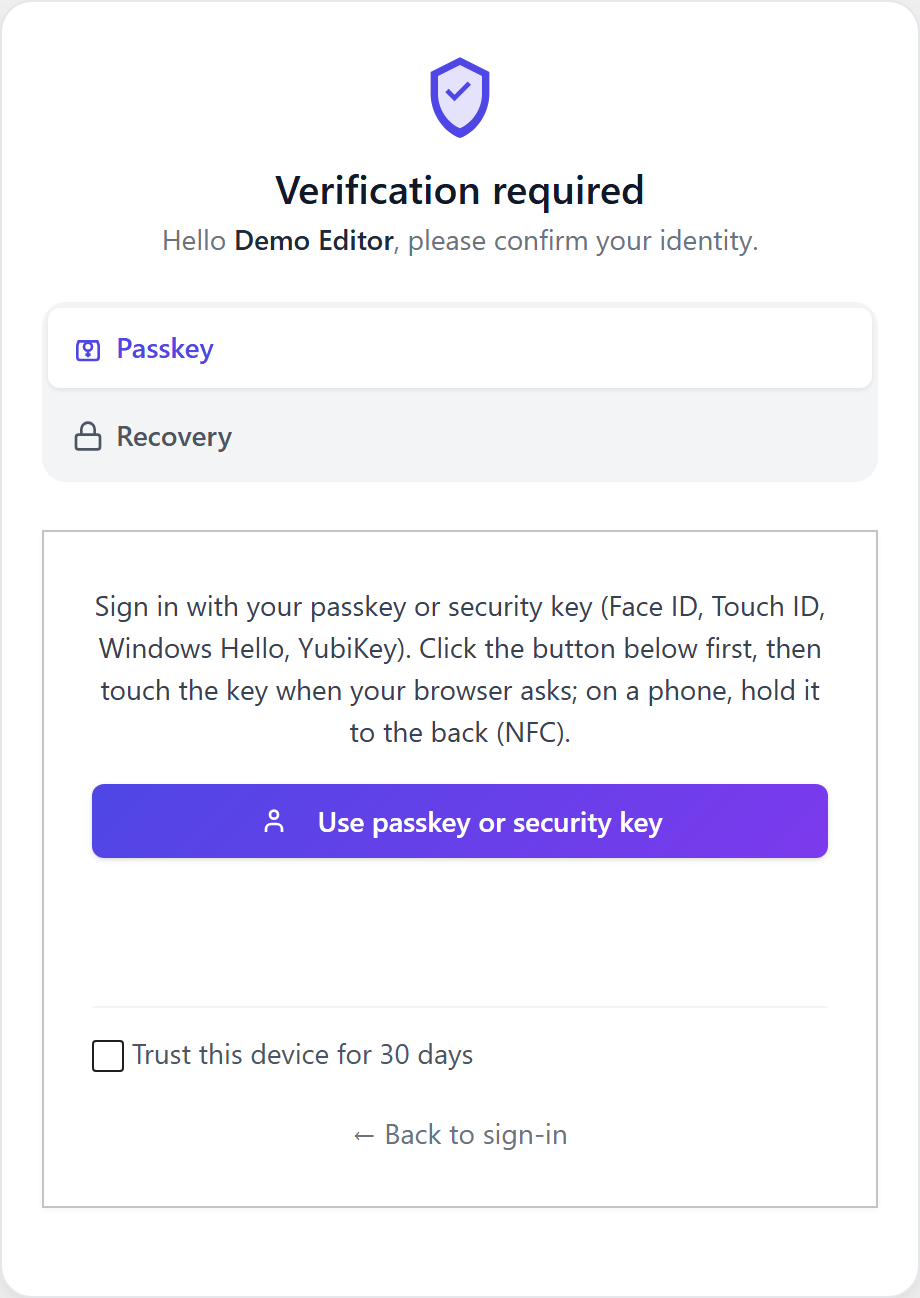
Hive gives this step two minutes, enough to fish the key out of a pocket and hold it against the phone. With Trust this device for 30 days, a personal computer skips the key for a while.
Settings for site owners
All 2FA settings are under ReportedIP Hive > Protection in the card Two-Factor Authentication. The quickest start is the Quickstart with its switch 2FA for administrators.
| Setting | Default | What it does |
|---|---|---|
| Two-factor authentication enabled | Off | Main switch for the whole site. |
| Allowed 2FA methods | Security key allowed | Which methods users may choose. |
| Roles required to use 2FA | Administrator | Which roles must set up a second factor. |
| 2FA grace period (days) | 7 | Time users get to set up 2FA. |
| Trusted device lifetime (days) | 30 | How long “trust this device” lasts. |
Only the main switch and the roles are visible in the simple view. The other fields, including Allowed 2FA methods, appear once you switch on Expert mode on the Protection page.
One security key per account is free on every plan. A second key as a backup, automatic model detection and mails when a key is added or removed come with the Business plan. The warning mail for a suspicious key login is included in every plan: if a key’s signature counter goes backwards, which points to a copied key, Hive refuses the login and mails the user.
For WooCommerce shops, customers sign in with their key on the regular WordPress login. The second step in the shop’s own design is part of the Professional plan, see the WooCommerce 2FA guide.
What to do when a key is lost
Every hardware key gets lost sooner or later. Plan for it on the day you register the first one:
- Recovery codes. Each of the ten codes works once in place of the key. Choose Recovery on the login page.
- A second method. An authenticator app next to the key keeps you in if the key is not at hand.
- A backup key. On the Business plan, register a second YubiKey and keep it in a safe place.
- Admin reset. An administrator opens Users, hovers over the account and chooses Reset 2FA. Hive asks for confirmation, logs the reset and mails the user.
After you are back in, remove the lost key from your profile with Remove. It stops working at once. Hive refuses to remove your last key if it is your only method and 2FA is required for your role, so you cannot lock yourself out by accident.
Staging sites, subdomains and several sites
A security key is bound to the domain on which it was registered. That is what makes it phishing-proof, and it has three practical effects:
- Staging copies: a key registered on the live site does not work on a staging copy under another domain. Register the key there separately or use another method.
- Subdomain networks: a key from shop.example.com does not work on blog.example.com. For multisite networks on subdomains, a developer can bind all keys to the shared main domain. Do that before the rollout, because keys registered earlier then have to be added again.
- Several independent sites: register the same YubiKey on each of them. It works everywhere and uses no storage on the key.
Rolling out YubiKeys to a team or client sites
For an agency that looks after several client sites, the key itself is the easy part. The planning sits in the details:
- Two keys per person. Three administrators with two Security Key C NFC each come to six keys for €207.06 in total. On the Business plan, register both keys on every site; on the other plans, register one key and add an authenticator app as the second method.
- One key for all client sites. Register the same key on each site. It uses no storage on the key, so there is no upper limit.
- Names that say where the key is. “YubiKey office” and “YubiKey safe” tell you at a glance which one to remove when a key goes missing.
- A key list. Note who has which key and on which sites it is registered. When someone leaves, remove their keys from each of those sites or delete the account.
- Test on one site first. Try the rollout on one site and its staging copy before you require 2FA for every administrator.
How to require 2FA for a whole team with a grace period is described in the passkey guide.
Common error messages and what they mean
| Message | Cause | Fix |
|---|---|---|
| The request timed out or was cancelled. | The key was not touched in time, the dialog was closed or the key was held against the wrong spot on the phone. | Try again and touch the key when it blinks. |
| The domain of this page does not match the key registration. | The page runs under a different address, for example with or without www. | Sign in under the address where the key was registered. |
| This key is already registered on this account. | The same YubiKey was added a second time. | Nothing to do, the key already works. |
| Unknown security key. | The key belongs to another account or was removed. | Use the right key or another method. |
| Security keys are not available on this site. | The site owner has not allowed the method. | Allow it under Allowed 2FA methods in Expert mode. |
| Multiple security keys per account require the Business plan. | A second key on a lower plan. | Keep one key or upgrade to Business. |
| Too many registration attempts. Please wait a few minutes. | Many registration tries in a row. | Wait briefly, then try again. |
One symptom is not an error at all: a string of characters starting with cccc in the password field. That is a Yubico OTP code, typed by the key because it was touched while a text field had focus. Clear the field and start the login with the button instead. More general problems such as missing HTTPS are covered in the passkey guide.
Questions about the YubiKey and WordPress
Does the YubiKey 5C NFC work with an iPhone?
The YubiKey 5C NFC works with an iPhone in two ways: by NFC, holding the key against the top edge of the phone, or by plugging it into the USB-C port of newer models. Safari shows a system dialog for the key. The WordPress login with Hive works the same way as on the desktop.
Do I need a paid plan for a YubiKey?
One security key per account is free on every Hive plan, including the warning about copied keys. The Business plan adds a second key as a backup, model detection and mails when keys change. The second factor in the WooCommerce shop design is part of the Professional plan.
Does registering a site use up space on the YubiKey?
Registering a WordPress site with Hive uses none of the passkey storage on the YubiKey, because the site keeps the login data. One key can therefore protect any number of WordPress sites. The storage on the key is only used by services that save a passkey directly on it.
What happens if I lose my only YubiKey?
Sign in with one of the ten recovery codes or a second method such as an authenticator app, then remove the lost key from your profile. Without either, an administrator can reset your two-factor authentication under Users. Hive logs that reset and informs you by e-mail.
Is the cheaper Security Key enough for WordPress?
Yes. The Security Key C NFC speaks FIDO2 and U2F, which is all the WordPress login with Hive uses. It costs €34.51 in the Yubico store for Germany (29 October 2026), half the price of the YubiKey 5C NFC. The 5 series is only worth the extra if you also need OTP, PIV or OpenPGP.
Does the YubiKey need a PIN for the WordPress login?
No. Hive asks only for a touch, because the password is already the first factor. The FIDO2 PIN of the key stays unused unless a developer configures the site to require user verification.
Read on
The Hive documentation covers hardware keys and two-factor authentication in detail. All other features are explained in the ReportedIP Hive plugin guides.