GDPR for WordPress Security: What Hive Stores and Shares
A GDPR-compliant WordPress security plugin has to process IP addresses to block attacks, but it does not have to keep more than that or keep it for long. This guide shows what ReportedIP Hive stores on your site, what leaves it in each mode, how long logs are kept and which settings and texts you need for your privacy policy.
Which personal data does a WordPress security plugin process?
Every login protection works with personal data. The IP address of a visitor is personal data under the GDPR, and so is a username typed into a login form. A security plugin that blocks a brute-force attack has to count failed logins per IP, so it cannot work without processing addresses. The question is not whether data is processed, but how much, for how long and where it goes.
ReportedIP Hive, the WordPress plugin with 16 attack sensors, four 2FA methods and progressive blocking, answers these questions with data-minimal defaults. They apply on every plan, including the free one. Privacy is not an add-on you have to buy.
What Hive stores on your site by default
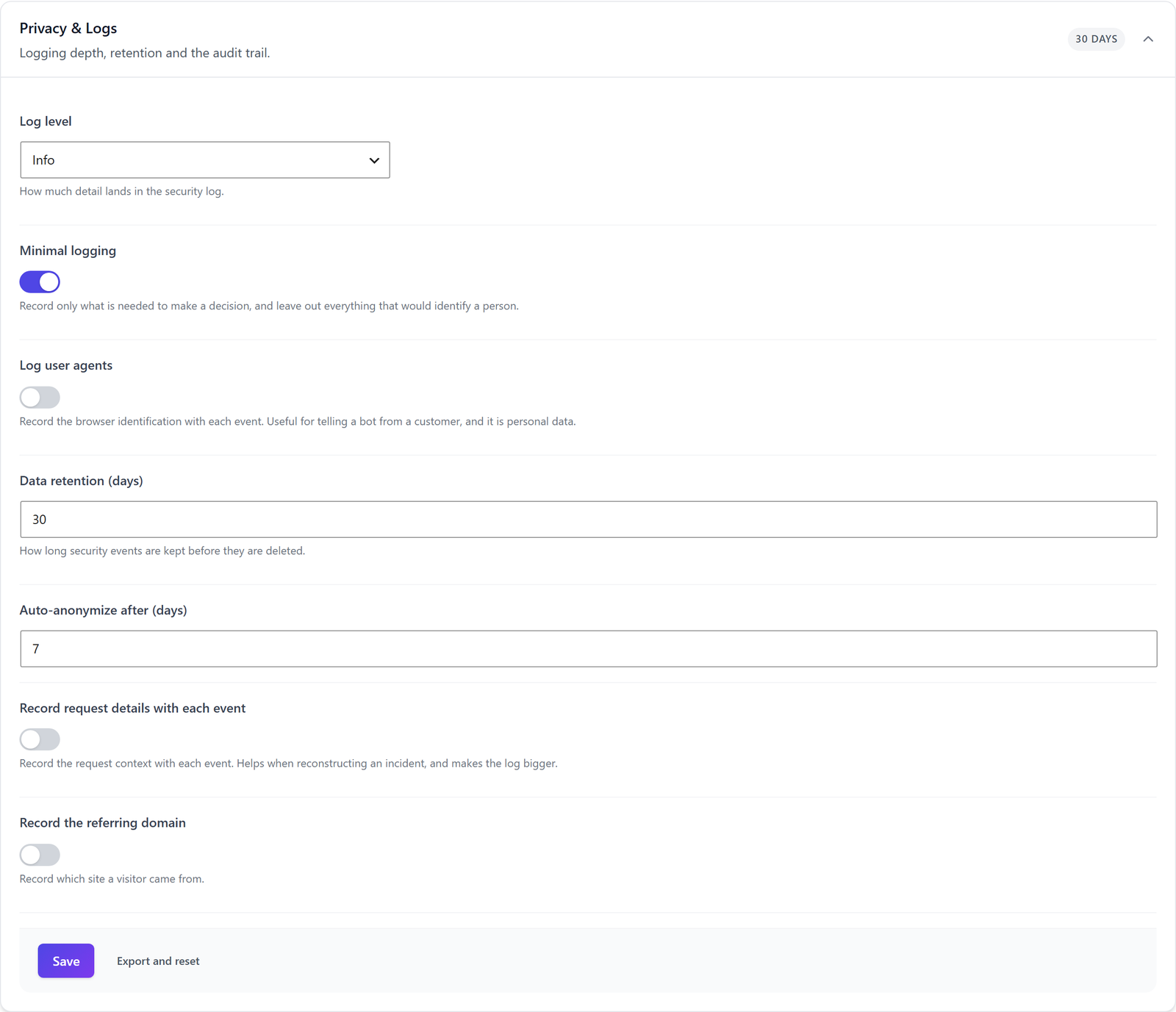
All settings for logging sit under ReportedIP Hive > Protection in the section Privacy & Logs. Out of the box they look like this:
| Setting | Default | Effect |
|---|---|---|
| Minimal logging | On | Records only what a blocking decision needs. |
| Log user agents | Off | The browser identification is not stored. |
| Record request details with each event | Off | No request context in the log. |
| Record the referring domain | Off | No record of where a visitor came from. |
| Data retention (days) | 30 | Older security events are deleted. |
| Auto-anonymize after (days) | 7 | Older events lose their personal details. |
If you switch on Log user agents, Hive keeps only the first 50 characters, which is enough to tell a bot from a browser. The field Auto-anonymize after (days) appears once you switch on Expert mode at the top of the page.
How long logs are kept and what anonymisation removes
A cleanup job runs once a day and does two things. Events older than the retention period are deleted completely. Events older than the anonymisation period lose the username, the user agent and the referrer. The IP address stays in an anonymised event until the retention period deletes it, because blocking and statistics depend on it. Plan the two periods with that in mind: the retention period decides how long an IP address is stored on your site.
The Quickstart recommends a longer retention on paid plans: 90 days on Professional and 365 days on Business. If you apply that recommendation, update the storage period in your privacy policy as well. You can change the value at any time between 1 and 365 days.
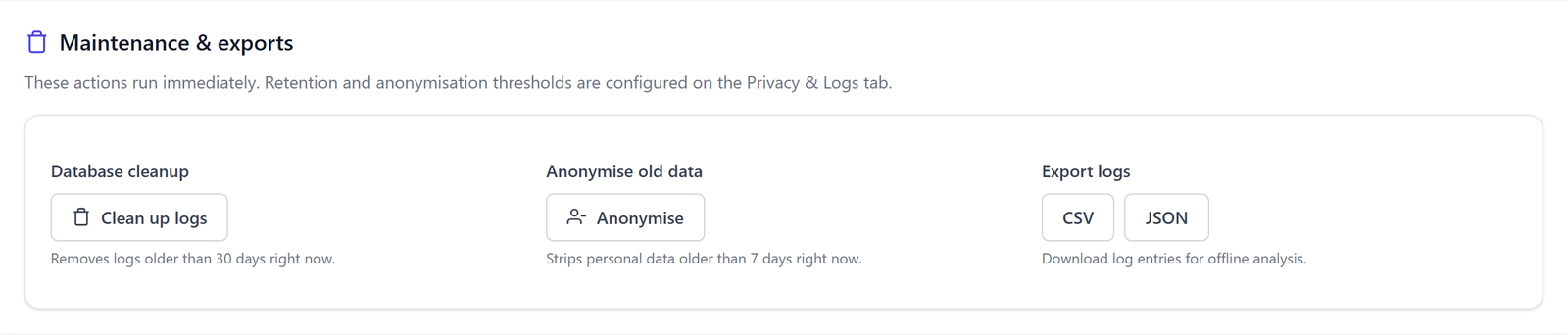
For a one-off cleanup, for example before an audit, go to ReportedIP Hive > Tools, tab Data. The card Maintenance & exports runs Clean up logs and Anonymise immediately and exports the log as CSV or JSON. The Tools menu is visible in Expert mode.
What leaves your site in Local Shield and Community Network
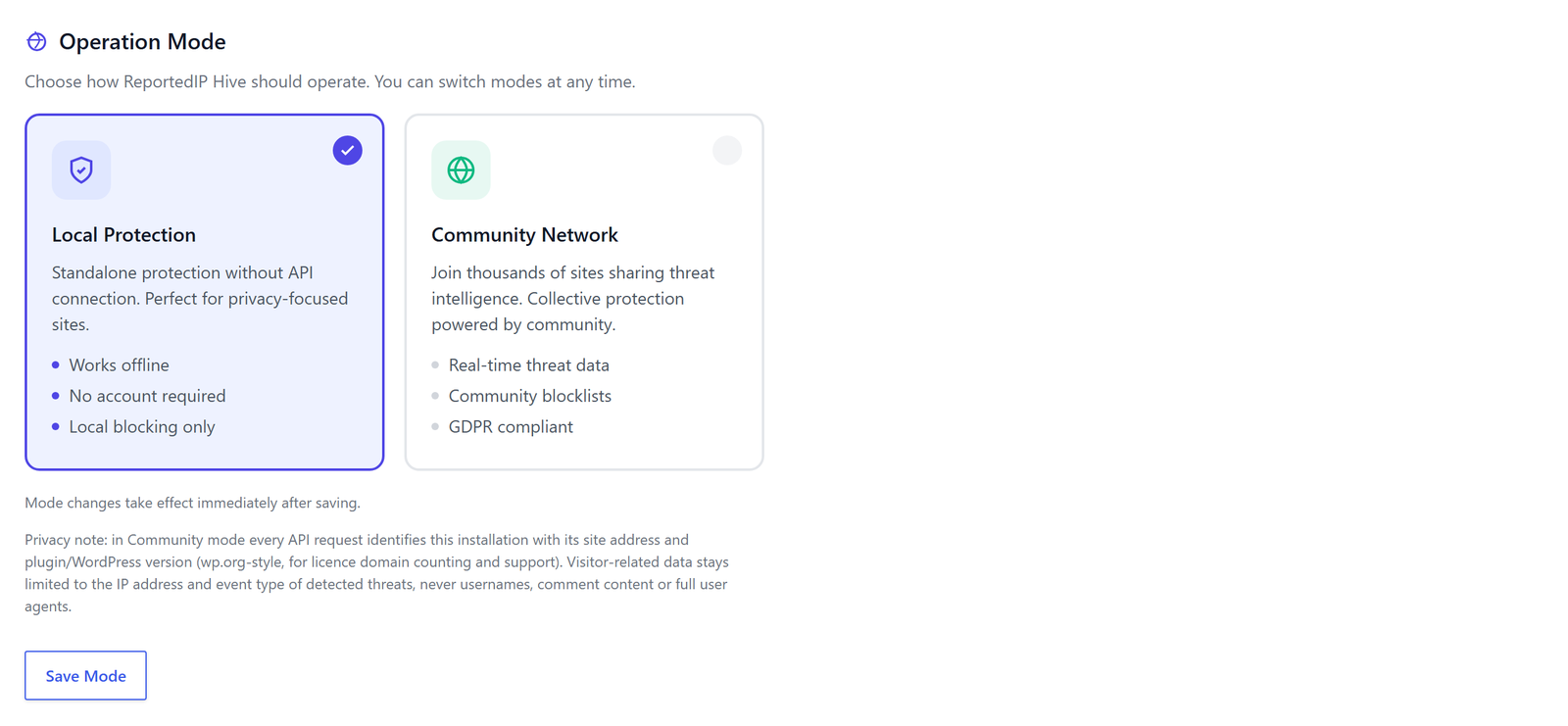
Hive runs in one of two modes, chosen under ReportedIP Hive > Community, tab Settings. The mode decides whether visitor data is shared.
- Local Shield (labelled Local Protection in the plugin) is the default. No visitor data leaves your site: no lookups, no reports, no account needed.
- Community Network is opt-in and needs a key. A report contains the attacking IP, the attack category and a short generated note with the number of attempts, the time window and the name and address of your site. Lookups send the visitor IP being checked. Every request names your site address and the plugin and WordPress version. Usernames, comment content and full user agents are never sent.
A few connections run in both modes, and none of them carries visitor data. Hive checks for new plugin versions. Admin pages load a short “What’s new” feed from reportedip.com, and that request names your site address. When a user changes a password, Hive checks it against known breaches by sending only the first five characters of its hash; you can switch that off with Check passwords against known breaches. There is no usage tracking and no analytics, and the admin pages load no fonts or scripts from third-party CDNs.
How 2FA secrets and phone numbers are protected
TOTP secrets for authenticator apps and phone numbers for SMS codes are stored encrypted with libsodium, with OpenSSL as a fallback on servers without it. A copy of the database alone does not give an attacker working second factors. Recovery codes are stored only as hashes, and so is the token of a trusted device.
Hive sets a cookie only for users who tick “trust this device” at the 2FA prompt. It is HttpOnly, SameSite=Strict and valid for 30 days by default, adjustable with Trusted device lifetime (days). Visitors who never sign in get no cookie from Hive.
Lawful basis and the text for your privacy policy
Security logging rests on Art. 6(1)(f) GDPR, the legitimate interest in protecting your site against unauthorised access. Recital 49 of the GDPR names network and information security explicitly as such an interest.
Hive adds a suggested section to the WordPress policy guide under Settings > Privacy. It describes the data, the local storage, the default periods and the lawful basis, and you can copy it into your policy. Customers of reportedip.com also find a privacy text generator in their dashboard that builds a German or English section from your actual configuration. Both are templates, not legal advice. If you use the managed mail and SMS relay, the data processing agreement of reportedip.com covers that processing.
Answering access and erasure requests
Hive connects to the WordPress core privacy tools, on every plan. Under Tools > Export Personal Data an export for a user includes the group ReportedIP Hive security data: the user’s login attempts, trusted devices, an account lock with its texts, open sessions and the login history. Tools > Erase Personal Data removes the same data, except an active account lock which stays in place.
On the Business plan an audit trail records administrative actions. It has its own retention period and the option Anonymize IPs in the audit trail, which stores only the network part of an address.
Removing all data when you uninstall
By default an uninstall keeps your configuration, so a reinstall restores it. To remove everything, switch on Delete all plugin data on uninstall (logs, settings, IP lists) in the card Uninstall behaviour under Tools, tab Data, before you delete the plugin. Hive then drops its tables, options and user data.
A GDPR checklist for your Hive setup
- Keep Minimal logging on and Log user agents off unless you have a documented reason.
- Set a retention period you can justify and write the same number into your privacy policy.
- Choose the mode on purpose: Local Shield shares nothing about visitors, Community Network shares attacking IPs.
- Copy the suggested text from the WordPress policy guide and adapt it.
- Test an export under Tools > Export Personal Data once, so you know the result before a real request arrives.
- Decide before an uninstall whether the data should stay or go.
Questions about GDPR and ReportedIP Hive
Does a WordPress security plugin need consent under the GDPR?
Security logging does not need consent. It rests on the legitimate interest in protecting the site under Art. 6(1)(f) GDPR, which Recital 49 names explicitly. You still have to describe the processing in your privacy policy, including the stored data, the retention period and whether IP addresses are shared with a threat network.
Is the IP address removed when Hive anonymises old events?
Anonymisation removes the username, the user agent and the referrer from older events, but the IP address stays until the retention period deletes the event. That keeps blocking and statistics working. The retention period, 30 days by default, therefore sets how long an IP address is stored on your site.
Does Local Shield mode send data to reportedip.com?
Local Shield sends no visitor data: no lookups, no reports and no IP addresses of your visitors. Independent of the mode, Hive checks for plugin updates and loads a short news feed on admin pages, which names your site address. The breach check for new passwords sends only a partial hash and can be switched off.
Which Hive data is included in a personal data export?
The WordPress export tool includes a group named ReportedIP Hive security data with the user’s login attempts, trusted devices, an account lock, open sessions and the login history. This works on every plan through the core privacy tools, so you answer an access request under Art. 15 GDPR the same way as for other plugins.
Read on
The Hive documentation covers privacy and GDPR and the operating modes in detail. All other features are explained in the ReportedIP Hive plugin guides.