Managed Mail and SMS Relay for Reliable WordPress 2FA Codes
A WordPress 2FA code sent by SMS or e-mail only helps if it arrives within seconds, and the managed relay of ReportedIP Hive makes sure it does, without your own SMTP server or SMS account. If the monthly allowance runs out, e-mail codes fall back to your site’s own mail, so nobody is locked out.
This guide explains what the relay delivers, how much is included in each plan, what happens at the limit and how prepaid bundles work.
Why do 2FA codes fail to arrive?
Most WordPress sites send mail through the web server’s own mail function. On shared hosting that mail often lacks proper sender authentication, lands in spam or arrives minutes late, which is fatal for a code that expires quickly. SMS codes need a separate gateway account, API keys and a prepaid balance that somebody has to watch. A second factor that does not arrive locks out exactly the people who did everything right.
What the managed relay delivers
- Mail relay: 2FA e-mails go out through the sending infrastructure of reportedip.com with authenticated sender domains, so codes land in the inbox instead of spam.
- SMS relay: 2FA codes by text message worldwide, without an account at an SMS provider and without API keys on your site.
Nothing needs to be configured: as soon as the site runs in Community Network mode with a key on the Professional plan or higher, Hive sends 2FA mail and SMS through the relay automatically. Authenticator apps, passkeys and e-mail codes work on every plan; the relay and SMS codes are part of Professional and above.
How much is included in each plan?
| Plan | Mails per month | SMS per month |
|---|---|---|
| Professional | 500 | 25 |
| Business | 2,500 | 75 |
| Enterprise | By agreement | By agreement |
If you book Business several times, for example for a larger group of sites, the included mail and SMS volume grows with it. The counters reset at the start of each billing month.
How to estimate what you need
Every sign-in with an e-mail or SMS code uses one message, a resent code uses another. Trusted devices skip the second step for a set number of days, so regular users on their own devices need far fewer codes than their number of logins suggests. An example: 12 editors who sign in on their own laptops and trust them need only a few codes each month, while a shop with 400 customers who sign in with SMS codes on shared or changing devices can exceed the 25 SMS of the Professional plan within days.
The cheapest way to save volume is to steer users towards authenticator apps and passkeys, which need no delivery at all. Keep SMS for the users who cannot use either.
What happens when the allowance is used up
- Hive first uses the monthly allowance of your plan.
- Then it uses the credits of any prepaid bundle you bought.
- When both are empty, e-mail codes switch to your site’s own mail function automatically, so the login keeps working. The same fallback applies if the relay cannot be reached.
- SMS codes have no fallback. The user sees that the SMS allowance is used up and can sign in with an authenticator app, an e-mail code or a passkey instead.
This is why every user should have a second method besides SMS. The 2FA overview guide shows how to set up several methods per account.
Where to see the remaining volume
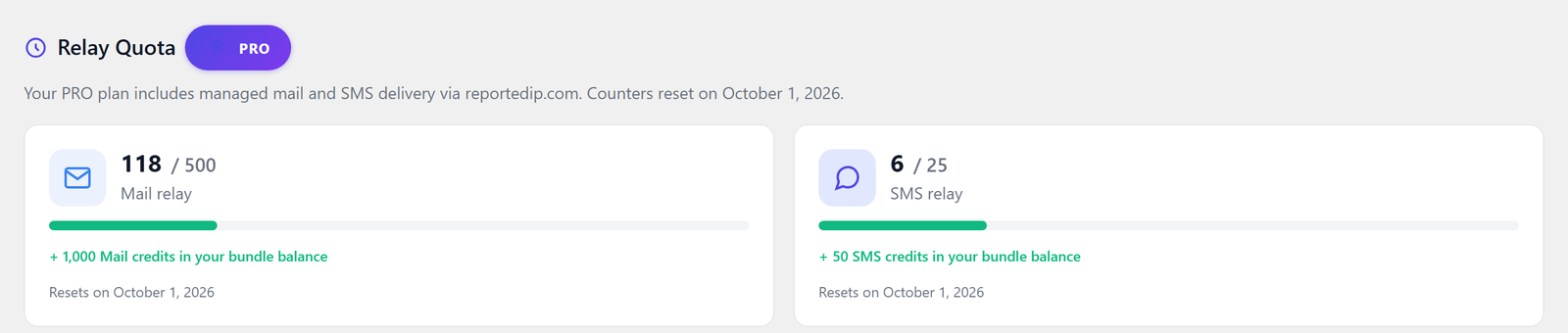
The Hive dashboard shows the section Relay Quota with one card for the Mail relay and one for the SMS relay: used and included volume, a progress bar, the bundle credits on top and the date the counters reset.
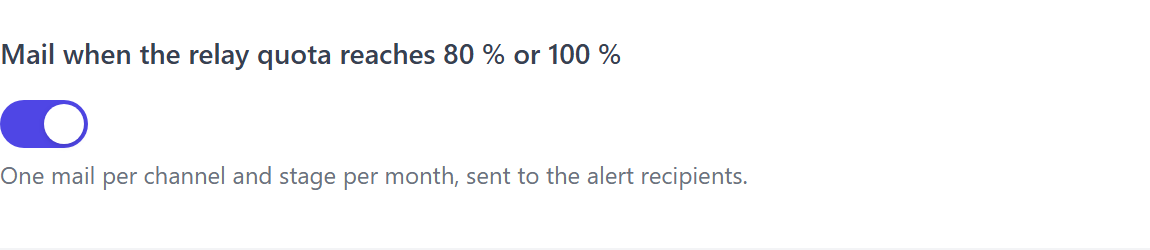
You do not have to check it by hand. With Mail when the relay quota reaches 80 % or 100 % under Protection, card Notifications, Hive sends one mail per channel and level each month to the alert recipients. While a channel is at its limit, the admin area also shows the notice Managed relay capacity reached.
Prepaid bundles for busy months
For months with more logins than usual, for example a sale in a WooCommerce shop, prepaid bundles top up the volume. They are available from the Professional plan, are bought once and never expire.
| Bundle | Price, incl. VAT |
|---|---|
| 50 SMS | €14.90 |
| 200 SMS | €49.90 |
| 500 SMS | €99.90 |
| 1,000 mails | €4.90 |
| 5,000 mails | €14.90 |
| 25,000 mails | €49.90 |
Bundles are bought in your reportedip.com dashboard under Bundles and show up on the Hive dashboard with the next quota update. A bundle can be refunded as long as none of its credits have been used. The pricing page lists the plans and bundles with all conditions.
SMS codes: numbers, countries and privacy
Phone numbers have to be entered in international format with a plus sign and country code, following the ITU E.164 standard, for example +49 for Germany. Hive checks the format when the number is saved. The relay delivers worldwide except for a few destinations; for those the user sees a clear message and can choose another method.
Phone numbers are stored encrypted on your site. The relay only receives what it needs to deliver the message, and the processing is covered by the data processing agreement of reportedip.com.
Questions about the 2FA mail and SMS relay
Do I need my own SMTP server or SMS provider?
With the relay you need neither. On the Professional plan and above in Community Network mode, Hive sends 2FA mail and SMS through reportedip.com automatically. Your site’s regular mail, such as order confirmations, keeps using whatever mail setup you already have.
What happens if the SMS allowance runs out during a login?
The user sees that the SMS allowance is used up and can switch to another method on the same screen, such as an authenticator app, an e-mail code or a passkey. An SMS bundle restores SMS delivery without waiting for the next billing month.
Do bundle credits expire?
Bundle credits never expire. They are only used once the monthly allowance of your plan is exhausted, so a bundle bought for a busy month stays available for later months if it is not needed.
Can I use the relay on the free plan?
The relay is part of the Professional plan and higher. On the free plan, e-mail codes go out through your site’s own mail function, and authenticator apps and passkeys work without any delivery at all, which makes them the most reliable choice there.
Read on
The Hive documentation covers mail and SMS delivery and two-factor authentication in detail.