WordPress Multisite Security: Hardening a Whole Network
WordPress multisite security fails differently than single-site security: one shared codebase, one database and one global user table mean that a single weak sub-site can hand an attacker the entire network. This guide covers the multisite threat model, a 10-point hardening checklist, and why network-wide blocking closes the gap that per-site security tools leave open.
Why securing a multisite network is different from a single site
A WordPress multisite network looks like many websites, but structurally it is one installation. Five properties define its threat model:
- One codebase. Every sub-site runs the same WordPress core, the same plugin files and the same theme files from one directory. A vulnerability in a single plugin is exploitable on every sub-site where that plugin is active.
- One database. Sub-sites get their own table sets, but there is no privilege boundary between them. An SQL injection on any sub-site reaches every table in the database, including the network tables.
- Global users. The user table is shared across the network. An account registered on one sub-site exists everywhere, and a credential stolen on the least important sub-site works against the most important one.
- One PHP process. All sub-sites are served by the same application server with the same file permissions. Code execution on one sub-site is code execution on the network.
- The Super Admin role. Super Admins pass every capability check on every sub-site. There is no partial compromise of a Super Admin account: phishing one of them means losing the whole network.
The practical consequence: the security level of a multisite network equals the security level of its weakest sub-site. A forgotten test site with an outdated plugin is not a small risk in a corner; it is a door into everything.
Which parts of a multisite network attackers probe first
Between May and July 2026, the ReportedIP community network logged 1.69 million attacks against WordPress sites, and login endpoints were the dominant target. On multisite, several of these surfaces multiply with the number of sub-sites:
| Attack surface | Why it matters more on multisite | First countermeasure |
|---|---|---|
wp-signup.php | Open registration lets bots create accounts, or entire sub-sites, on the whole network. | Set Registration to “disabled” or “user accounts only” in the Network Settings. |
| Login pages | Every sub-site exposes its own login form, and all of them authenticate against the same shared user table. | Network-wide login monitoring with shared attempt counters. |
xmlrpc.php | Exists once per sub-site; each copy accepts authentication attempts and amplified multicall requests. | Disable it network-wide or rate-limit it centrally. |
| REST user enumeration | The users endpoint can reveal global usernames; one query maps the accounts of the whole network. | Block user enumeration for unauthenticated requests. |
| Stale sub-sites | Abandoned sub-sites still run the full codebase, but nobody reads their logs. | Delete or archive sub-sites that are no longer maintained. |
| Mapped domains | A mapped domain without valid TLS exposes the shared authentication cookies of the network. | Serve every sub-site and mapped domain with a valid certificate. |
A 10-point hardening checklist for WordPress multisite
Work through these in order. Points 1–3 remove the highest-impact risks; points 4–9 reduce the attack surface; point 10 covers detection.
- Close or restrict registration. The Registration setting in the network admin decides whether strangers can create accounts or sub-sites. If registration must stay open, add disposable-email blocking and a registration honeypot so bot signups fail before they create load.
- Keep the Super Admin list minimal. Every Super Admin account is a complete network compromise if phished. Two or three named people are enough; service accounts and agencies should get sub-site administrator roles instead.
- Enforce two-factor authentication for privileged roles. Super Admins first, sub-site administrators second. Phishing-resistant methods such as passkeys and hardware security keys protect the accounts whose loss costs the most.
- Govern plugins and themes centrally. WordPress already prevents sub-site administrators from installing plugins. Keep it that way. Review which plugins are network-activated versus selectively activated, and remove anything no sub-site still uses: deactivated plugin files are still reachable code.
- Disable file editing in the dashboard. Define
DISALLOW_FILE_EDITin the configuration file so a hijacked admin session cannot turn the theme editor into a PHP shell. On managed networks with a deployment pipeline,DISALLOW_FILE_MODSalso blocks installs and updates through the browser entirely. - Restrict uploads. The network settings control the allowed upload file types and a per-site storage quota. Shorter allowlists mean fewer ways to smuggle executable content into the uploads tree.
- Remove stale sub-sites. Every sub-site is a login page, an XML-RPC endpoint and a REST API namespace. If nobody maintains a sub-site, archive or delete it. The attack surface disappears with it.
- Serve valid TLS everywhere. Sub-domain installs need a wildcard certificate; mapped custom domains each need coverage. A single sub-site on plain HTTP exposes session cookies that are valid across the network.
- Update from the network admin, completely. There is no such thing as updating “only the important sub-sites”. All of them run the same files. A plugin kept outdated because one sub-site depends on the old version keeps the vulnerable code loaded for everyone.
- Centralize detection and blocking. Distributed attacks are invisible in per-site logs. One shared view of attempts, blocks and sensor events across all sub-sites is the difference between seeing a campaign and seeing thirty unrelated nuisances.
The official WordPress hardening documentation covers the file-permission and configuration basics that apply to any install; the points above are what multisite adds on top.
How to audit an existing network in five commands
Before changing anything, measure the current state. On a server with WP-CLI, five commands answer the questions every WordPress multisite security review starts with:
wp site list --fields=blog_id,url,last_updated: every sub-site with its last content change. Sub-sites untouched for a year are candidates for point 7 of the checklist.wp super-admin list: the accounts that can do anything, anywhere. If this list surprises you, fix it today.wp plugin list --fields=name,status,update: network-activated plugins, selectively active plugins and pending updates in one view. Anything listed as inactive is still code on disk.wp user list --role=administrator --url=SUBSITE-URL: per sub-site, who holds the administrator role. Run it for each sub-site and compare against who actually works there.wp core verify-checksums: compares every core file against the official WordPress checksums and reports files that were added or modified. A clean result rules out the most common persistence method after a compromise.
Repeat the audit after every structural change to the network, a new sub-site: a new agency with admin access, a new mapped domain. The list of Super Admins and the list of stale sub-sites are the two findings that change most often between audits.
Why per-site security plugins fail on a network
Most WordPress security plugins were designed for single sites. Installed on multisite, they typically keep their attempt counters, block lists and logs in per-site database tables. Every sub-site defends itself alone.
That model breaks against the cheapest possible attack. A brute-force attacker who spreads four login attempts across each of ten sub-sites stays below every per-site threshold, while making forty guesses against the same shared user table. No single sub-site ever sees enough activity to react, so no block is issued anywhere.
The second failure is operational: thirty sub-sites mean thirty separate log screens. In practice nobody reads them, which is why compromised sub-sites on large networks are so often discovered by outsiders rather than by the operator.
How ReportedIP Hive shares one threat state across the whole network
ReportedIP Hive combines 16 attack sensors, four 2FA methods, progressive blocking and opt-in community threat intelligence. It has been fully multisite-aware since version 2.0, and the current release is 2.1.67. On a network the plugin can only be network-activated; WordPress hides the per-site activation link.
Hive keeps its data once for the whole network instead of once per sub-site, and the event log records which sub-site each event came from. The result is one shared threat state: login failures from the same IP across different sub-sites add up in one central counter, and one block locks the IP out of every sub-site at once. The distributed attacker from the example above trips the network-wide threshold after a handful of attempts, not never.
The same aggregation applies to the other sensors: XML-RPC abuse, REST rate limiting, user-enumeration defence, 404 scanner detection and the request-inspecting Web Application Firewall all count per IP per network, not per sub-site. Blocked responses are cache-safe, so a caching plugin cannot serve stored HTML to a blocked address on protected paths.

Networks running in Community Network mode additionally check visitors against shared intelligence: as of 26 September 2026 the ReportedIP blacklist lists 30,926 high-confidence threat IPs, so an address that attacked other community sites can be refused before its first password guess. Networks that must stay fully offline use Local Shield mode and keep every mechanism described here, minus the shared reputation data.
What super admins and site admins each control
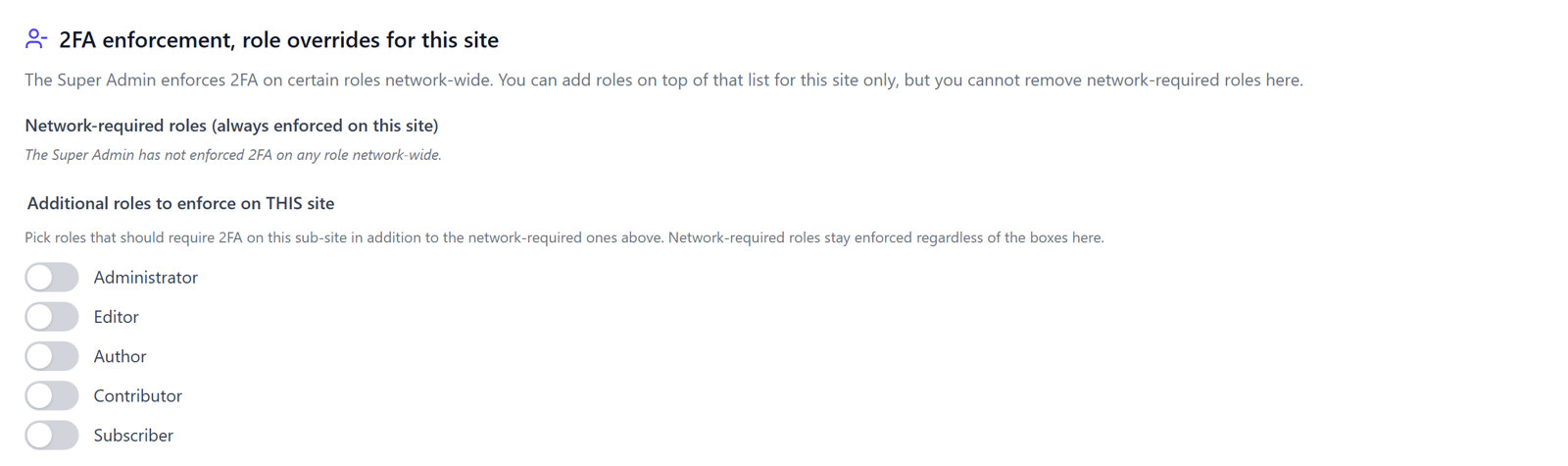
Super Admins manage the network settings in the Network Admin, and Hive requires them to set up 2FA by default. Site administrators on a sub-site get a read-only Status and Logs view (plus their own site’s audit trail on Business) and one writable settings page with two overrides: the WooCommerce frontend 2FA page slugs, and additive enforcement roles. A site admin can add a role to 2FA enforcement but cannot drop one the network requires. Sub-site convenience can tighten the policy, never loosen it.
The trusted-device cookie is scoped to the network cookie path, so a single “trust this device” confirmation carries across all sub-sites instead of re-prompting on each one. Scheduled tasks run only on the main site, so a network with fifty sub-sites does not run fifty cleanup jobs.
Moving an existing single site into a protected network
The plugin tables of a single-site install already use the network prefix, so the event history carries over when the site becomes a network. After the conversion, network-activate Hive and review the settings once in the Network Admin. Both the single-site and the multisite behaviour are covered by PHPUnit suites that run on every commit.
What network-wide protection costs
The detection core is free on every plan: sensors, firewall baseline, progressive blocking and the core 2FA methods all work network-wide at no cost. Paid plans add the managed relays and multi-domain dashboard comfort: 3 domains on Professional, 15 on Business, and a custom limit on Enterprise; a whole multisite network counts as one domain. Plan details are on the plugin product page.
Frequently asked questions
Does a hacked sub-site compromise the whole WordPress network?
A hacked sub-site usually means a hacked network. All sub-sites share one codebase, one database and one user table, and they run in the same PHP process. Code execution or SQL injection on any sub-site reaches network data, which is why multisite hardening treats every sub-site as part of one perimeter.
Should security plugins be network-activated on multisite?
Protection that individual site admins can switch off is not a network policy, so a security plugin belongs in network activation. ReportedIP Hive enforces this by design: on multisite it can only be network-activated, so no sub-site can opt out of monitoring or blocking.
How many super admins should a multisite network have?
As few as the operation allows, typically two or three named people. Each Super Admin passes every capability check on every sub-site, so each additional account multiplies the phishing risk for the entire network. All of them should use phishing-resistant two-factor authentication.
Does one IP block apply to all sub-sites?
A block applies network-wide when the security plugin stores it once for the network. In ReportedIP Hive a single block locks the IP out of every sub-site simultaneously, and attempts against different sub-sites aggregate into one counter. A botnet hopping between sub-sites is counted as one campaign.
Related guides
- Local Shield vs. Community Network across a network
- The progressive block ladder, applied network-wide
- Quickstart with the setup wizard
The Hive documentation covers multisite networks and two-factor authentication in detail. Browse all ReportedIP Hive plugin guides for the other features.