Share IP Bans Across WordPress Sites With Groups

To share IP bans across WordPress sites, put the Community Access Keys of those sites into one group on reportedip.com, and every address one site reports is blocked on all the others for the group’s ban window. ReportedIP Hive fetches the group list every fifteen minutes, mirrors it as blocks of its own type and shows, for every entry, whether the site blocked it and why not when it did not.
Groups come with the Professional plan and above and need Hive 2.1.67 or later in Community Network mode. A key in no group sees no change at all.
What a group does for a set of WordPress sites
Without a group, each site learns about an attacker on its own. A bot that is blocked on the shop after a run of failed logins starts again from zero on the blog next door, and the blog only pays for it once its own thresholds trip. A group closes that gap inside your own account: the report one member sends reaches every other member at its next sync, whatever sensor raised it and whether the member is a WordPress site or a Linux server.
The service derives the list from what the members reported inside the group’s window, adds the entries you placed by hand in the account and leaves out the exclusions you set there. The address a member reports from is never on the list it receives, so a group cannot lock its own members out of each other.
| Professional | Business | Enterprise | |
|---|---|---|---|
| Groups per account | 1 | 3 | 100 |
| Members (keys) per group | 10 | 50 | 500 |
| Manual entries per group | 200 | 200 | 200 |
| Whitelist entries per group | 200 | 200 | 200 |
Every derived list is capped at 20,000 entries, newest kept. A key belongs to at most one group. The full rules, including the signed webhook a group can send per new ban, are on the Groups documentation page.
How Hive applies the group list on a WordPress site
Every fifteen minutes Hive asks the service for the group list with the ETag of the last answer. An unchanged list comes back as 304 Not Modified and costs one request and no transfer. A changed list is mirrored into the blocked table as entries of the type Group Ban, each one blocked until the expiry the service names. An entry that leaves the list is lifted on the next sync.
- The whitelist wins. An address on the whitelist of the site, a range included, is never blocked by the group.
- A manual block is never touched. The sync neither shortens nor lifts a block you placed by hand.
- A shorter block becomes the group ban. An automatic or reputation block that would end before the group’s expiry is replaced by the group ban, so the address does not walk free once the short block runs out.
- The server’s own address is never blocked. That holds for a range from the list as well: a /24 that covers the host is skipped, because blocking it would take the site’s cron and cache preloads down with it.
- Report-only mode blocks nothing from the list and writes no log line per entry.
When the list stops arriving, everything the group placed goes again: when the key leaves its group, when the plan no longer includes groups, when the key is removed and when the site switches to Local Shield. A list that nobody refreshes any more must not keep trusting or banning addresses.
Where to see the group in wp-admin
All screenshots below come from a test installation. The addresses are from the documentation ranges of RFC 5737 and RFC 3849, the member names end in .example, and no real site or customer is shown.
The dashboard shows the group and its last sync
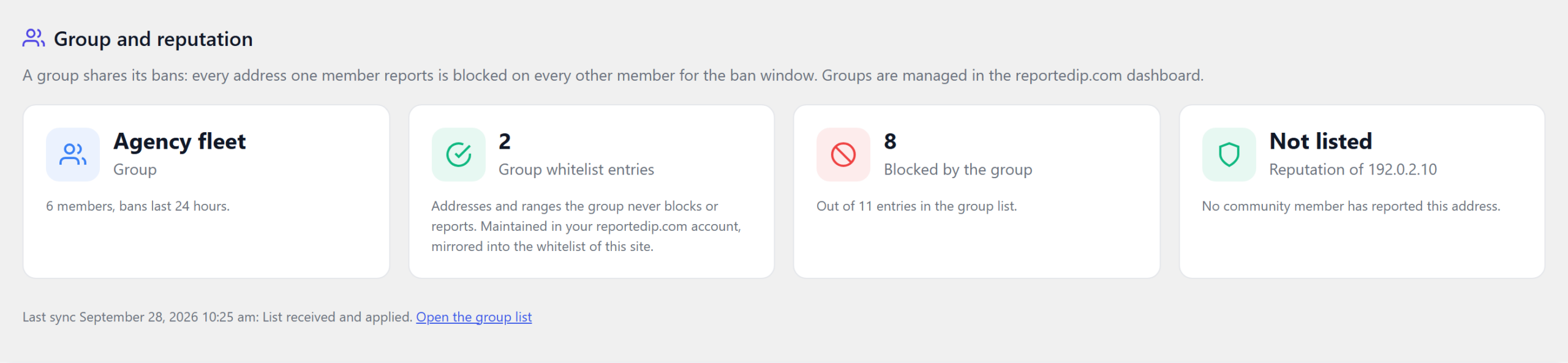
The Hive dashboard carries a group card as soon as the key belongs to a group: the group’s name, its members and ban window, the number of group whitelist entries, how many entries of the list are blocked on this site, and the community reputation of the address the site connects from. Below the cards sit the time and the result of the last sync, with a link to the full list.
The Group tab lists every entry and why it is or is not blocked
Under Activity, IP Lists, Group Hive shows the list exactly as the service sent it: the address, the member that reported it, the categories, since when and until when it is listed. The column On this site says what Hive made of each entry. The reason is worked out when the tab opens, so it stays true after you stepped in by hand.
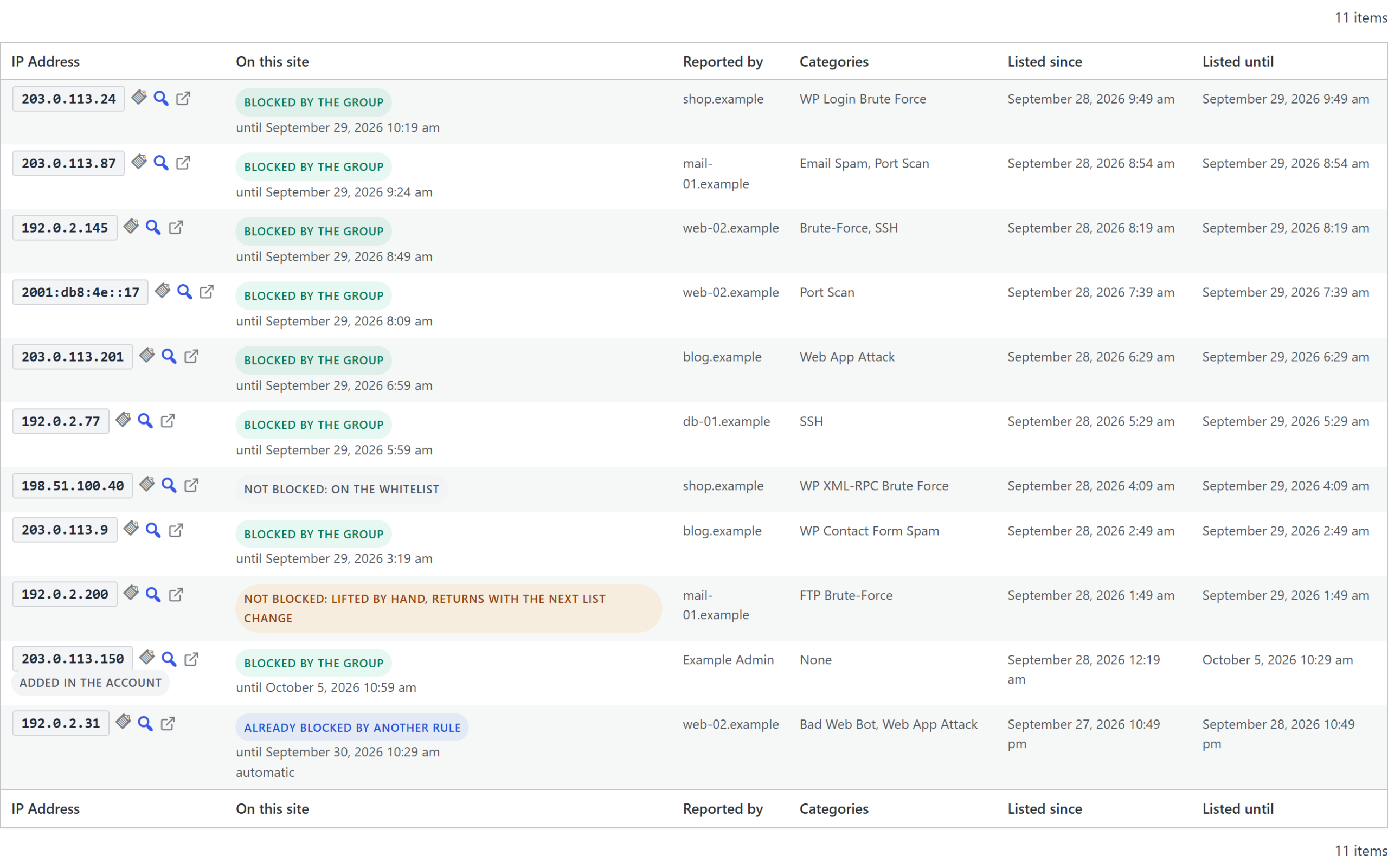
| Status on this site | What it means |
|---|---|
| Blocked by the group | A group ban is active, with its end date below the badge. |
| Already blocked by another rule | A manual block of any length, or an automatic or reputation block that runs longer, covers the address. |
| Not blocked: on the whitelist | The whitelist of the site, or the group whitelist, covers the address. |
| Not blocked: address of this server | The entry is the host itself, or a range around it. |
| Not blocked: report-only mode | The site logs and refuses nothing. |
| Not blocked: lifted by hand, returns with the next list change | Someone removed the block on this site. It comes back with the next change of the list. |
| Window over, drops with the next list | The entry has expired and drops out with the next list. |
The tab filters by blocked by the group, blocked by another rule or not blocked, and by member, and the search takes part of an address. To remove an entry for the whole group, or to exclude an address for good, use the group in your reportedip.com account: a block lifted on one site returns with the next change of the list, on purpose.
The sync status shows what the last run changed
Above the list, a sync card shows the last run, its result in plain words, the number of entries, the last change with what it blocked, extended, lifted and skipped, and the next scheduled run. Sync now runs the sync at once, which is useful right after you changed the group in the account.
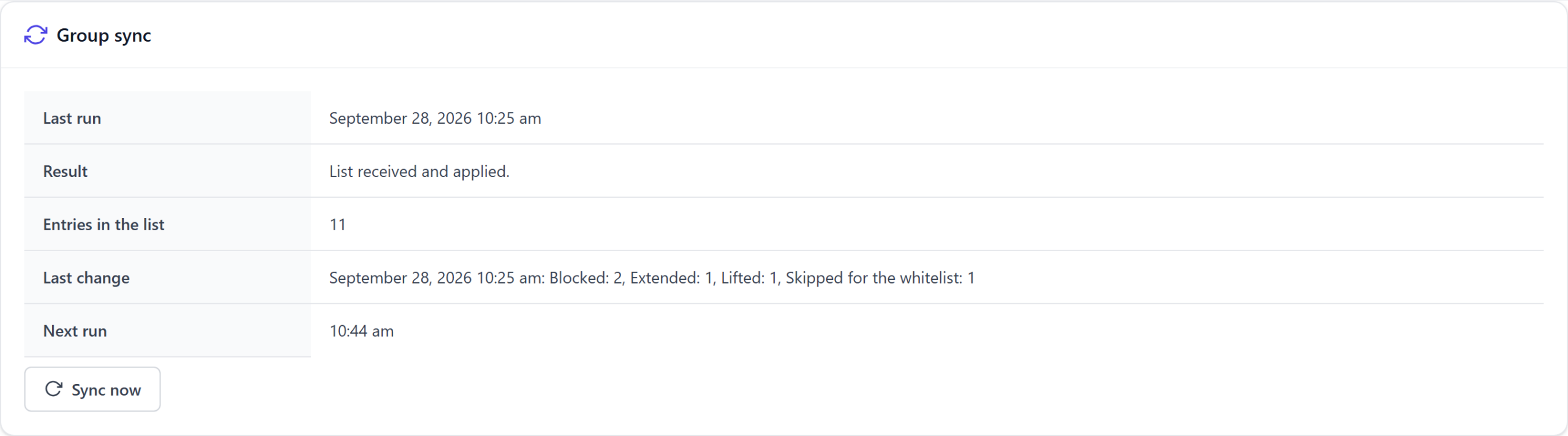
Every sync that changes something also writes one line of the type group_list_synced to the event log, next to the per-address block rows. The Blocked tab lists group bans with their own badge and filter, and the badge links back into the Group tab.
How the group whitelist reaches every site
A group can carry a whitelist of its own: addresses and prefixes up to /24 and /64, each with a note, kept in the account. Hive takes it over with the list and writes it into the whitelist of the site with the origin Group. No member blocks or reports such an address, a block already sitting on one is lifted, and a report still waiting in the queue is dropped before it is sent.
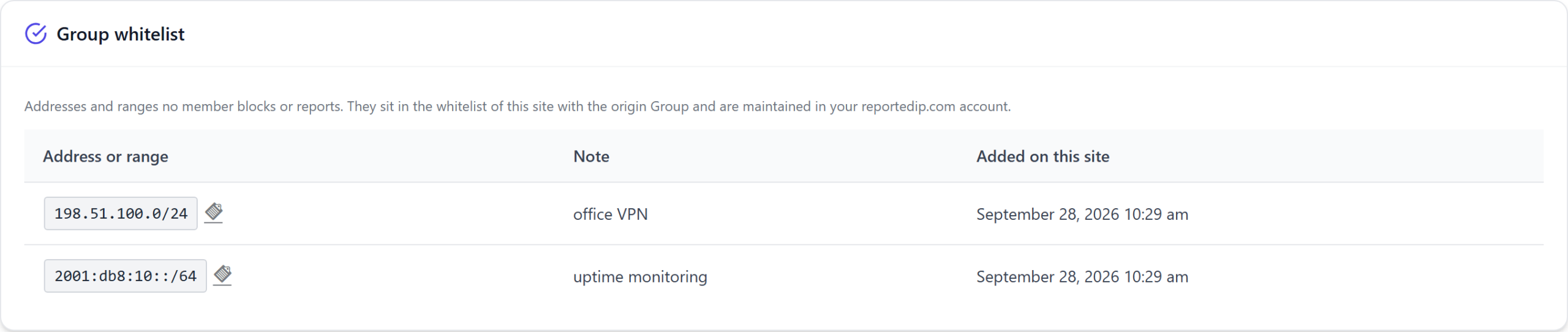
Entries you added by hand keep their origin Manual and are never touched by the sync. A group entry cannot be removed on the site, neither in the table nor through WP-CLI; the message says it is maintained in the account.
Setting up a group in four steps
- Update every site to Hive 2.1.67 or later and run it in Community Network mode with its Community Access Key.
- Create the group under Groups in your reportedip.com account and choose the ban window, 24 hours by default.
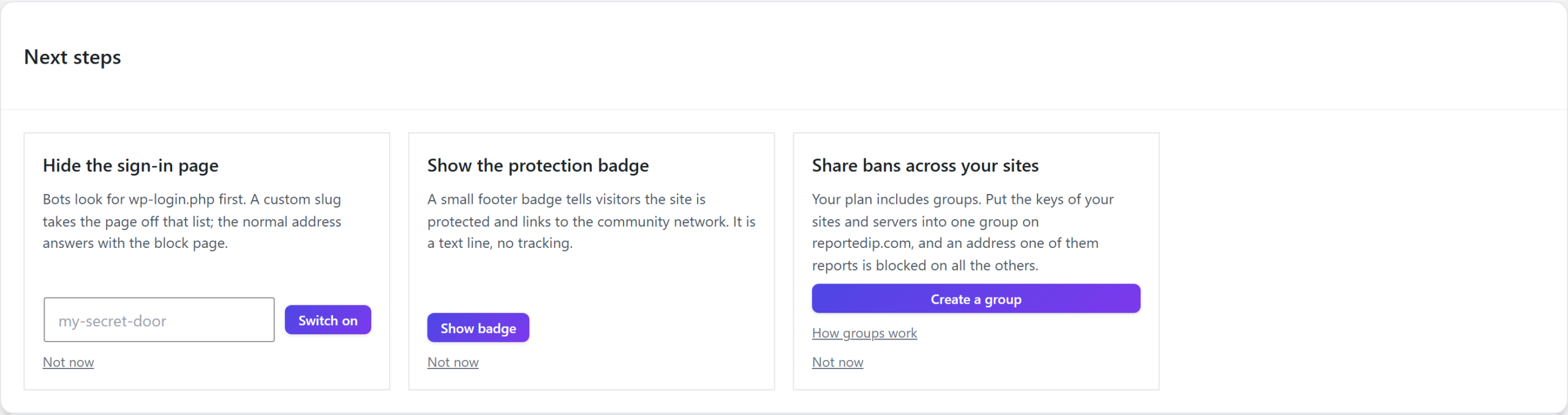
- Add the keys of the sites and servers that should share their bans. On a site whose plan includes groups and whose key is in none, the dashboard’s Next steps show a card that leads straight there.
- Press Sync now in the Group tab, or wait up to fifteen minutes. The dashboard card appears with the first answer.
Servers join the same group through the ReportedIP Linux Agent, which drops a group address on every port of the host. How that works on the server side is covered in Share IP bans across Linux servers.
Questions about group bans in Hive
Does a group ban replace the site’s own blocking?
No. The sixteen sensors, the escalation ladder and the community threat check keep running as before. The group list is one more source of blocks next to them, with its own type and its own badge.
What happens when the plan no longer includes groups?
The service refuses the list, Hive removes the group bans and group whitelist entries it placed and shows one notice. The sync keeps asking, so the list returns by itself after a plan change.
Why does a local block last a little longer than the service says?
Hive stores block durations in whole hours and rounds up, so a local group ban can outlast the service’s expiry by up to 59 minutes. The next sync after the expiry lifts it.