Share IP Bans Across Linux Servers With a Group
To share IP bans across Linux servers, put the API keys of those servers into one group on reportedip.com, and the ReportedIP Linux Agent on every host drops an address any member reports, on every port, for the group’s ban window. The list travels with the community feed, lives in its own kernel set and needs no configuration key on the host.
Groups come with the Professional plan and above. The group set exists since agent 0.3.25, the group whitelist since 0.3.27. A key in no group keeps working exactly as before.
What a group changes on a Linux server
The agent already fills five kernel sets from the community blacklist, one per exposed service: ssh, mail, web, ftp and edge. Those sets hold what the whole community reported, filtered by your confidence level, and each one matches only the ports of its service. A group adds a sixth list, group, with what the other members of your own account group reported, and that one matches every port.
The difference matters in practice. A scanner that hammers SSH on your web server is banned there by the local watcher; with a group, the same address is dropped on the mail server and the database host at their next sync, before it reaches them. Members can be Linux servers running the agent and WordPress sites running the Hive plugin, mixed in one group.
| List | Kernel sets | Ports the rule matches | Where the addresses come from |
|---|---|---|---|
ssh | rip-ssh, rip-ssh-v6 | from lists.ssh.ports | the community |
mail | rip-mail, rip-mail-v6 | 25, 465, 587, 110, 995, 143, 993 | the community |
web | rip-web, rip-web-v6 | 80, 443 | the community |
ftp | rip-ftp, rip-ftp-v6 | 21 | the community |
edge | rip-edge, rip-edge-v6 | every port | the community |
group | rip-group, rip-group-v6 | every port | the members of your group |
How the agent fetches and applies the group list
On a licensed server the group list is fetched as JSON in the same pass as the community feed. A licence is included with Professional (one server) and Business (three servers), more can be added per host. How often the pass runs is decided by the server, not by the host: every 15 minutes from Professional upwards. Every fetch is conditional, so an unchanged list answers 304 and costs one request and no transfer.
- The swap is atomic. The new set is built next to the old one and swapped in, so there is never a moment with an empty set.
- An empty group is valid. Unlike the community lists, the group list has no minimum size: a group with no current bans is a real state, not a failed download.
- The host is protected first. Loopback, private ranges, the host’s own addresses, the SSH client you are connected from and
whitelist.confare kept out of every set before anything is applied. The service never puts a member’s own reporting address on the list either. - Nothing to configure. The
grouplist is always on and needs no entry inconfig.yaml. On a key in no group the service answers with no list, and the set simply stays empty.
The full blocking model, including the iptables and nftables rules the agent writes, is in Blocking with the Linux Agent. For the kernel side, the ipset manual describes the set types the agent uses on an iptables host.
How the group whitelist reaches every server
A group can carry a whitelist of up to 200 addresses and prefixes, each with a note, maintained in your account. The agent reads it in the same request as the group list and writes it to /var/lib/reportedip-agent/group-whitelist, in the format of whitelist.conf, with each note as a comment. It then applies it in the same run in all three places a whitelist works on the host:
- the kernel whitelist set, which sits before every ban rule,
- the filter every downloaded list passes through,
- the reporting gate of the log watcher, so the host never reports such an address.
The group whitelist is one more layer next to the host’s own whitelist.conf and its auto whitelist; it never replaces them. Do not edit the file by hand, the next sync writes it again. A key that leaves its group loses the file with the next sync.
How to check the group on a host
reportedip-agent status shows the group in three places: the group line under the lists with its entry counts and the age of the last successful fetch, the group whitelist lines marked group: with their notes, and a line under the account with the group’s name, its size and the ban window. The terminal images below are example output with documentation addresses from RFC 5737 and RFC 3849 and made-up host names; the layout is the one the agent prints.
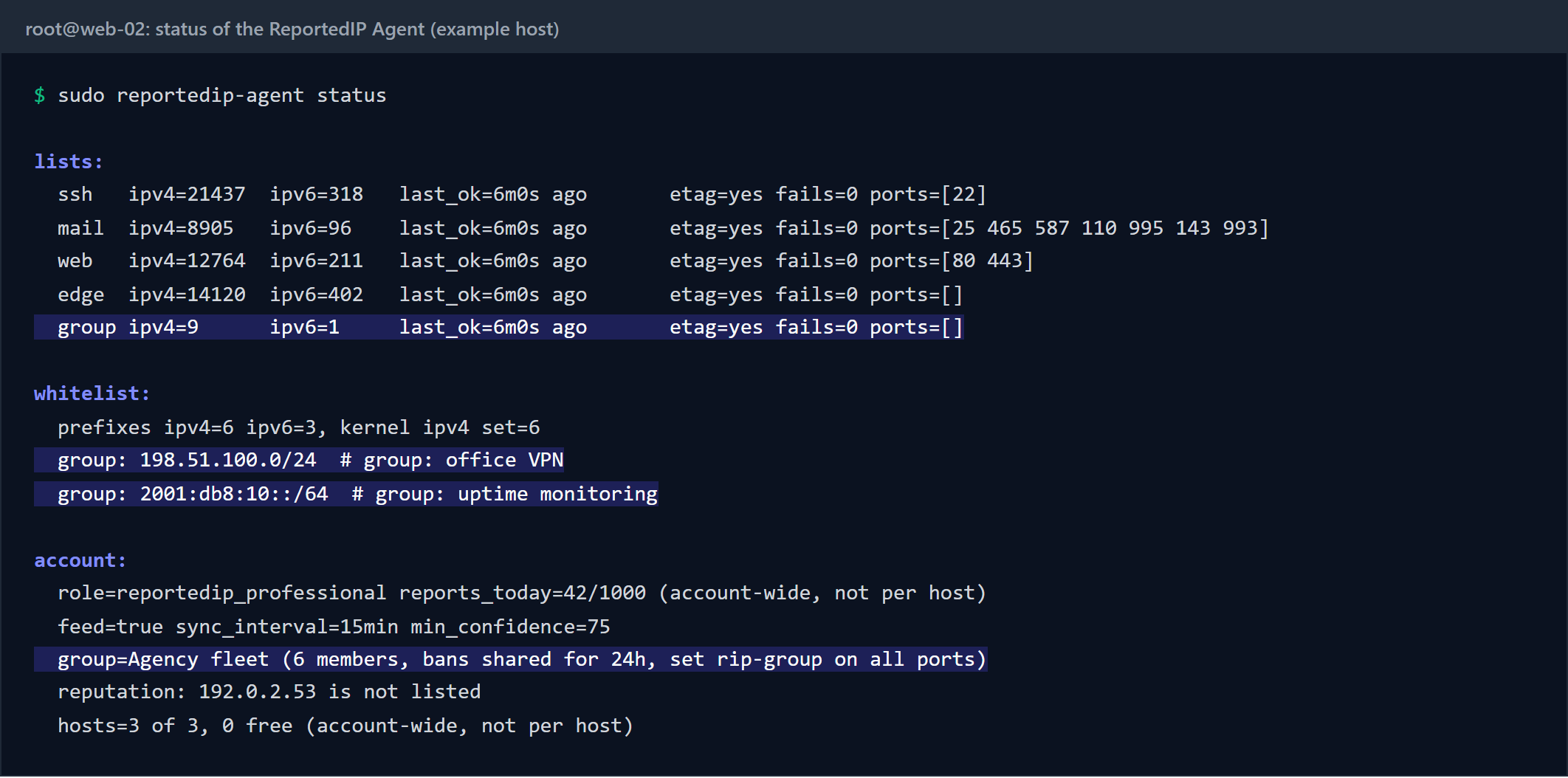
reportedip-agent status on a host whose key is in a group.A key in no group prints group=none and a hint where groups are managed. That is not a fault, and it does not turn the exit code of status into a warning: monitoring that reads the exit code stays green on every host without a group.

reportedip-agent whitelist list prints the host’s own file, the auto whitelist and the group whitelist, the last on lines marked group:. The same account line also carries the reputation of the address the host reports from; an address listed at confidence 75 or above, the lowest any feed serves, is raised as the health condition reputation.
Setting up a group for your servers in four steps
- Update the agent to 0.3.32 or later on every host. Each host needs a server licence for the feed.
- Create the group under Groups in your reportedip.com account and choose the ban window, 24 hours by default.
- Add the API keys of the servers, and of any WordPress sites running Hive, that should share their bans. A key can be in one group.
- Run
sudo reportedip-agent syncor wait for the next pass, then checkstatusfor the group line. Runningsyncby hand is always allowed; a list fetched less than 15 minutes ago is simply not fetched again.
The group can also send a signed webhook for every new ban, with an HMAC-SHA256 over the body, to a chat or a ticket system; the details are on the Groups page. On the WordPress side, the Hive plugin mirrors the same list as its own block type, covered in Share IP bans across WordPress sites.
Questions about group bans on Linux servers
Does the group list replace the community feed?
No. The five community lists keep their ports and their confidence filter. The group list is a sixth list next to them, fed only by the members of your group, and it matches every port because sharing a ban is the point of a group.
Can a group lock my own servers out of each other?
The service leaves every member’s own reporting address off the list, and the agent keeps the host’s own addresses, private ranges and your SSH client out of every set. Addresses you want exempt everywhere belong in the group whitelist.
How do I lift a group ban?
For the whole group, remove the entry or add an exclusion in your account; every member drops it at its next sync. On a single host, reportedip-agent whitelist add <address> keeps it out of that host’s sets for good.