ReportedIP Hive 2.1.66: One Form Rule for WPForms, Forminator and Every Other Form
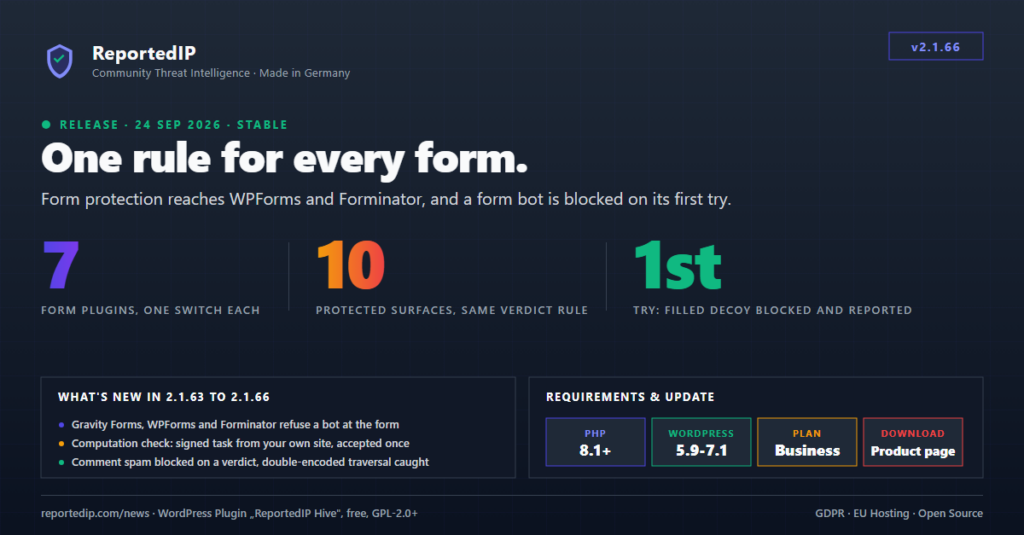
ReportedIP Hive 2.1.66 closes a two-day run of four releases that brought the form protection to WPForms, Forminator and Gravity Forms, bound the computation check to your own site, and put every protected form on one rule: a filled decoy field is refused, blocked and reported on the first try, on all ten surfaces the plugin now covers. The same run fixed a refused Elementor submission that still sent its mail, an Ultimate Member sign-up the proof script never saw, and a comment spam counter that almost no spammer ever reached.
Update from the WordPress admin or download the current ZIP from the Hive product page. The third-party form adapters are part of the Business plan, Contact Form 7 is covered on every plan; the feature list per plan is on the Hive plugin documentation page.
What changed between 2.1.62 and 2.1.66
Four releases shipped on 23 and 24 September 2026. This is what they add up to.
| Release | Date | Headline change |
|---|---|---|
| 2.1.63 | 23 Sep | Gravity Forms adapter, Contact Form 7 free on every plan, double-encoded traversal caught by the firewall, comment spam blocked on a verdict instead of a counter |
| 2.1.64 | 23 Sep | Computation check bound to a task from your own site, signed and single-use; no visitor loses a message to it |
| 2.1.65 | 24 Sep | WPForms and WPForms Lite adapter, Elementor mail leak fixed, Ultimate Member jQuery submit seen, Extended Protection card on PHP-FPM |
| 2.1.66 | 24 Sep | Forminator adapter, one rule for every form, first-try block and report for a filled decoy, whitelist checked in the dispatcher |
Form protection now covers seven form plugins
Three adapters arrived in three releases. Gravity Forms came with 2.1.63, WPForms and WPForms Lite with 2.1.65, Forminator with 2.1.66. Each has its own switch on the Protection page under Form Protection, each is detected by the plugin’s own class, and each refuses a bot at the form: a validation error the sender reads above the form, no entry written, no mail sent, nothing dropped into a spam folder where nobody looks. Together with Contact Form 7, Formidable Forms, Formidable Forms PRO, Elementor Forms and Ultimate Member, the layer now judges seven form plugins plus the comment, sign-up and password-reset forms of WordPress itself, ten surfaces in all.
| Form plugin | Since | Plan | Where the verdict lands |
|---|---|---|---|
| Contact Form 7 | 2.1.58 | Every plan | Validation hook, refusal shown at the form |
| Formidable Forms and Formidable Forms PRO | 2.1.58 | Business | Validation hook, refusal shown at the form |
| Elementor Forms (Elementor PRO) | 2.1.58 | Business | Field error since 2.1.65, which stops every submit action including the mail |
| Ultimate Member | 2.1.61 | Business | Sign-in, sign-up and password forms; a sign-up also runs the registration rules |
| Gravity Forms | 2.1.63 | Business | Form-level validation error, multi-page forms judged on the last page, API submissions never judged |
| WPForms and WPForms Lite | 2.1.65 | Business | Header error on the processing hook, after the plugin’s own field validation |
| Forminator | 2.1.66 | Business | Submission error list, before the entry is built and before the mail goes out |
2.1.63 also moved the plan line. Contact Form 7, the most common contact form, is covered on every plan and switched on by the quickstart wherever the plugin is installed; Ultimate Member moved from Professional to Business next to the other advanced adapters. A site on Professional with the Ultimate Member switch on keeps its stored value and can still switch it off; the adapter stands down until the plan covers it again. The Gravity Forms guide and the WPForms and Forminator guide walk through the adapters one hook at a time.
Every protected form reads the same rule
Until 2.1.66 the surfaces disagreed about the clearest evidence this layer produces. A filled decoy field, the invisible input no person can see, is automation with no innocent explanation. The six third-party adapters refused such a submission and counted the address. The WordPress sign-up form and the password reset looked at only one of the four verdicts and let a bot that filled every field, the hidden one included, straight through. The decision now lives in one place, ReportedIP_Hive_Form_Proof::consequence(), and every surface calls it: a sign-up with a filled decoy is refused with a sentence the sender reads, and the address spends the same budget a comment or a contact form would have cost it.
Nothing changes for a visitor without JavaScript. Their submission carries an empty decoy and no proof field, which is a different verdict: on a contact form it is refused with a message that says why, on the comment form it costs a moderation step, and on neither does it count towards a block.
A form bot is blocked and reported on its first try
Filling a hidden field takes a machine, so waiting for a second and a third attempt before acting only bought the sender two free runs and left the community without the report. A filled decoy now goes straight to the block ladder and to the community report, the way the comment filter has treated the same evidence since 2.1.52. The report names the form the submission came through instead of reading “suspicious activity”, and a comment that was certain spam names the signals that gave the sender away instead of “1 spam comments in 0 minutes”, a sentence that also raised a PHP notice while it was being built.
A whitelisted address can no longer be blocked by a fast sensor
The whitelist was checked while attempts were counted, not while they were acted on, so any sensor sure enough to act at once walked past it. Both the comment filter and the form layer are that sure. The lookup now sits in the dispatcher every sensor ends up in, so an address on your allow list is never blocked by a check that skips the counter.
The computation check is bound to your site
Before 2.1.64 the computation check planted its task in the page itself, with a starting value that depended only on the hour. A script that fetched the page once knew the decoy name, the proof field and the task, and solved it in a few milliseconds. The browser now fetches a task from the site’s own endpoint instead: signed with the site salt, good for ten minutes, accepted once, and harder the faster one network asks for tasks. The page carries nothing but the address of the endpoint, identical for every visitor, so a full-page cache, LiteSpeed, WP Rocket or a CDN keeps serving it unchanged; the task travels in a POST that no cache stores. Verified against the same script: refused without a task, refused with a spent task, refused with a tampered one, through with a fresh one, exactly once. The hourly task and its reportedip_hive_form_proof_buckets filter are gone.
No visitor loses a message to it
- Every refusal is told to the sender by the form it came from.
- A task the server cannot mint is handed out with zero difficulty rather than withheld, and a verifier fault answers with a pass.
- A plugin update restarts the day of grace and purges the page cache, so a page cached by the previous version keeps working.
- A browser that submits before its task has come back is held for at most eight seconds and then sent on as the visitor sent it.
- The task is not bound to the visitor’s address, so a phone that changes networks between page load and submit is not refused.
- Without HTTPS the task carries no arithmetic but keeps its signature, expiry and single use.
- The script tag carries
data-cfasync="false"for Cloudflare’s Rocket Loader anddata-nowprocketfor WP Rocket, and the endpoint is fetched on the scheme of the page, so a proxy that terminates TLS is not stopped by a mixed-content block.
Three refusals that did not do what they said
A refused Elementor submission still sent the form mail. The adapter handed its refusal to Elementor PRO as a message only, and the handler runs every submit action, the mail included, as long as it holds no field error. The sender was told the form had failed after the mail had already left. Since 2.1.65 the refusal is a field error as well, which stops the submission before any action runs; the browser spec checks the mail catcher in both directions, a refused bare post sends nothing, a real browser sends exactly one.
Ultimate Member sign-ups failed the computation check. Ultimate Member sends its forms with a jQuery-triggered submit, which fires no native submit event, so the proof script never saw the submission and a visitor who clicked before the task had come back was refused as unproven. The script now listens to jQuery-triggered submits as well and treats a submission prepared within the last second as the same one, because Gravity Forms triggers the same jQuery submit right after its own pre-submission hook. Every adapter now has a browser spec with the computation demanded: Contact Form 7, Elementor, Formidable, Gravity Forms, WPForms and Ultimate Member.
A form loaded after the first pass could never pass. The proof script read the challenge once, when the page was ready; a form rendered later, in a popup or again after a failed validation, found no computed answer waiting. Since 2.1.63 the script reads the challenge and starts the clock again whenever a form plugin reports a fresh render, and since 2.1.64 a submit without an answer in stock is held while one is fetched.
Comment spam is blocked on a verdict, not on a counter
The comment filter detected and filed spam since 2.1.52, but the consequence hung entirely on a frequency counter: five rejected comments from one address inside sixty minutes. Measured over thirteen days on a live magazine, 56 per cent of the spamming addresses posted exactly one comment and the rest spread theirs over hours, so 104 of 109 addresses could never reach the threshold no matter how obvious the spam was. Since 2.1.63 a verdict that stands on its own no longer waits for a second comment: a filled decoy field, or a score at or above CERTAIN carrying at least one reason a reader cannot produce (no browser user-agent, pasted link markup, a hand-typed anchor, a throwaway TLD, a URL as the author name, a body seen before), blocks and reports the address on the spot. Scores built only from soft signals keep going through the counter, so somebody browsing without JavaScript who links their own site is still merely filed for review.
The counter itself stands at three rejected comments a day now, down from five an hour. Five inside sixty minutes is a burst almost no spammer produces, which is why the counter hardly ever reached it, and the attempts table restarted after sixty idle minutes anyway, so a longer window in the settings never saw more than the restarted count. Schema migration v18 moves installs that still carry the old pair onto the new one; a value an operator set themselves is left alone. The same pair governs the form adapters.
Double-encoded directory traversal no longer passes the firewall
The baseline traversal rule knew ../, ..%2f and %2e%2e/, but not %2e%2e%2f with an encoded slash, not the double-encoded %252e%252e%252f and not the overlong UTF-8 form. The double-encoded shape is exactly what the WordPress 7.1.2 template-resolution fix (CVE-2026-87902) is about: PHP decodes the query once, WordPress decoded pagename a second time, so the attacker sends the double-encoded form and the firewall saw nothing it knew. Since 2.1.63 the rule matches every encoding on the wire, in both firewall layers, and stays quiet on file..txt or per_page=2..5. Sites in Community Network mode receive the same rule through the next ruleset sync.
Smaller fixes that matter on a real install
- The “Switch on Extended Protection” card never appeared on PHP-FPM sites. The dashboard asked whether the server reads
.htaccess, but the one-click setup writes.user.iniunder PHP-FPM, CGI and LiteSpeed, so nginx and most managed hosts never got the suggestion. The card follows the same detection the Server tab uses. - The off-screen rule of the decoy field wins against a form plugin’s own element reset, which had put the field on the page for a visitor to fill in.
- A community-reputation refusal above a third-party form talked about a password reset. A refused contact form now says so in its own words.
- Three German strings on the Protection page showed garbled umlauts after a Latin-1 round trip in 2.1.61; the i18n gate now refuses a translation file carrying that pattern.
- Four admin surfaces kept their own list of form adapters and had not grown with the table. They now read the table, so a new adapter shows up in the locked-state note, the readiness deep link and the dashboard action at once.
- Adding a protected form is one call. The rule, the wording, the log row and the counter sit behind a single entry point, and a test names the file when a new surface starts reading verdicts on its own.
What it changes for a managed fleet
Two keys were added to the remote settings schema, reportedip_hive_form_proof_wpforms and reportedip_hive_form_proof_forminator, both on by default from Business through the quickstart recommendation; nothing was removed or changed in kind. A dashboard that has not reloaded the schema keeps working. The comment counter pair moves through migration v18 unless an operator set it, and the removed reportedip_hive_form_proof_buckets filter only ever affected a site that hooked it.
2.1.66 follows 2.1.62, which turned the audit trail into a record of who changed what, and 2.1.57, which put every setting on one Protection page. The plugin documentation carries the current feature list per plan, the sensors and their defaults, and the form honeypot guide explains the four verdicts every surface now shares.