ReportedIP Hive 3.0.5: security headers that reach cached pages too
ReportedIP Hive 3.0.5 makes sure the security headers reach every page, also the ones a page cache like WP Rocket delivers. Since the move to the WordPress plugin directory with Hive 3.0.0 on 16 October, five updates came out. This post walks through what changed in the admin area, with a screenshot for each part, and what you need to do (in most cases nothing).
All updates arrive through the normal WordPress update screen. The free plugin comes from wordpress.org, the Pro add-on from reportedip.com. Both are at 3.0.5 now.
Why did cached pages miss the security headers?
A customer running nginx and WP Rocket asked us why the header checker showed no security headers on the home page, although they were switched on in Hive. The answer: WordPress adds headers while it builds a page. A page cache stores the finished page and hands it out on the next visit before WordPress even starts, so the headers never get added. With Rocket-Nginx the cached page does not touch PHP at all.
A second problem showed up on the same site: nginx already sent HSTS and a Referrer-Policy itself, with other values than Hive. Pages past the cache got both copies. WordPress cannot see headers the web server adds, so it could not warn about that either.
How do the headers reach visitors now?
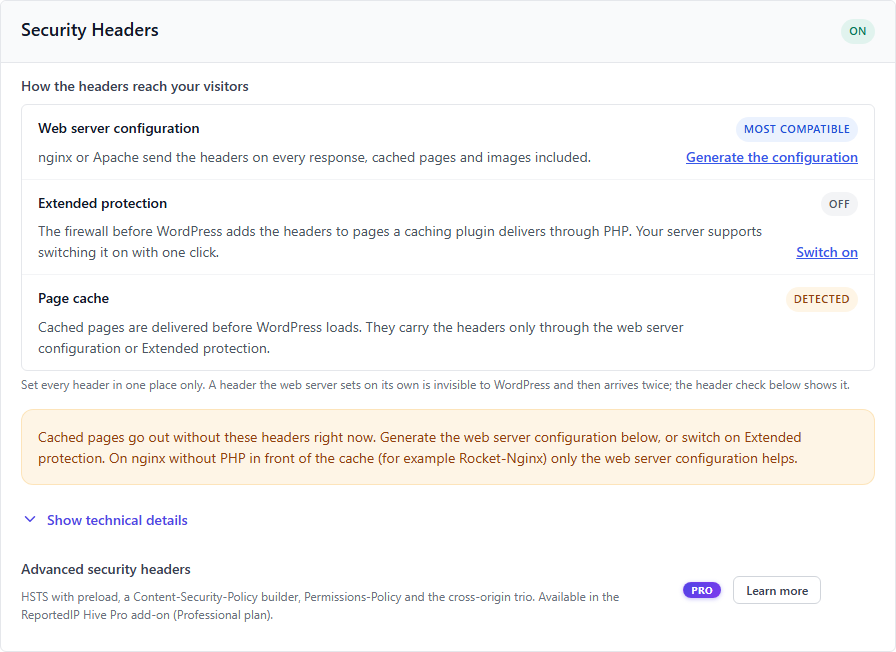
The Security Headers section under Protection Settings, Firewall & Bots now starts with a short list of the three ways a header can reach the browser, each with its state on your site:
- Web server configuration. nginx or Apache send the headers on every response, cached pages, images and error pages included. This is the most compatible way.
- Extended protection. The firewall that runs before WordPress now sends the headers too. Pages a caching plugin delivers through PHP (WP Rocket, WP Super Cache, W3 Total Cache in their default setup) carry them from 3.0.5 on. The row says whether your server can switch it on with one click and links straight to the switch.
- Page cache. Whether Hive found one. If it did and neither of the two ways above is active, a warning says so.
How do I get the nginx or Apache configuration?
Below the settings, Server configuration and header check folds open. Hive writes the configuration for exactly the headers you switched on, for nginx and for Apache, each with a copy button.
- nginx lines end with
always, so the headers also go out with 404 and 500 pages. The comment above them warns about a trap many people step into: alocationblock with its ownadd_headerinherits none of the lines from theserverblock. - Apache lines sit inside
<IfModule mod_headers.c>, so a missing module does not take the site down with an error 500. HSTS is only sent over HTTPS. - Once the configuration is live, switch off “Send security headers” in Hive. Otherwise every header arrives twice.
What does the header check show?
The button Check the headers of the home page loads your home page like a visitor would: twice, so the second answer can come from the page cache, and once past the cache. Then it compares what arrived with your settings, header by header.
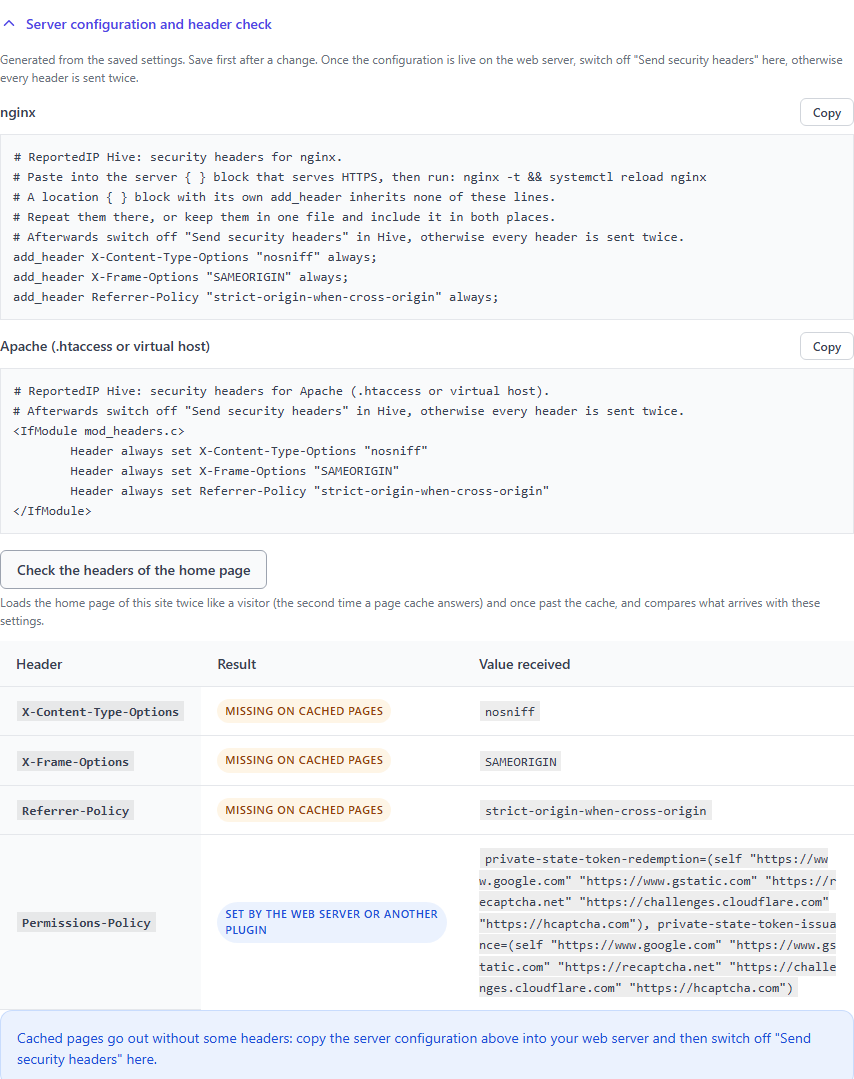
Each header gets one of these results: arrives as set, missing on cached pages, missing everywhere, arrives twice, arrives with another value, or set by the web server or another plugin. Below the table one sentence says what to do about it. The check only calls your own site; nothing is sent anywhere else.
What goes into the Content-Security-Policy field?
This was the original question of the customer. Every header field now explains in plain words what the header protects against, which value we recommend and what it can break, and shows an example. Text fields show the example as a placeholder. The advanced headers (HSTS, Content-Security-Policy, Permissions-Policy and the three Cross-Origin headers) come with the Pro add-on from the Professional plan on.
- Content-Security-Policy: a starting point that works for most WordPress sites is
default-src 'self'; script-src 'self' 'unsafe-inline'; style-src 'self' 'unsafe-inline'; img-src 'self' data: https:; font-src 'self' data:; object-src 'none'; base-uri 'self'; form-action 'self'; frame-ancestors 'self'. Add every outside source your site loads, such as analytics, fonts, maps, videos or the consent tool. Run it in report-only mode first and watch the browser console. - CSP report URI: may stay empty. If you fill it in, the address receives a report for every blocked resource, including the IP address of the visitor. An outside service for that needs a data processing agreement. From 3.0.5 on Hive also sends it as
report-towith aReporting-Endpointsheader, which is what current browsers use;report-uristays for older ones. - HSTS: test with a short max-age such as 300 seconds first, then raise it to a year. Include subdomains only if every subdomain has a certificate.
What changed on the Protection Settings page?
Every section of a tab now sits in its own framed block with a heading and its state, so Firewall & Bots, Access Lockdown and Security Headers no longer run into each other. Since 3.0.4 the page names are also clearer: Protection Settings (was Protection), Server & Maintenance (was Tools, now always in the menu) and Community & Key (was Community). On wide screens a list of the sections of the current tab stays next to the settings.
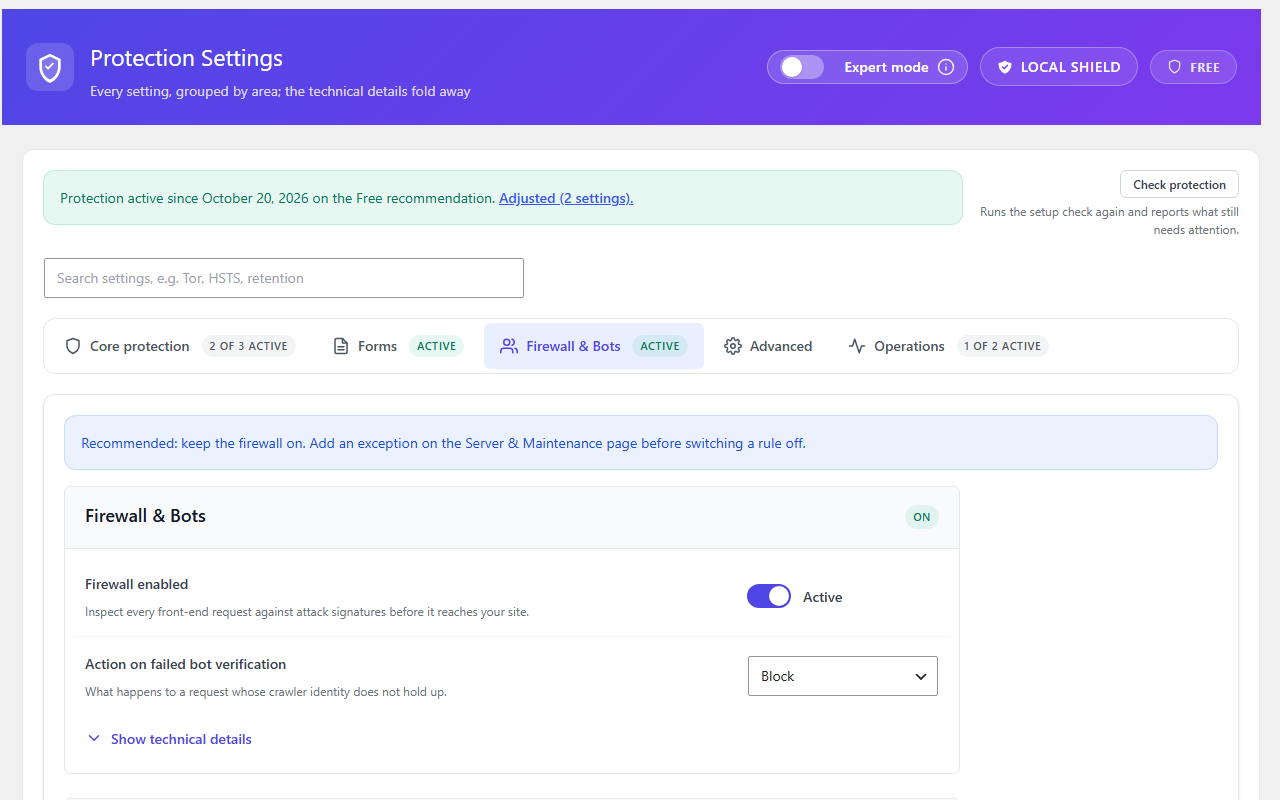
Notices no longer break their text into side-by-side columns. Some notices with a link or a list looked like three narrow columns; that is fixed everywhere in the plugin.
What does the dashboard suggest now?
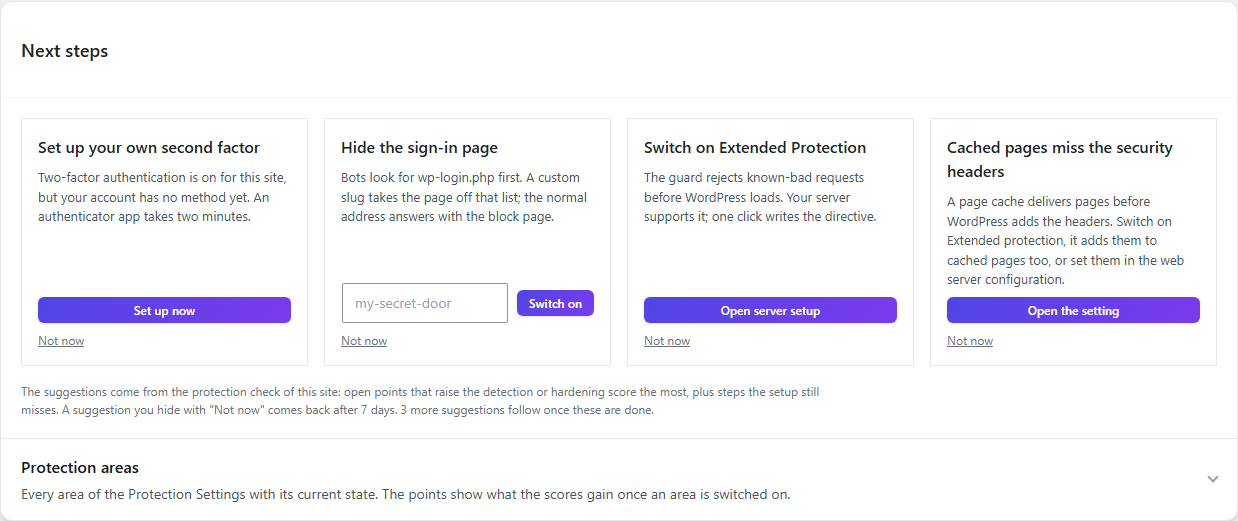
The Next steps card shows at most four suggestions, picked from what raises your scores most and what fits your plan and your server. A suggestion only appears where it can be done: Extended protection only on servers that support it, the advanced security headers only where the plan includes them. New in 3.0.5 is the card “Cached pages miss the security headers”, with the fix your server allows. A card disappears as soon as its setting is on.
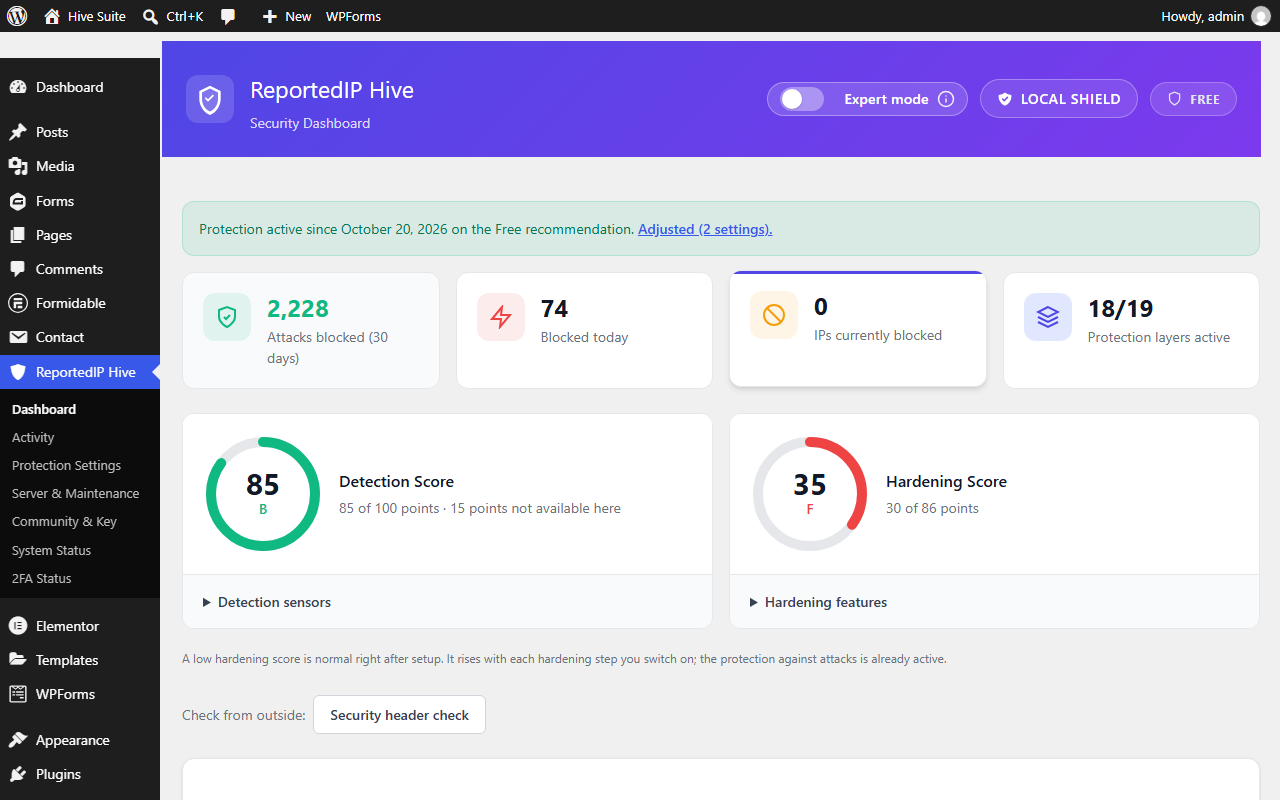
Each score lists its sensors or features directly below it. The scores no longer count a firewall in test mode, a bot check whose sensor is off, or two-factor roles while two-factor is switched off.
Where is the Community Access Key?
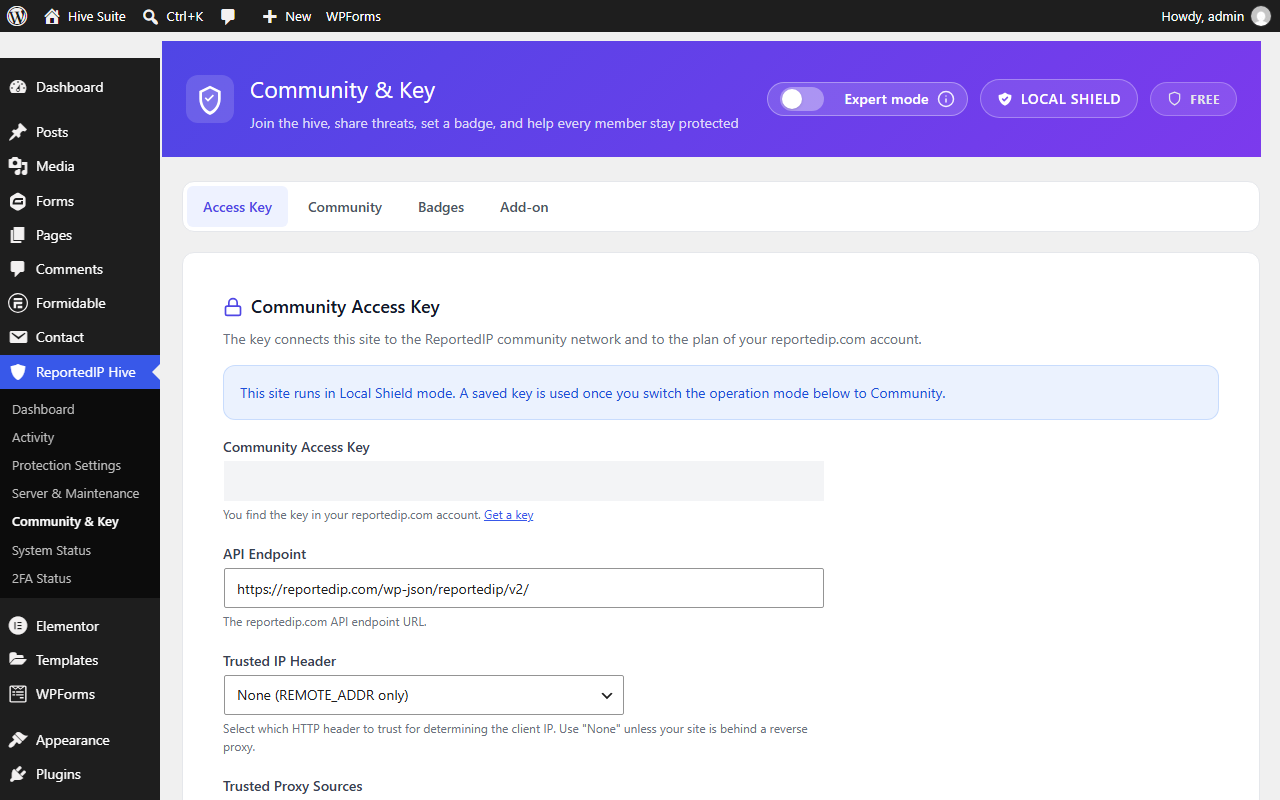
Several users could not find it. Community & Key now opens on the Access Key tab with the key field first, also in Local Shield mode. The “Join the community network” card on the dashboard leads there directly.
Why fewer mails, and which ones still arrive at once?
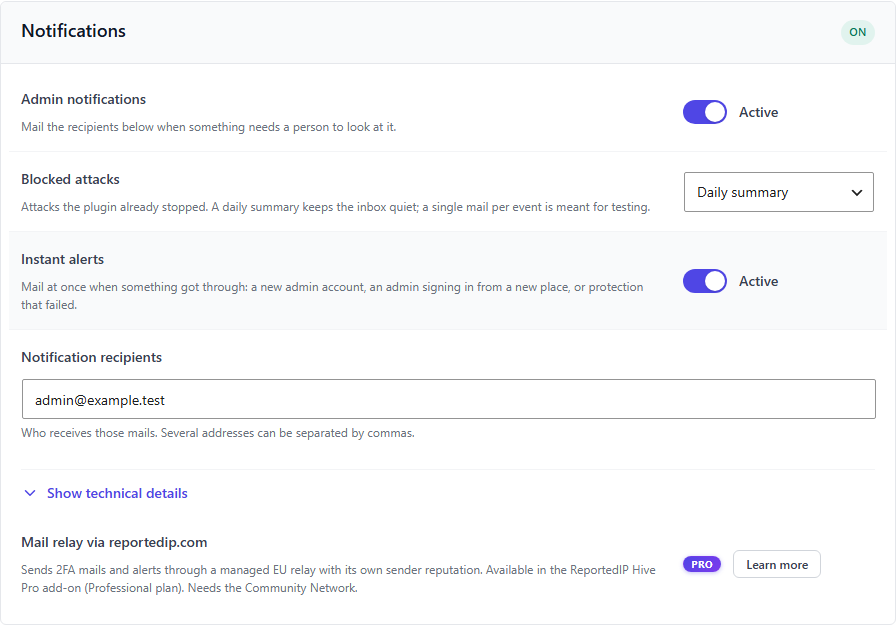
Since 3.0.3 blocked attacks arrive as one daily summary instead of one mail per threshold: the count per kind of attack, new blocks and the most active addresses. A blocked attack is good news; it does not need a mail at three in the morning.
Instant alerts with “Alert” in the subject are kept for things that got through: a new administrator, an administrator signing in from a new country or network, or a block that could not be written. With the Pro add-on on the Business plan the audit trail adds a plugin or theme installed, a plugin activated, a file edited in the editor and changed role capabilities. Both settings sit under Protection Settings, Operations, Notifications.
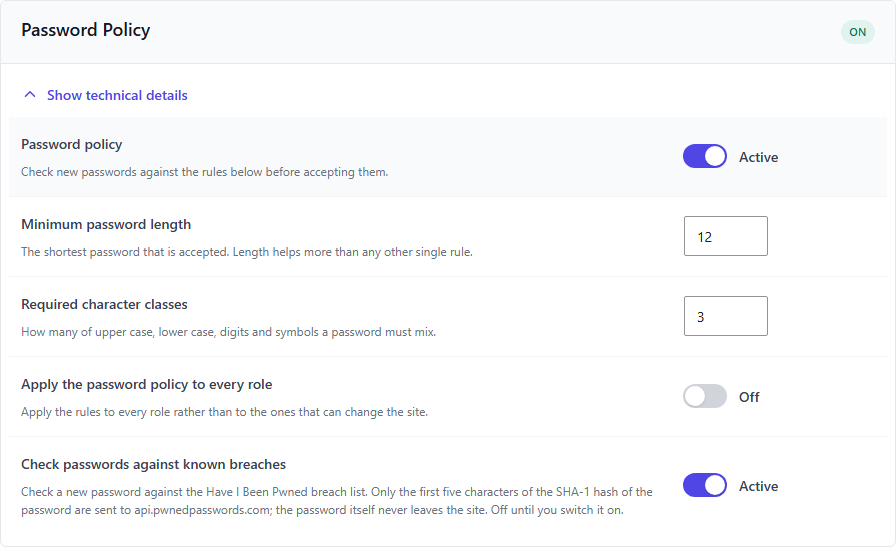
Does the password policy cover shop customers?
Since 3.0.1 the length, character and breach rules also apply under My Account in WooCommerce and on the Ultimate Member account and registration forms. “Apply the password policy to every role” now really covers every user; before, it only had an effect while no role had to use two-factor. The breach check no longer refuses a password because of the padding entries the breach service adds to every answer.
What is new in the Pro add-on?
- Withdrawal form protection (Business). The EU withdrawal button for WooCommerce shops, standalone or bundled in Germanized, gets the same spam check as the other forms. A refused request is shown above the form; nothing is stored and no mail is sent.
- Hardening mode during attack waves is armed again when the hourly scan finds exactly one coordinated attack. A single result reached the add-on in the wrong shape and the scan stopped with a type error.
- Gravity Forms older than 2.5 no longer fails with a fatal error on submit.
- Plan changes no longer switch settings back on that you switched off, and removing and entering the key again no longer counts as an upgrade.
- Fleet management checks the permission of every single request on its own again (3.0.1).
In which languages does Hive ship?
Both plugins bring their translations with them: German (informal and formal, also for Austria and Switzerland), French and Spanish. They load before any language pack from translate.wordpress.org, so a half-finished pack no longer leaves the admin area mostly English.
Questions about Hive 3.0.5
Do I have to do anything after the update?
Only if you use a page cache. Open Protection Settings, Firewall & Bots, Security Headers and run the header check. If it reports headers missing on cached pages, switch on Extended protection or copy the generated configuration into your web server.
Extended protection or web server configuration?
If you can edit the nginx or Apache configuration, take that: it covers every response, including images and pages that never reach PHP. If you cannot, Extended protection covers everything a caching plugin delivers through PHP. On nginx with a cache that skips PHP entirely, such as Rocket-Nginx, only the web server configuration helps.
My hosting already sends security headers. Is that a problem?
Only if Hive sends the same header too. The header check marks such a header as “arrives twice” or “set by the web server”. Keep each header in one place: either remove it from the server or switch it off in Hive.
Read on
- Installation and updates
- Pro add-on and plans
- Hive changelog
- Hive 3.0.0: one free plugin on WordPress.org
Changelog
3.0.5 (29 October 2026)
- Header check on the Protection Settings page: per header, whether it arrives, is missing on cached pages, arrives twice or with another value.
- nginx and Apache configuration for the configured headers next to the settings, with copy buttons.
- With Extended protection on, the pre-WordPress firewall sends the security headers itself, so pages a caching plugin delivers through PHP carry them too.
- Every security header explains what it protects against, the recommended value and what it can break, with an example.
- Sections of the Protection Settings sit in framed blocks; notices keep their text in one column.
- Next steps suggest the advanced security headers where the plan includes them and name cached pages without headers.
- Pro: CSP reports also via report-to and Reporting-Endpoints; spam protection for the EU withdrawal form (Business); hardening mode armed again after a scan with exactly one coordinated attack.
3.0.4 (22 October 2026)
- Clearer page names: Protection Settings, Server & Maintenance (always in the menu) and Community & Key with the key on its first tab.
- Each score shows its items below it; next steps show at most four suggestions, now also for two-factor, firewall, security headers and the password policy.
- A next-step card disappears as soon as its setting is on; the scores no longer count a firewall in test mode.
3.0.3 (17 October 2026)
- Blocked attacks as one daily summary instead of one mail per threshold.
- Instant alerts for a new administrator, a sign-in from a new place and protection that failed.
- A new plan counts within the same request; a key check without a plan no longer counts as a downgrade.
- Pro: no fatal error with Gravity Forms older than 2.5.
3.0.2 (17 October 2026)
- No error 500 together with Loco Translate.
3.0.1 (16 October 2026)
- Password policy and breach check on WooCommerce and Ultimate Member forms.
- Plan upgrades apply the recommended settings also without the add-on.
- Bundled translations in seven languages.
- Pro: fleet management checks every request on its own again.
Protect your WordPress site with a firewall, login security, 2FA and form checks. Free from the WordPress plugin directory.