Bot flood on a WordPress calendar: what an IP reputation agent sees, and what only your web server can stop
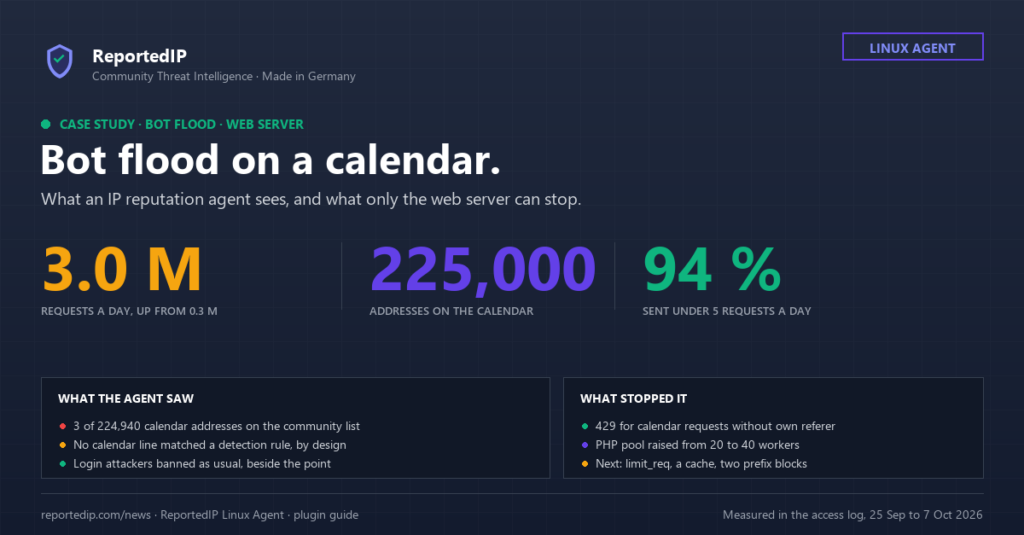
A WordPress site with an events calendar on a shared hosting server went from under 400,000 requests a day to about three million, its PHP pool ran full and visitors got 502 errors. The ReportedIP Agent on the same server read every line of that bot flood and banned no address for it, and this guide explains why that was correct and what stopped the flood instead.
The numbers come from the access log of the site, 25 September to 7 October 2026, and from a measurement across five web servers. The hosting team saw 38,870 failed connections to PHP in 200,000 lines of error log. The agent saw ordinary page views.
What happened to the calendar site?
Until 28 September the site served up to 364,000 requests a day, most of them calls to the calendar filter /events/?mcat=… of the My Calendar plugin. On 29 September at 07:00 UTC the hourly count jumped from 15,360 to 86,240, an hour later to 187,994. Calendar requests stayed flat; the jump came from page assets alone.
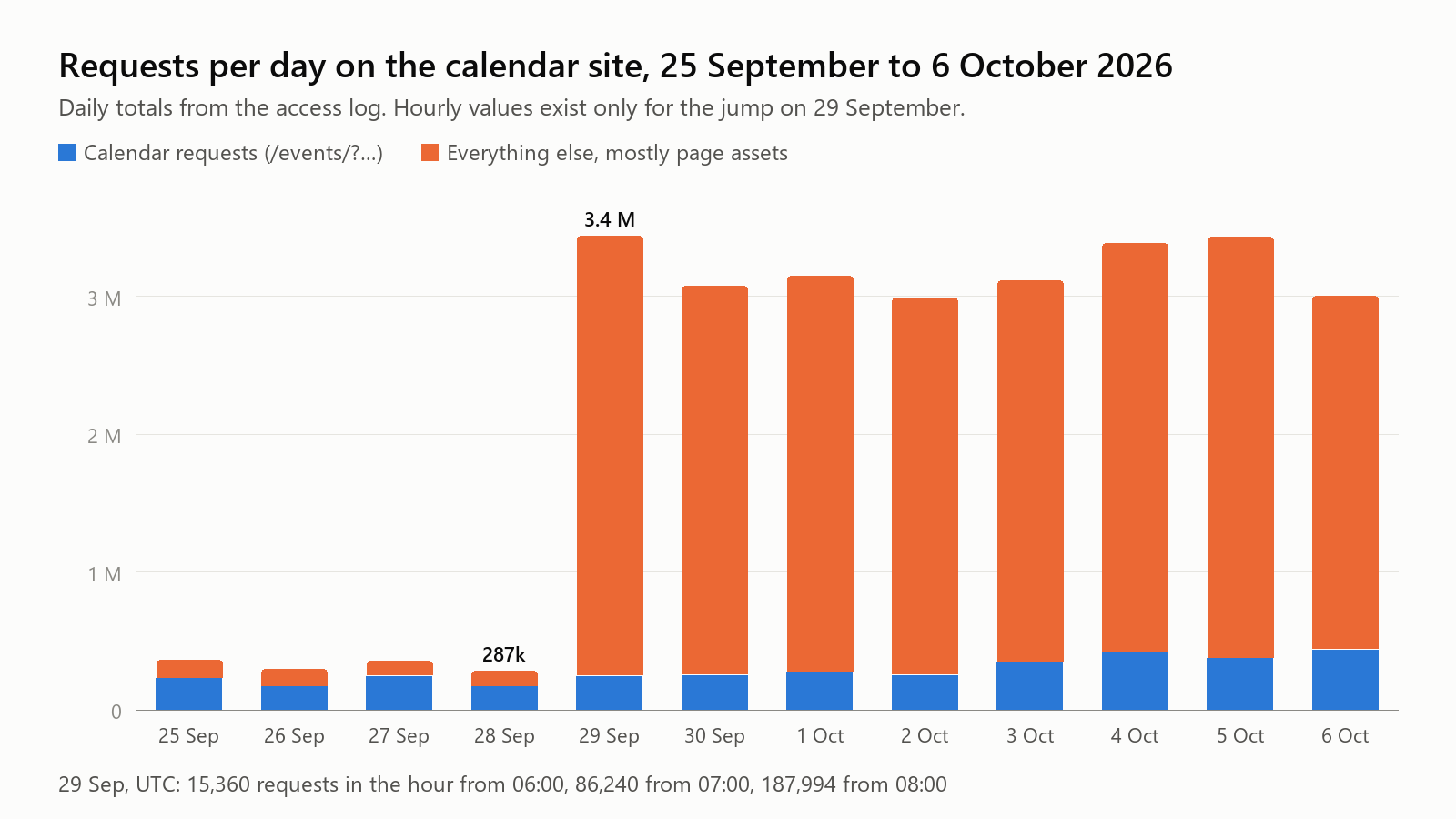
The PHP pool allowed 20 workers and hit that limit 75 times on 6 October; the calendar answered 30,129 requests that day with a 502. No alarm went off for eight days. Then the hosting team doubled the pool and put a rule in front of the calendar.
Which bots were behind the bot flood?
The calendar crawl over residential proxies
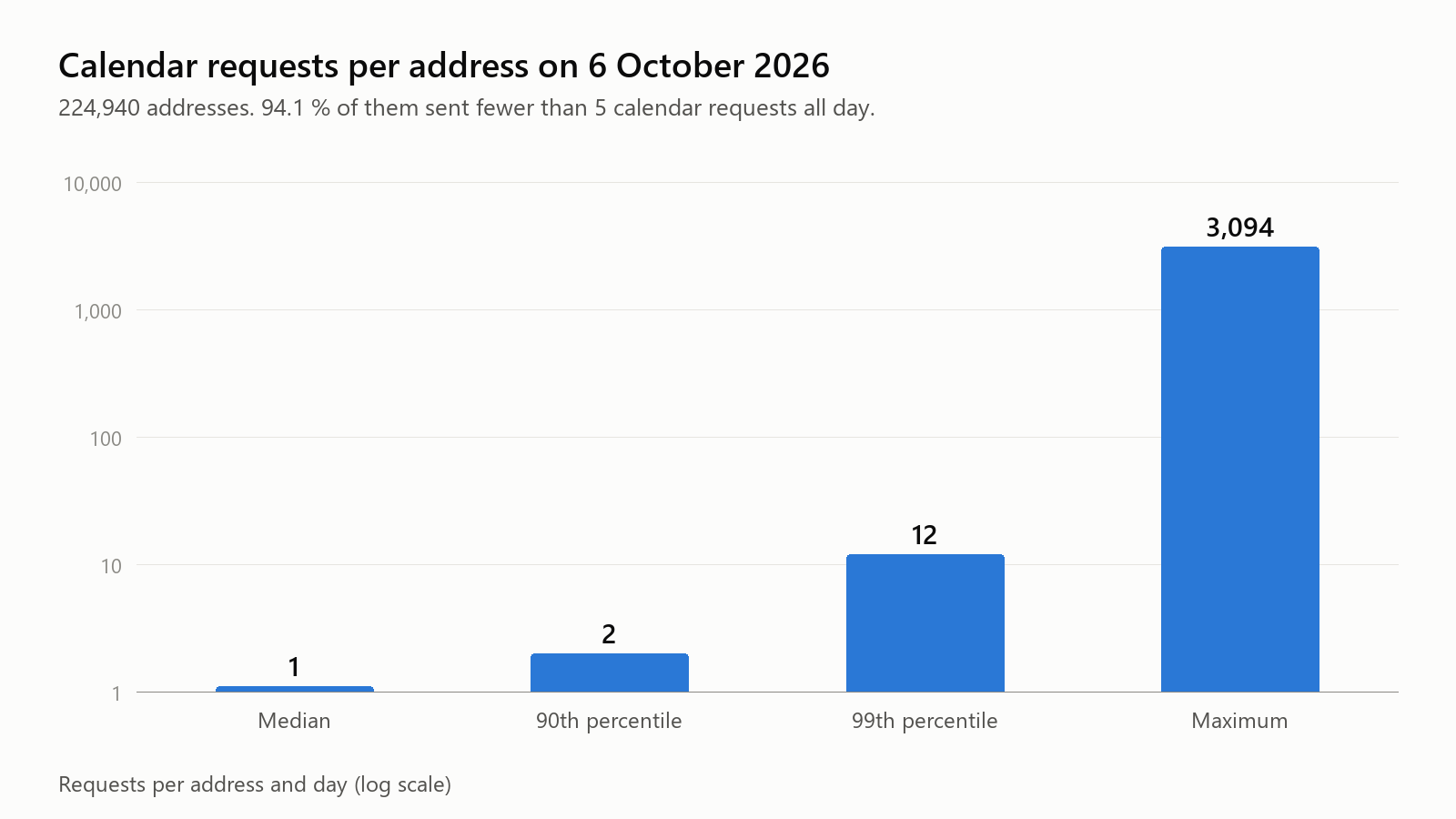
The first stream walked through every combination of calendar categories, days and months. On 6 October 224,940 addresses sent 432,855 calendar requests. Most addresses appeared once and never again.
| Calendar crawl, 6 October | Value |
|---|---|
| Addresses | 224,940 |
| Addresses with fewer than 5 requests all day | 94.1 % |
| Requests per address, median | 1 |
| Requests per address, 99th percentile | 12 |
| Requests per address, maximum | 3,094 |
| Different /24 networks | 125,482 |
| Requests with a referer from the site itself | 0.3 % |
The largest /16 network held 0.8 percent of the addresses. That spread across home and mobile networks is the signature of a residential proxy pool. The six most common user agents all claimed Chrome on macOS, yet only 987 calendar addresses loaded any asset that day.
The asset flood from two rented blocks
The second stream requested the assets of normal pages, with the site’s own address as referer, the way a browser does. It made 84.6 percent of all log lines on 6 October.
| Asset flood, 6 October | Value |
|---|---|
| Asset requests | 2,543,994 |
| Addresses | 28,520 |
| Requests with the site’s own referer | 99.8 % |
| Assets per address, median | 70 |
| Share from 154.222.128.0/20 | 21.1 % |
| Share from 154.217.192.0/20 | 19.1 % |
| Share of the five most common user agents | 48.9 % |
Five user agents with almost the same count each are a rotated list, not a real audience. In the first /20 block each /24 showed 252 or 253 active addresses: a rented block used to the last address. And the pages behind these assets barely appear in the log, 29,281 page views against 2.5 million assets.
Why did the IP reputation agent not stop the bot flood?
Because a successful request for an ordinary page is never an attack, and the agent is built that way on purpose. Its web source counts login posts, scanner paths and probes that end in an error. Calendar requests answered with 200, 499 or 502 match none of that, and the web detector drops assets before it looks at them. A detector that counts page views bans real visitors.
The community list knew 3 of the 224,940 calendar addresses and 1 of the 28,520 asset addresses; fresh proxy exits are on nobody’s list yet. Meanwhile the agent did its normal job: 2,066 local bans in four and a half days for password guessing, scanner probes and SSH attacks across all sites of the server. Correct, and beside the point.
What can the agent do against a calendar crawl?
It can take out the hard core. Sixteen addresses from datacenter networks sent between 1,162 and 3,094 calendar requests each, slowly and evenly, about three a minute for seven to fourteen hours. A rule of your own sees the whole log line, including query string and referer, so it can count exactly these requests. Since 0.3.43 a rule can be simulated first: it logs simulated ban instead of banning. Since 0.3.45 a rule of your own runs before the shipped regex rules of the same source; until 0.3.44 a shipped rule that only simulates could take the lines first.
The examples block at the end is the rule’s self-test, not a list of targets. Every match line must hit and yield the address given with it; the inject line plants decoy addresses in the URL and the user agent, and the rule must still read the client address; nomatch lines must not count. The agent runs these checks when it loads the file and refuses the rule if one fails. In operation the rule bans whatever address in the real log reaches 10 hits in 60 minutes. The file below is the rule now running on two affected calendar sites. It runs armed there (simulate: false) because it ran as a simulation first and its hits were measured.
# /etc/reportedip-agent/rules.d/60-calendar-crawl.yaml
format: 1
rules:
  - id: calendar-crawl
    source: web
    match:
      regex: '"GET /[^" ]*\?[^" ]*mcat=[^"]*" [0-9]{3} [0-9]+ "(-|https?://(www\.)?(google|bing)\.[^"]*)" "Mozilla/[^"]*"$'
      anchors:
        - '"GET /'
      ignore:
        - 'mc_id='
        - '"[^"]*([Bb]ot|[Cc]rawl|[Ss]pider|Barkrowler|Turnitin|GoogleOther)[^"]*"$'
    addr: {field: 0}
    threshold: {hits: 10, window_minutes: 60}
    categories: [19]
    noun: calendar crawl requests
    action:
      ban: true
      report: false
      time_minutes: 60
      simulate: false
    # Self-test, not a target list: checked when the file loads; in operation the rule bans any address that reaches 10 hits in 60 minutes.
    examples:
      match:
        - {line: '45.33.32.156 - - [06/Oct/2026:12:00:00 +0000] "GET /events/?cid=my-calendar&dy=29&mcat=6%2C5%2C7&time=day HTTP/2.0" 200 5120 "-" "Mozilla/5.0 (Macintosh; Intel Mac OS X 10_15_7)"', addr: 45.33.32.156}
        - {line: '45.33.32.157 - - [06/Oct/2026:12:00:01 +0000] "GET /events/?mcat=7,1,12,3,8 HTTP/1.1" 429 162 "https://www.google.com/" "Mozilla/5.0 (Linux; Android 10; K)"', addr: 45.33.32.157}
        - {line: '45.33.32.158 - - [06/Oct/2026:12:00:02 +0000] "GET /kalender/?cid=my-calendar&mcat=6%2C5&yr=2026 HTTP/2.0" 200 5120 "-" "Mozilla/5.0 (Windows NT 10.0; Win64; x64) AppleWebKit/537.36 (KHTML, like Gecko) Chrome/118.0.0.0 Safari/537.36"', addr: 45.33.32.158}
      inject:
        - {line: '45.33.32.156 - - [06/Oct/2026:12:00:03 +0000] "GET /events/?mcat=1&x=8.8.8.8 HTTP/1.1" 200 5120 "-" "Mozilla/5.0 8.8.4.4"', addr: 45.33.32.156}
      nomatch:
        - '45.33.32.156 - - [06/Oct/2026:12:00:10 +0000] "GET /events/?mcat=1 HTTP/2.0" 200 5120 "-" "RetroDocumentResearch/0.1"'
        - '45.33.32.156 - - [06/Oct/2026:12:00:04 +0000] "GET /events/?mcat=1 HTTP/2.0" 200 5120 "https://example.org/events/" "Mozilla/5.0"'
        - '45.33.32.156 - - [06/Oct/2026:12:00:05 +0000] "GET /kalender/?mc_id=123&mcat=1 HTTP/2.0" 200 5120 "-" "Mozilla/5.0"'
        - '45.33.32.156 - - [06/Oct/2026:12:00:06 +0000] "GET /kalender/?cid=my-calendar&mcat=6%2C5&yr=2026 HTTP/2.0" 200 5120 "-" "Mozilla/5.0 (compatible; Barkrowler/0.9; +https://babbar.tech/crawler)"'
        - '45.33.32.156 - - [06/Oct/2026:12:00:07 +0000] "GET /events/?mcat=1 HTTP/2.0" 200 5120 "-" "Mozilla/5.0 (compatible; Googlebot/2.1; +http://www.google.com/bot.html)"'
        - '45.33.32.156 - - [06/Oct/2026:12:00:08 +0000] "GET /events/?cid=my-calendar HTTP/2.0" 200 5120 "-" "Mozilla/5.0"'
        - '45.33.32.156 - - [06/Oct/2026:12:00:09 +0000] "POST /events/?mcat=1 HTTP/2.0" 200 5120 "-" "Mozilla/5.0"'
The rule counts every request with mcat= in the query string, on any path, so it fits calendars under /events/ as well as /kalender/, and with any status, so a crawl the web server already answers with 429 still counts. It counts only requests without a referer or with Google or Bing as referer: a visitor who clicks through twenty filters carries the site’s own referer and never counts, and a link to a single event (mc_id) is left out. The rule counts only clients whose user agent starts with Mozilla/, which every browser and every disguised crawler sends; a crawler or tool that names itself is never counted, even one whose name contains no word like bot, as we saw live, and the name list catches the crawlers that also start with Mozilla/, such as Googlebot. report: false keeps the crawl out of the community feed, time_minutes: 60 doubles the first ban, and the ladder multiplies it by four up to seven days. Check it with reportedip-agent rules check, try it on a day of log with reportedip-agent test <log> --rule calendar-crawl, and on your own site start with simulate: true until the hits look plausible.
On 6 October, measured against a first draft at 20 requests an hour, at most 69 addresses reached that level, and they sent 9.4 percent of the calendar load. The other 90 percent come from addresses that ask a few times at most and leave, and no count per address separates them from people.
Why declared crawlers are not banned
We measured a similar, broader rule (any query string, status 200 only) on five servers over two days. At 20 requests in 60 minutes it caught 53 addresses: no human and no monitoring, but 35 SEO and AI crawlers, one real search engine, one tool and 16 bots posing as browsers or as a known crawler. On the flooded site that broader rule caught 46 of the 69 heavy addresses, all 16 datacenter addresses among them. Our decision: a crawl rule counts only clients that pose as browsers. A crawler that names itself may be an SEO service the site owner booked, so the second ignore line skips it.
Skipping named crawlers is a policy, not a safety check. The measurement contained an address calling itself Googlebot from a hosting network, and the rule lets it pass; the login and scanner detectors still count it. A real exemption for search engines needs a reverse DNS check, never the user agent. For a health check that should never count at all, one line in /etc/reportedip-agent/ignore.d/web.conf is enough, see lines a source must never see.
Who gets banned, and who does not?
With the rule armed on both sites, the web server’s emergency 429 rule was removed and we watched the next hour, 13:11 to 14:11 UTC on 7 October. Site A is the calendar site from this case; site B is a second WordPress site with the same calendar plugin.
| Who | Banned | Why |
|---|---|---|
| Six addresses of one cloud provider, same Chrome on macOS user agent | Yes | Crawled the calendar since midnight, 156 to 402 calendar requests each that day, no own referer, no logins, no POSTs |
| One address of a second cloud provider, Android user agent | Yes | A crawler posing as a browser, with a forged Google referer |
| Declared crawlers such as Googlebot, bingbot, PetalBot, GPTBot, Reflectionbot and Barkrowler | No | A crawler that says who it is raises a policy question for the site owner, not an attack. Only user agents starting with Mozilla/ count at all, and the name list skips crawlers like Googlebot that start that way too |
| People clicking calendar filters | No | They send the site itself as referer |
| The site’s own server and monitoring | No | Always on the whitelist |
| The long tail of the swarm | No | Thousands of addresses with a handful of requests each; no rule per address catches them without hitting people |
Precision was 7 of 7: no human, no good bot, and nobody had to be unbanned. After their ban the seven addresses sent no further request within the hour.
The effect on the load is small, and that belongs in the picture. On site A the seven addresses made 1.2 percent of the calendar requests of that hour, 70 of 5,901. On site B no crawler went above 9 requests per address and hour, under the threshold, while a declared AI crawler alone produced 28 percent of the calendar load. The rule leaves that crawler alone; blocking it is the site owner’s call, in the web server or in robots.txt. Neither site answered a request with a 5xx in that hour, and the PHP pool of site A used at most 14 of its 40 workers.
The rule removes the loud crawlers that pose as browsers, with near-certain precision. The swarm and the declared crawlers belong to the web server, with a rate limit and a cache, and to the site owner’s crawler policy.
The agent reads every vhost log on a Linux server, bans what its rules name and syncs the community blocklist into the kernel. Rules of your own run beside the shipped ones.
How do you stop a bot flood in nginx?
Everything that limits load regardless of who sends it belongs in the web server. The snippets below are generic; adapt the path, the domain and the numbers to your site. The details of each directive are in the nginx limit_req documentation.
Limit the calendar as a whole with limit_req
A zone per address does nothing against 225,000 addresses with one request each; the server’s existing zone of 100 requests per second per address never fired. The zone that helps has a fixed key, so PHP never sees more than a set number of calendar requests per second, however many addresses send them.
# http {}
limit_req_zone $binary_remote_addr zone=calendar_ip:10m rate=1r/s;
limit_req_zone $server_name        zone=calendar_all:1m rate=10r/s;

# server {}
location ^~ /events/ {
    limit_req zone=calendar_ip  burst=5  nodelay;
    limit_req zone=calendar_all burst=20;
    limit_req_status 429;
    try_files $uri $uri/ /index.php?$args;
}
Cache the calendar with the query string in the key
A FastCGI cache with the full request URI as key answers repeated filter calls without PHP. It caches nothing while WordPress sends Set-Cookie or Cache-Control: no-cache; fastcgi_ignore_headers is the setting for that. With practically unlimited filter combinations its hit rate stays limited, so combine it with fewer combinations: filter links with rel="nofollow", the filter path in robots.txt, or filters by script instead of by link.
# http {}
fastcgi_cache_path /var/cache/nginx/calendar levels=1:2 keys_zone=calendar:10m max_size=1g inactive=10m;

# inside the PHP location of the server
set $skip_cache 1;
if ($request_uri ~ "^/events/\?") { set $skip_cache 0; }
if ($http_cookie ~* "wordpress_logged_in|wp-postpass|comment_author") { set $skip_cache 1; }
fastcgi_cache        calendar;
fastcgi_cache_key    "$scheme$request_method$host$request_uri";
fastcgi_cache_valid  200 5m;
fastcgi_cache_lock   on;
fastcgi_cache_bypass $skip_cache;
fastcgi_no_cache     $skip_cache;
Answer 429 to calendar requests without the site’s own referer
This is the rule the hosting team switched on, as an emergency brake. On 6 October 99.7 percent of the calendar requests came without the site’s own referer. In the first full hour with the rule, 29,170 of 29,208 calendar requests got a 429. It holds only until the bot forges the referer, which the asset stream already does.
# http {}
map $http_referer $own_referer {
    default 0;
    "~^https://(www\.)?example\.org/" 1;
}
map "$own_referer:$arg_mc_id:$args" $calendar_brake {
    default 0;
    "~^0::.+" 1;   # no own referer, no single event, but a query string
}

# server {}, inside location ^~ /events/
if ($calendar_brake) { return 429; }
Block rented prefixes after a whois check
The two /20 blocks carried 40 percent of the asset flood. Check the owner with whois first: a hosting provider can be blocked as a whole, a consumer ISP cannot.
# server {}, only after whois names a hosting provider
deny 154.222.128.0/20;
deny 154.217.192.0/20;
Put a bot challenge or a fronting service in front
Telling a headless browser from a person takes JavaScript or fingerprinting, which neither a log reader nor nginx does. A reverse proxy with a bot challenge, or a challenge in front of the calendar filter, is the last step when the referer brake stops holding.
Checklist for operators of a WordPress calendar
- Watch the request count per vhost and hour, not only the error log.
- Split calendar requests, assets and pages in the access log before you act.
- Check whether the clients load assets. Crawlers that pose as browsers usually do not.
- Put a
limit_reqzone with a fixed key on the filter path. - Cache the filter path with the query string in the cache key.
- Take filter links out of the crawl with
nofollowandrobots.txt. - Use 429 for requests without the site’s own referer only as an emergency brake.
- Block a prefix only after whois shows a hosting provider.
- Add a rule of your own for the datacenter core, first with
simulate: true. - Keep
report: falsefor crawl rules and leave residential addresses out of the feed.
Rules, the test command, ignore patterns and the daily routine of the agent are described step by step in the operations documentation.
Questions about bot floods on WordPress
Would Cloudflare have stopped this bot flood?
Partly. A bot challenge in front of the calendar filters out clients without JavaScript, and the calendar crawlers did not even load stylesheets. The asset flood with forged referers looks like a browser and needs a rate rule or a prefix block there as well.
Should I report residential proxy addresses to a blocklist?
Not as a rule. Residential proxy exits are home and mobile connections, often behind carrier-grade NAT, and the pool changes daily. Reporting 225,000 of them would put ordinary customers on the list and protect nobody tomorrow. Only the datacenter addresses of the hard core are defensible, and only as bad-bot reports.
Why does the agent not ban whole prefixes?
Because a /24 in a mobile network can hold thousands of customers behind carrier-grade NAT, and one bad client would lock them all out. The agent bans single addresses with an escalating ladder. A prefix block is a decision for a person with the whois record in front of them, and nginx or the firewall carries it out.