WordPress 7.1.5: 18 security fixes and how the Hive firewall covers the four that need no login
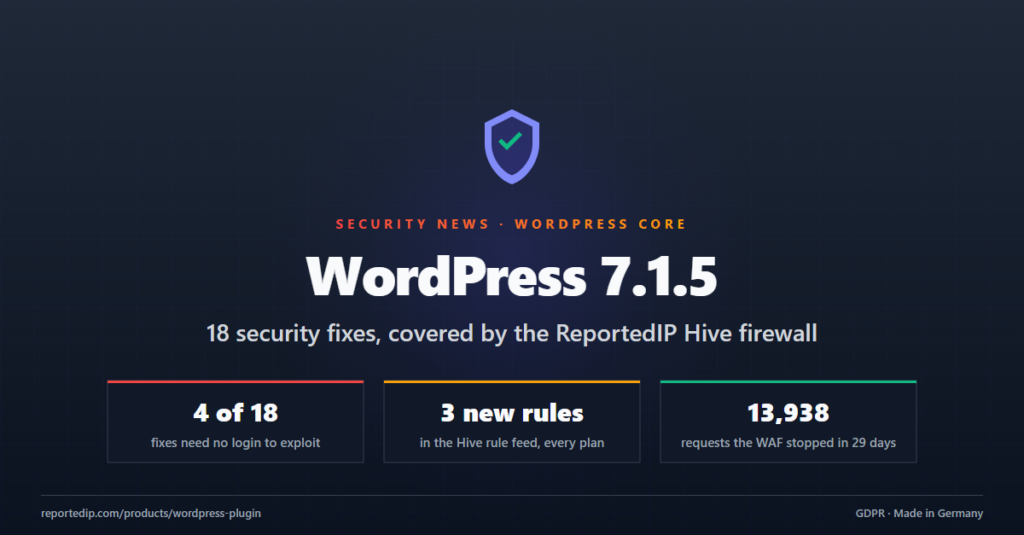
WordPress 7.1.5 closes 18 security issues, and four of them can be exploited without an account. The ReportedIP Hive firewall already covered two of the four; the other two are covered by three new rules that reached every connected site on 19 November 2026.
Update WordPress first. The rest of this post lists the four issues, shows what the firewall does with each of them, and explains how the Hive WAF works, with screenshots from the plugin and the numbers of the last 30 days.
What does WordPress 7.1.5 fix?
WordPress 7.1.5 was released on 18 November 2026 as a short-cycle security release. The official release post lists 18 vulnerabilities and two hardening changes. Fourteen of the 18 need an account on the site, from Subscriber up to Administrator. The four below do not.
| Issue | What an attacker gets | Reported by |
|---|---|---|
| Privilege escalation via Template Part block attributes | Content control up to remote code execution, without an account | Logan Homolka |
| Stored XSS via shortcode attributes in comments | Script in a comment that runs for every visitor and admin | Rafie Muhammad |
| Private taxonomy terms exposed by the REST API search endpoint | Names of private terms, without an account | Anthropic |
| Denial of service via batched XML-RPC pingbacks | One request that makes the site contact many targets | Giovanni Cintolo |
The 14 account-based issues include two SQL injections, several stored XSS vectors in the block editor and the Customizer, and a multisite takeover from a site administrator to a super admin. No firewall fixes those for you. The update does.
Which of the four does the Hive firewall block?
We checked all four against the live rule set on the morning of 19 November. Two were already covered, two were not. The gaps are closed.
- Template Part privilege escalation: the exploit carries a directory traversal inside a REST request. The traversal rule has been part of every Hive rule set since the firewall launched, including the bundled baseline. A second way in routed the REST call through an admin screen address. The new rule
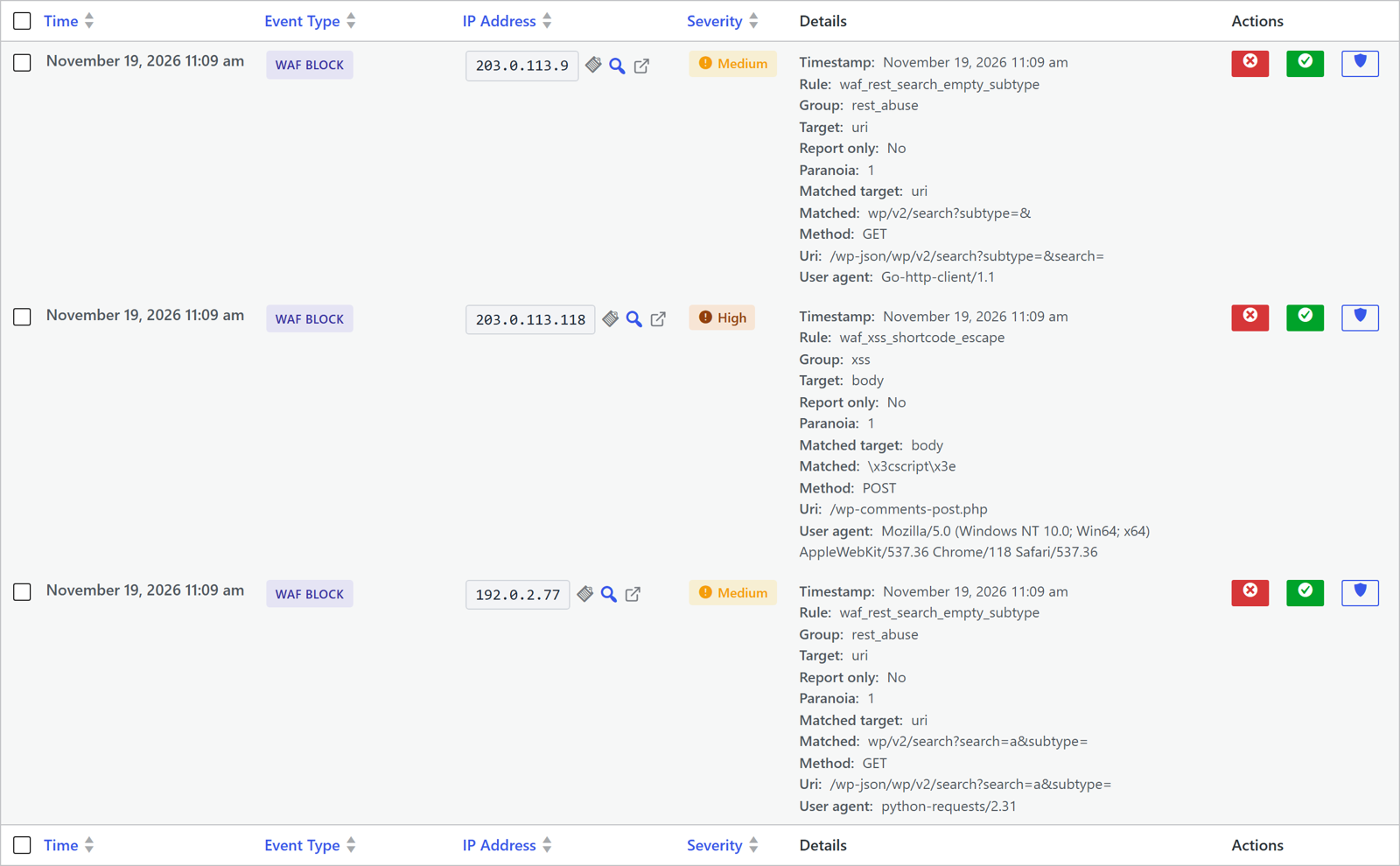
waf_admin_rest_routerefuses that form, because no admin screen takes a REST route as a parameter. - Shortcode XSS in comments: the trick is an escaped angle bracket such as
\x3cthat WordPress turned back into<after every filter had looked at the comment. Our markup signatures look for a real bracket, so this one passed. The new rulewaf_xss_shortcode_escapematches the escape followed by a tag shape. - Private terms via REST search: an empty
subtypeparameter on the search endpoint is never sent by a browser or by the block editor. The new rulewaf_rest_search_empty_subtyperefuses it. - Pingback denial of service: Hive 3.0.10 refuses batched XML-RPC calls by default, so the batch never reaches the pingback handler. No firewall rule was needed.
All three new rules sit at paranoia level 1, the false-positive-averse level that every plan runs. They went out in rule set version 13 for Pro, version 5 for Contributor and version 12 for Free accounts in Community Network mode. Sites in Local Shield mode get them with the next plugin release, because they use the bundled baseline only.
Rules are a bridge, not a fix. They buy time until the update is installed, and they catch the scanners that will keep sending these requests for years.
How does the Hive WAF work?
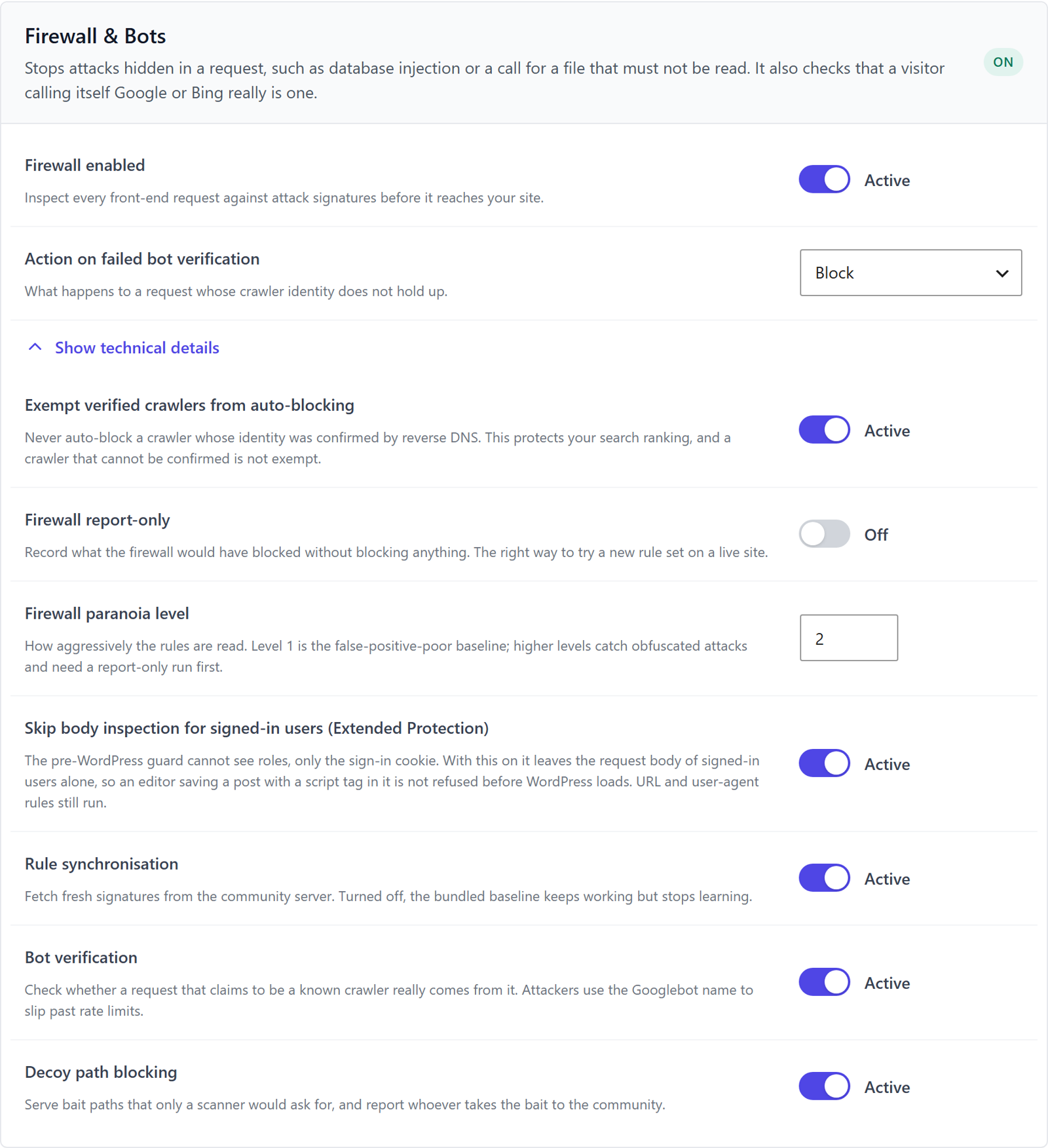
The firewall runs inside the plugin on every front-end request. Logged-in users with editing rights and whitelisted addresses are left alone. For everyone else it checks three things:
- The address, in its raw form and in two decoded forms, so that
%2e%2e%2fand../are treated the same. - The request body, both the parsed form fields and the raw input, for POST requests such as comments, logins and REST calls.
- The user agent, for known scanner names and malformed values.
Each check runs against a rule set of signed signatures. A rule has an id, a group such as xss or path_traversal, a paranoia level from 1 to 3 and the part of the request it looks at. Level 1 rules are chosen to produce almost no false positives. Levels 2 and 3 catch obfuscated attacks and are meant to be tried in report-only mode first.
Where the rules come from
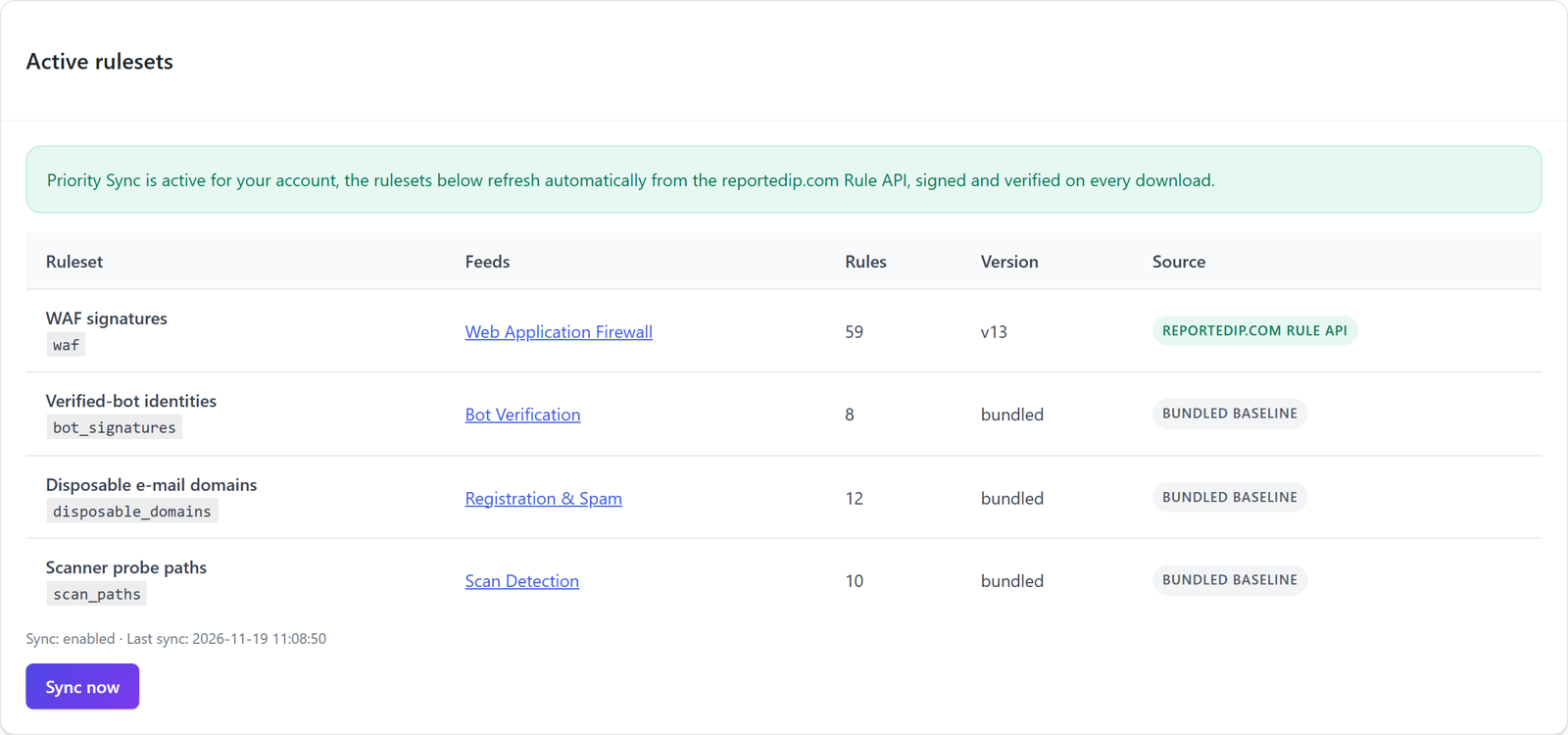
Rules are not hard-coded in the plugin. They are versioned rule sets, maintained on reportedip.com and delivered through a rule feed. Every download is signed with Ed25519 and verified by the plugin before it is used. A rule set that fails the check is dropped and the previous one stays active. The plugin also ships a bundled baseline of 24 rules, so a site is protected even when it never talks to the feed.
- Free sites in Local Shield mode run the bundled baseline.
- Free and Contributor accounts in Community Network mode receive the server rule sets through the feed.
- Pro accounts receive the deepest rule set, 59 rules as of today, with daily Priority Sync.
What happens on a hit
A request that matches a rule gets a 403 answer with a reference code. The code lets a site owner find the exact log entry when a visitor reports a wrong block. The log entry stores the rule, the group, the matched fragment and a snapshot of the request.
Some groups ban the address at the first hit: command injection, path traversal, webshell access and file probes, because no legitimate request looks like that. Groups with a higher false-positive risk, such as XSS and SQL injection, only ban an address after repeated hits within a short window. A banned address is blocked locally and, in Community Network mode, reported to the community so that every other connected site can block it too.
Three safety nets
- Fail-open: a rule that does not compile is skipped and logged, it cannot take the site down. Matching runs with a strict backtracking limit, so a rule cannot be turned into a denial of service against the site itself.
- Exceptions without code: every WAF log entry has an Allow button that creates an exception for that rule and path.
- Extended Protection: the same rules can run before WordPress loads, as a small guard file the plugin writes and maintains. Blocked requests then cost almost nothing, and the guard covers paths that never reach WordPress.
The firewall documentation describes the settings in detail, and the post What a WordPress web application firewall does goes deeper into the rule design.
What did the firewall block in the last 30 days?
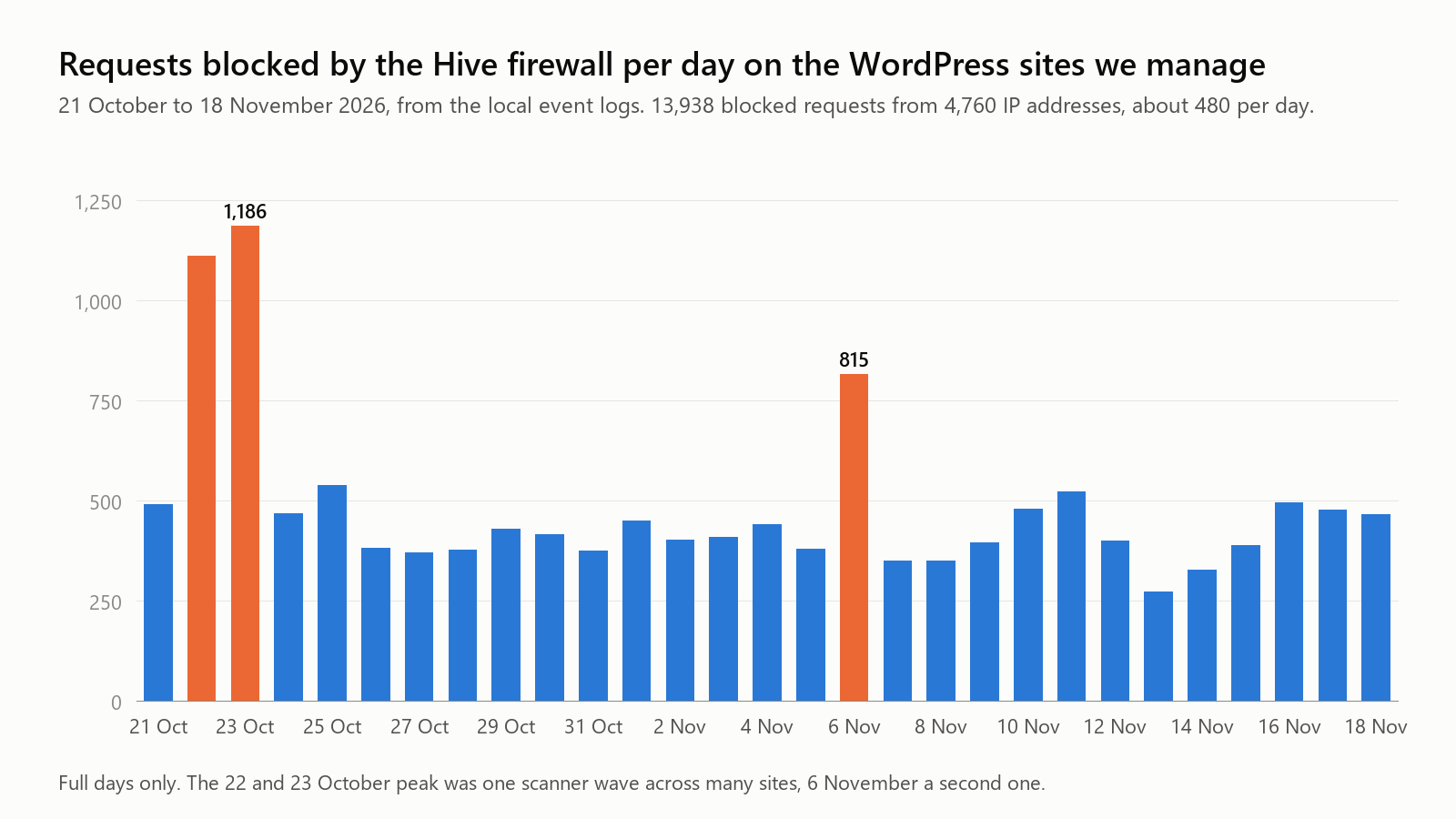
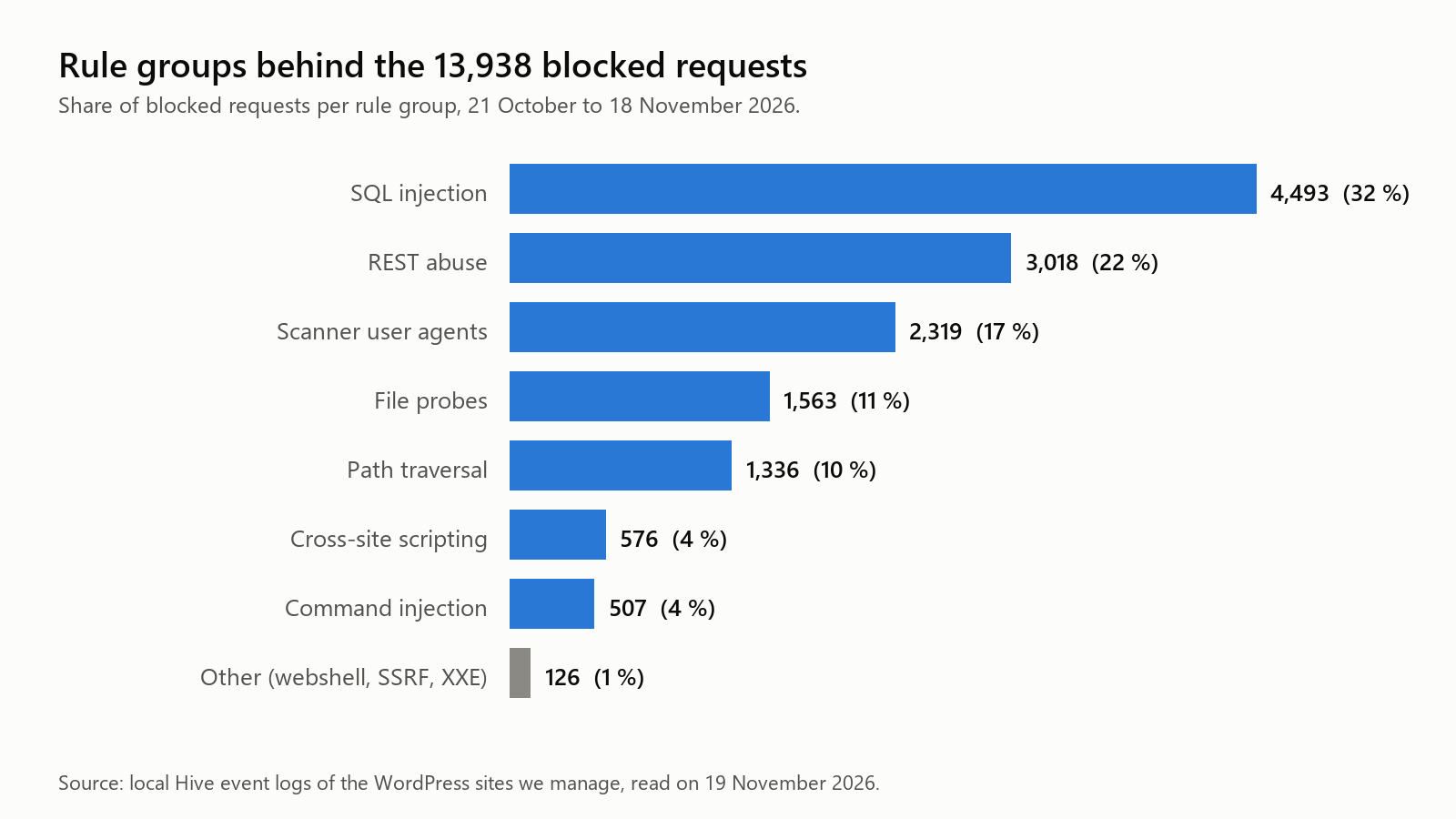
To see what the firewall actually stops, we read the local event logs of the WordPress sites we manage. Between 21 October and 18 November 2026 the firewall there blocked 13,938 requests from 4,760 IP addresses, about 480 per day. 3,034 of those addresses sent exactly one request and never came back. The peak on 22 and 23 October was one scanner wave that hit many sites at once, 6 November a second one.
Only a part of this reaches the community network, because Hive reports an address when the ban fires, not on every blocked request. Even so, the whole Hive fleet reported 9,654 firewall bans from 5,533 attacking IP addresses between 20 October and 19 November 2026, 1,931 of them in the last seven days.
Every reported address feeds the shared blocklist, which held 10,722 addresses on the morning of 19 November. The list is self-cleaning: an address that stops attacking drops out again.
What should WordPress site owners do now?
- Update to 7.1.5. Older branches get backports down to 4.7; use the latest release of your branch.
- Search recent comments for the strings
\x3cand\074. A comment that contains them was an attempt, approved or not. - If you do not use pingbacks, switch off XML-RPC or at least its batch mode. Hive does the latter by default.
- Keep Hive on the current version. 3.0.10 is the release with the batch refusal, and the next release carries the three new rules in the bundled baseline.
These steps fit into the WordPress hardening checklist. For the update race condition fixed three weeks ago, see WordPress 7.1.4 and how Hive blocks it.
FAQ about WordPress 7.1.5 and the Hive firewall
Do Free users get the new rules?
Free accounts in Community Network mode received the three rules through the rule feed on 19 November, in rule set version 12. Sites in Local Shield mode run the bundled baseline and receive the rules with the next plugin release. The update itself remains the fix for all 18 issues.
Does the shortcode rule block normal comments?
The rule only matches an escaped angle bracket that is directly followed by a tag shape, for example an escaped < plus a tag name and an attribute. Prose about escape sequences, Windows paths and ordinary shortcodes do not match. A hit is logged with the matched fragment, and the Allow button creates an exception if a site really needs such input.
Is the firewall a replacement for the update?
No. The firewall covers the four issues that need no login, and only those. The 14 issues that need an account are closed by the update alone. The rules protect a site in the hours or days between the release and the update, and they keep the scanners out afterwards.
ReportedIP Hive blocks attacks like these for every connected site and shares the attacking IPs with the community network. The Free plan includes the firewall and the rule feed.